BuddyPress + Jetonomy: The Modern Alternative to bbPress for Social Communities
bbPress was the default forum for BuddyPress communities for over a decade. But performance issues, missing features, and stalled development have pushed community builders to modern alternatives. Here is why Jetonomy is the natural successor.

If you run a BuddyPress community, you have probably used bbPress for forums. It was the obvious choice, built by the same people, deeply integrated, and free. For years, there was no serious alternative.
But bbPress has not kept pace with what modern communities need. The architecture that worked in 2015 struggles at scale in 2026. Features that communities now expect, voting, Q&A format, trust levels, analytics, private messaging, require cobbling together multiple third-party add-ons that may conflict with each other.
Jetonomy was built to fill this gap. Not as a general-purpose forum that happens to work with BuddyPress, but as a community platform designed from the start to integrate with WordPress’s social networking layer.
Why BuddyPress Communities Outgrow bbPress
The Performance Wall
bbPress stores forums, topics, and replies in wp_posts. This works fine at 1,000 topics. At 10,000+, queries slow down noticeably. At 50,000+, some pages take seconds to load even with object caching. The wp_postmeta key-value store makes things worse, counting topics, calculating activity, and building user profiles requires expensive JOINs across huge tables.
Jetonomy uses 24 purpose-built tables with proper indexes and denormalized counters. Topic pages require 3–5 queries regardless of database size. The performance difference is not incremental, it is architectural.
For detailed benchmarks, see our three-way plugin comparison.
The Feature Gap
bbPress gives you threaded forums. That is it. Everything else requires add-ons:
Feature | bbPress | Jetonomy |
|---|---|---|
Q&A with voting + accepted answers | Third-party plugin | Built-in |
Ideas board with voting | Not available | Built-in |
Trust levels (auto-promotion) | Not available | Built-in (0–5) |
Reputation system | Third-party plugin | Built-in |
Leaderboard | Not available | Built-in |
Full-text search | WordPress default | FULLTEXT indexes |
Private messaging | Separate plugin | Pro extension |
Polls | Not available | Pro extension |
Emoji reactions | Not available | Pro extension |
Analytics dashboard | Not available | Pro extension |
Auto-moderation | Not available | Pro extension |
REST API | WordPress default (posts) | 42+ dedicated endpoints |
The Development Stall
bbPress development has slowed significantly. Major releases are infrequent. The codebase has not adopted modern WordPress features like the Interactivity API or the Abilities API. The community around bbPress is still active, but the plugin itself is in maintenance mode rather than active development.
Our bbPress alternatives guide covers this landscape in detail.
How Jetonomy Integrates with BuddyPress
The integration covers three areas:
Group Forums
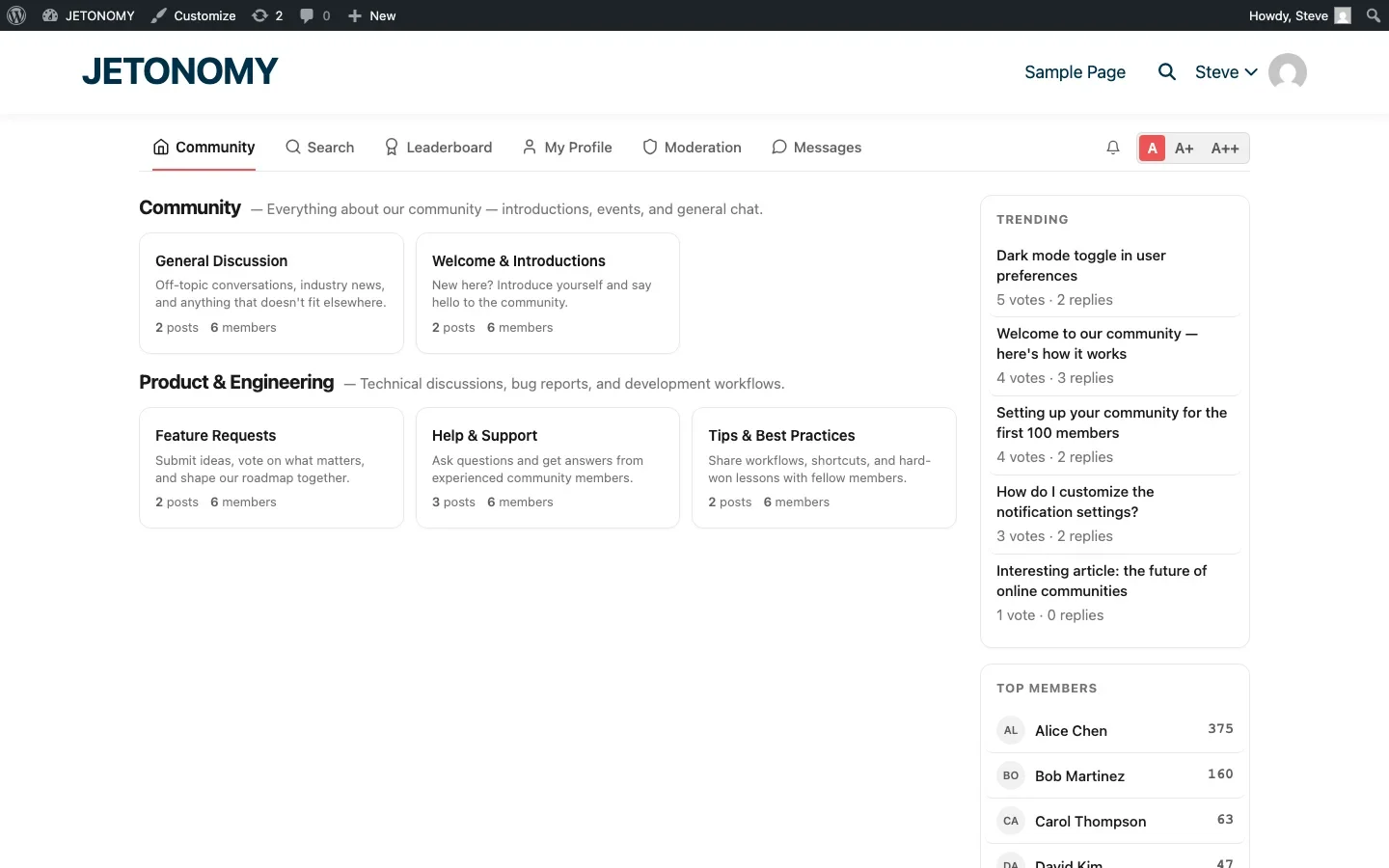
Each BuddyPress group can have a linked forum space with automatic member sync. When users join a group, they get forum access. When they leave, access is revoked. Group admins moderate their own forums independently. See our detailed BuddyPress group forums guide.
Member Profile Tabs
Jetonomy adds tabs to BuddyPress member profiles:
- Posts, Topics the member has created across all spaces
- Replies, Replies the member has posted
- Bookmarks, Topics the member has bookmarked for later
These tabs appear alongside the standard BuddyPress profile tabs (Activity, Profile, Groups, etc.), creating a unified view of each member’s community presence.
Activity Stream Integration
Forum activity flows into the BuddyPress activity stream. New topics, replies, and accepted answers appear as activity items. Members can see forum activity alongside wall posts, group updates, and friend connections in a single unified feed.
Migration from bbPress to Jetonomy
If you are currently running bbPress with BuddyPress, the migration is straightforward:
- Install Jetonomy alongside bbPress (both run without conflicts)
- Run the built-in bbPress importer, forums become spaces, topics and replies transfer with authors intact
- Enable BuddyPress integration to link groups to the new spaces
- Set up URL redirects from old bbPress URLs to new Jetonomy URLs
- Deactivate bbPress after verifying everything works
For the complete migration walkthrough, see our bbPress migration guide.
What You Gain After Switching
BuddyPress communities that switch from bbPress to Jetonomy typically see:
- 3–5x faster page loads on forum pages (custom tables vs. wp_posts)
- Higher engagement from voting, reactions, badges, and reputation systems
- Better support quality from Q&A format with accepted answers
- Self-moderating behavior from trust levels that limit new users and empower veterans
- Actionable data from the analytics dashboard (Pro)
- Reduced support load from community-powered Q&A (see our 5 ways forums save your team hours)
The Complete BuddyPress + Jetonomy Stack
Here is the recommended configuration for a BuddyPress community with Jetonomy:
Component | Plugin | Purpose |
|---|---|---|
Social networking | BuddyPress | Profiles, groups, activity stream, connections |
Forums & Q&A | Jetonomy | Discussions, Q&A, Ideas, trust levels, reputation |
Premium features | Jetonomy Pro | Messaging, analytics, reactions, polls, badges |
Theme | BuddyX or compatible | Theme that supports both BuddyPress and Jetonomy |
Jetonomy inherits your theme’s styles automatically through CSS custom properties, so it matches your BuddyPress theme without custom CSS.
Getting Started
- Install Jetonomy on your BuddyPress site (setup guide)
- Enable BuddyPress integration in Jetonomy Settings
- Link your groups to forum spaces (group forums guide)
- If migrating from bbPress: follow the migration guide
- Configure engagement features: reputation, leaderboard, polls & reactions
BuddyPress gives your community social networking. Jetonomy gives it knowledge infrastructure. Together, they create a community platform that neither can build alone.
Deciding Whether Groups or the Forum Owns a Discussion
The one design decision this migration forces that bbPress never made you confront: once every group can have its own linked space, you have to decide whether group discussions stay private to that space or whether some threads should also surface in a global forum view. Skip this decision and communities end up with duplicate conversations, one in the group, one in the general forum, competing for the same members’ attention.
- Route topic-specific, ongoing discussions (a cohort, a customer account, a project team) into group-linked spaces so membership and access control match automatically.
- Keep evergreen, searchable questions (setup help, general Q&A) in the global forum where they can rank and get found by non-members.
- Audit which BuddyPress profile tabs and activity items you actually want visible, unfiltered forum activity in every stream gets noisy fast once trust levels and reputation are live.
When Jetonomy Pro Is Worth Adding
The free Jetonomy core covers everything in this migration: spaces, group sync, profile tabs, and activity stream integration. Jetonomy Pro becomes relevant once the community outgrows plain threads, private messaging, polls, reaction sets, and the analytics dashboard are the features that come up once you have real usage data to look at. For a BuddyPress site specifically, that means messaging and reputation tools that already understand your group and profile structure rather than a bolt-on. Details are on the Jetonomy Pro page.













