5 Ways a Support Forum Saves Your Team Hours Every Week
A support forum is not just a nice-to-have. It is a force multiplier for your support team. Here are five concrete ways it saves hours every week — with real math to prove it.


Your support team is busy. Too busy. They are answering the same questions over and over, writing the same troubleshooting steps into separate email threads, and losing institutional knowledge every time a team member leaves.
A support forum does not just give your customers a place to ask questions. It fundamentally changes the economics of support. Here are five specific ways it saves your team real time, every week.
1. Repeat Questions Answer Themselves
Pull up your support inbox right now and count how many questions this week were essentially the same question asked by different people. If you are like most product teams, the answer is: a lot.
“How do I reset my password?” comes in twelve times. “Does it work with WooCommerce?” comes in eight times. “How do I export my data?” comes in six times.
In a private ticket system, every one of those is a separate interaction. Your agent reads the question, types the answer, and sends it. Five minutes per ticket. Twelve identical questions means sixty minutes spent on one topic.
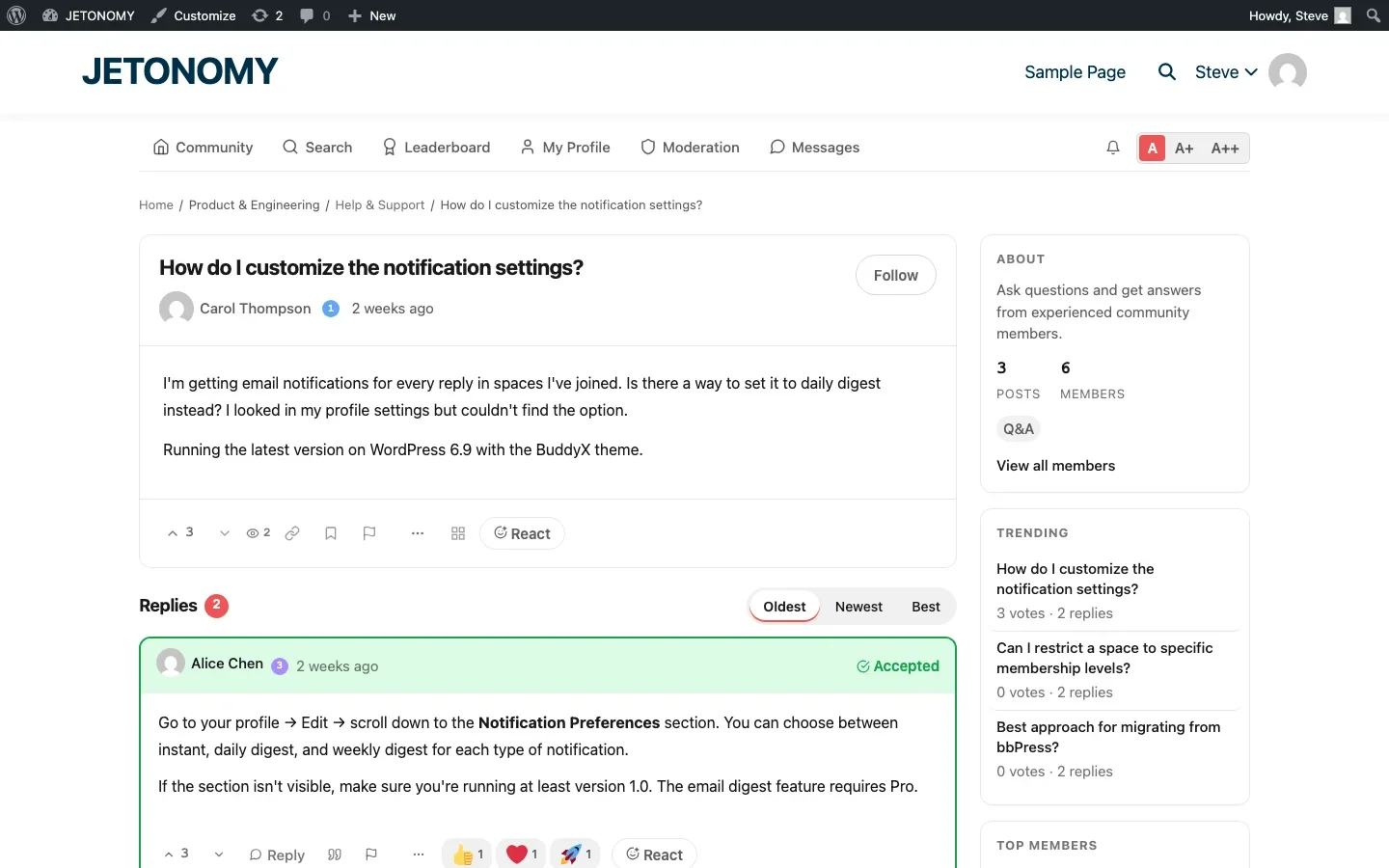
In a support forum, the first time someone asks “How do I reset my password?” your team writes a thorough answer. That answer gets marked as accepted. Every future person with the same question finds it through search. Twelve identical questions become one answer, five minutes instead of sixty.
The math scales beautifully. If your top 20 questions each come in five times per week, that is 100 tickets per week, about 8 hours of support labor, that a forum eliminates entirely.
2. Your Community Becomes Your First Line of Support
Something remarkable happens when you run a support forum for a few months: your users start answering each other’s questions.
This is not wishful thinking. It happens consistently in every healthy support forum. Power users who know your product well enjoy helping others. They have been through the setup process, hit the edge cases, and figured out the workarounds. They answer questions faster and sometimes better than your team because they have the customer’s perspective.
In mature support communities, 30–50% of questions get answered by community members without any staff involvement. That is a third to half of your support volume handled for free by people who genuinely want to help.
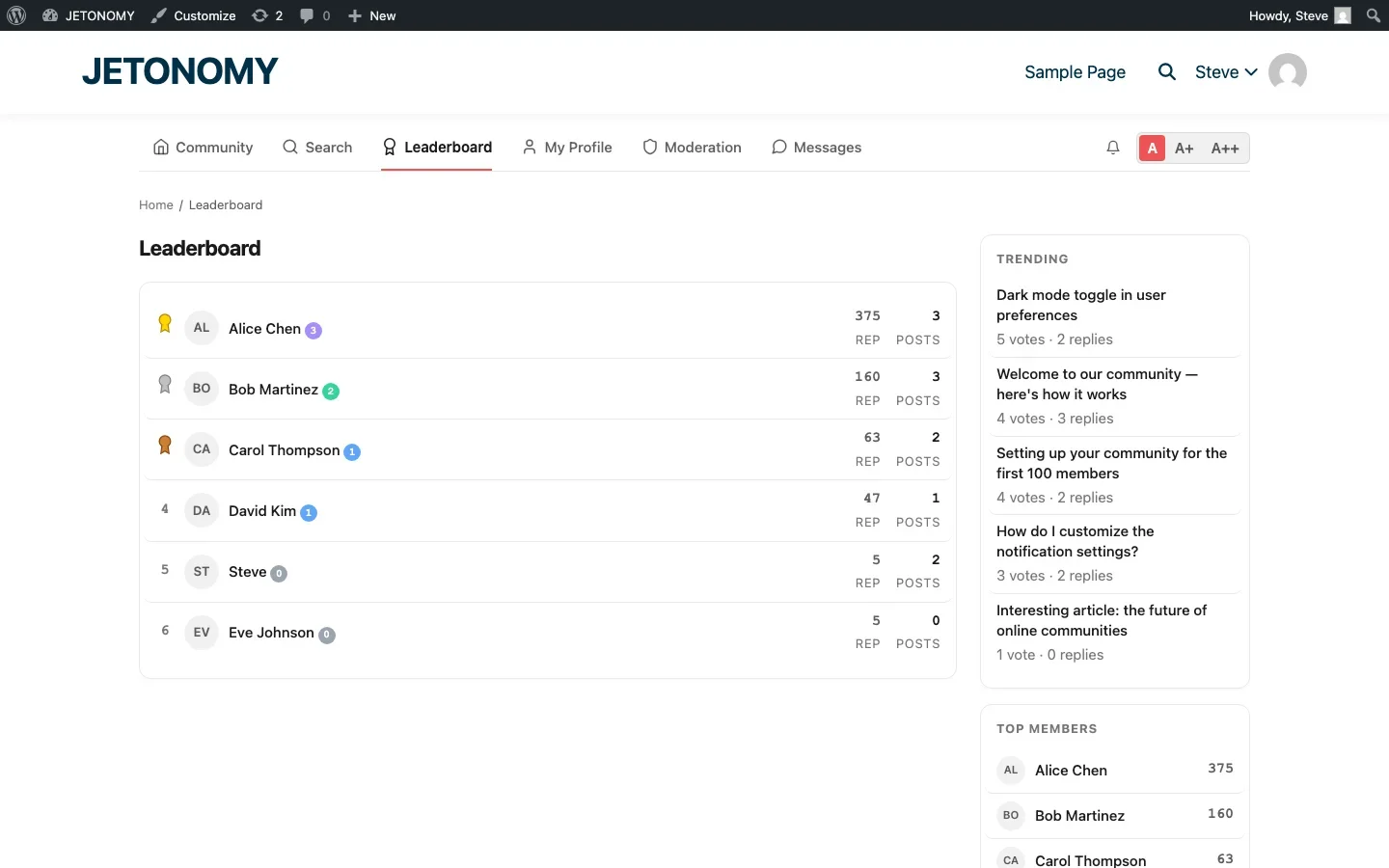
The key is recognition. Trust levels and reputation systems give these helpers visible status in the community. Leaderboards show who is contributing the most. Custom badges like “Community Expert” or “Top Helper” reward their effort publicly.
These community contributors are worth more than you think. A single active community helper can deflect 20–30 tickets per week. At $10 per ticket, that is $200–$300 per week in support savings from one volunteer.
3. Knowledge Persists Instead of Evaporating
When your best support agent writes a brilliant troubleshooting guide inside a Zendesk ticket, that knowledge dies in the ticket. The customer sees it. Nobody else ever will.
When the same agent writes that guide as a forum answer, it becomes a permanent, searchable resource. Every future customer with the same problem finds it. Every future support agent can link to it instead of rewriting it. The knowledge compounds instead of evaporating.
This has a cascading effect on team efficiency:
- Onboarding new support agents is faster. Point them to the forum’s greatest hits. They learn from real customer questions and real solutions instead of reading an outdated internal wiki.
- Institutional knowledge survives turnover. When a senior agent leaves, their answers stay. The forum becomes your team’s collective memory.
- Internal search becomes external search. Forum answers rank in Google. Customers find solutions before they even think about opening a ticket.
We have seen SaaS teams reduce ticket volume by 30–40% in the first year simply by making their support knowledge public and searchable.
4. Context Comes Pre-Built
One of the biggest time sinks in support is the back-and-forth required to understand the customer’s problem. Private tickets often start with:
“It is not working.”
Your agent replies asking for details. The customer responds a day later with partial information. Your agent asks follow-up questions. Another day passes. By the time you have enough context to actually help, three days and five messages have been exchanged.
Forum questions naturally contain more context because they are public. Users know that other people will read their question, so they tend to provide more details upfront. They describe what they tried, include error messages, and mention their environment.
But the bigger context advantage is this: when someone posts a question in the forum, other users with the same problem add their own details in the replies. “I am seeing this too, but only on PHP 8.3.” “Same here, but it works fine on the staging server.” This crowdsourced debugging context gives your support team information they would never get from a private ticket.
A question that would take five back-and-forth messages to understand via email often arrives fully contextualized in a forum because other users have already filled in the gaps.
5. Proactive Content Prevents Tickets Before They Happen
A support forum is not just reactive. It is a platform for proactive support that prevents questions from being asked in the first place.
Release Notes That Prevent “What Changed?” Tickets
Every product update triggers a wave of confusion. “The button moved.” “The menu looks different.” “Did you remove the export feature?” (No, you moved it.)
Post release notes in an Announcements space before each update. Explain what changed, why, and where features moved. Include screenshots. This single practice can eliminate 10–20 tickets per release cycle.
Pinned FAQ Topics
Pin your most commonly asked questions at the top of relevant spaces. A pinned “Getting Started Checklist” in your setup space prevents dozens of basic setup questions per month.
Known Issues Thread
When you discover a bug, post about it proactively in the forum. Include the workaround and the fix timeline. This prevents hundreds of duplicate bug reports and shows customers you are aware and working on it.
The Numbers: What This Looks Like in Practice
Here is a realistic scenario for a product team handling 400 support tickets per month:
Savings Source | Tickets Deflected / Month | Hours Saved / Month |
|---|---|---|
Repeat questions answered via search | 80–120 | 7–10 |
Community members answering questions | 60–80 | 5–7 |
Proactive content (release notes, FAQs) | 30–50 | 2.5–4 |
Better context reducing back-and-forth | N/A | 3–5 |
Faster onboarding for new agents | N/A | 2–3 |
Total | 170–250 | 19.5–29 |
That is 20–30 hours per month, roughly 5–7 hours per week, saved by running a support forum alongside your ticket system. At $30/hour for support labor, that is $600–$900 per month in direct savings. Plus the SEO value of all those indexed Q&A pages driving organic traffic.
How to Get Started
You do not need to replace your existing support system. A forum works alongside tools like Zendesk, Freshdesk, or Help Scout. The workflow is simple:
- Set up a Q&A forum using our WordPress forum setup guide
- Seed it with your top 20 most frequently asked questions and answers
- Train your team to answer appropriate questions in the forum instead of in tickets
- Add a “Search our community” step to your support contact form
- Track ticket deflection monthly to measure the impact
For the detailed strategy, including metrics to track and common mistakes to avoid, read our comprehensive guide on building a support forum that reduces tickets.
Your support team’s time is your most expensive resource. A forum makes that time go further by turning every answer into a reusable asset. The question is not whether you can afford to build a support forum. It is whether you can afford not to.
Where the Time Savings Break Down
The math above assumes a forum that is actually maintained. A support forum with no seeded FAQ, no staff presence in the first few weeks, and no one watching the unanswered queue does not save anyone time, it just becomes a second, more public place where questions go unanswered. The time savings in this article come from combining the forum with the habits described in our support forum guide: seeding the top questions before launch, checking the unanswered queue daily for the first month, and giving your best community answerers visible recognition early so the flywheel has something to start turning.
Where Jetonomy Pro Fits
None of the five savings sources above require anything beyond free Jetonomy. Where Jetonomy Pro adds measurable time back is in the Analytics extension, which turns “we think the forum is saving us time” into an actual number, tracking deflection rate, median time-to-first-response, and which spaces are pulling their weight versus sitting idle. If you are past the stage of guessing and want to report real figures to your team, that is what Jetonomy Pro is for.













