Best WordPress Social Networking Plugins for Community Websites (2026)
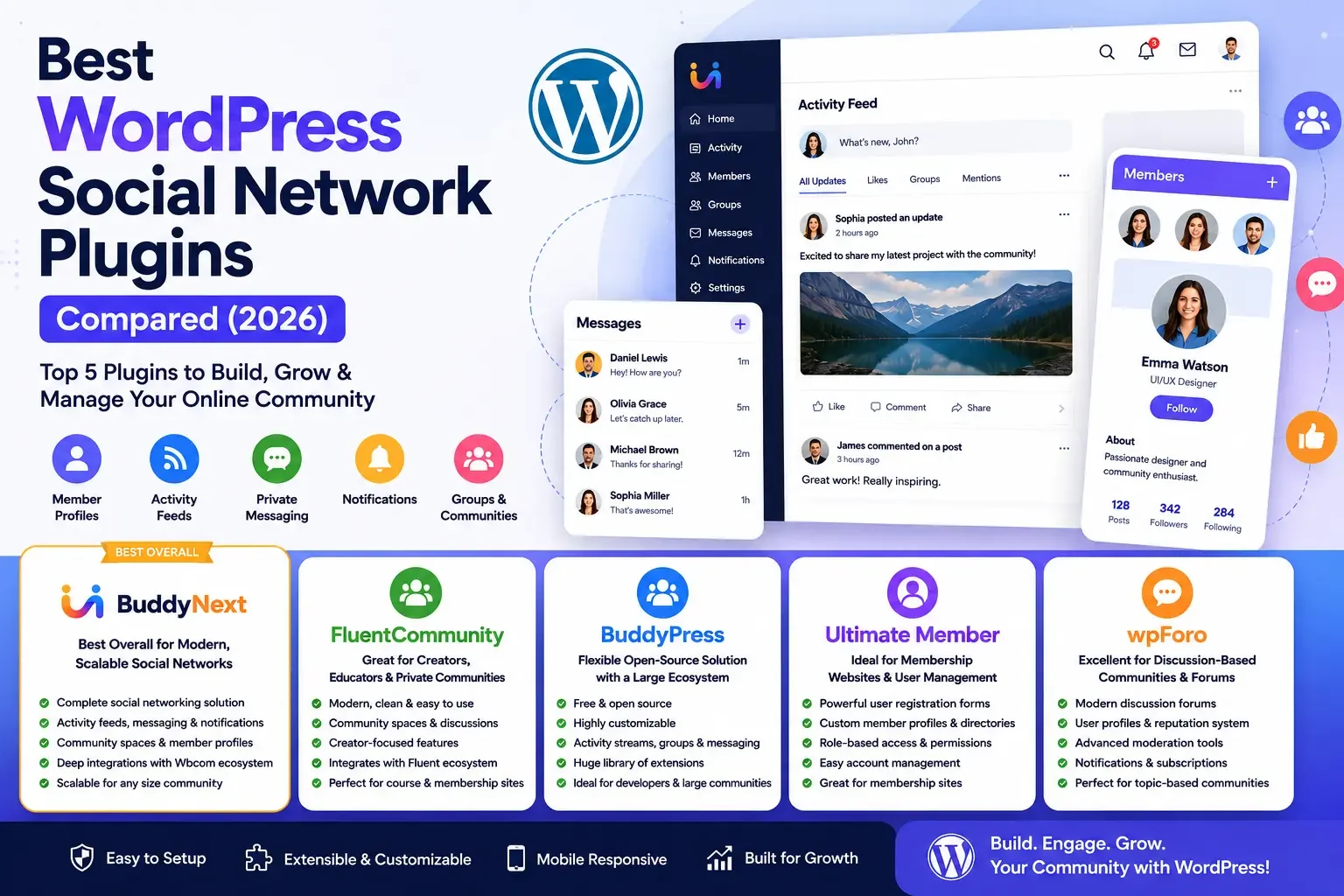
Creating a social networking website with WordPress has never been easier. Whether you’re building a membership site, private community, educational platform, or niche social network, choosing the right plugin is essential.
The best WordPress social network plugins offer features like member profiles, activity feeds, private messaging, notifications, and community groups to help users connect and engage.
In this guide, we’ll compare the best WordPress social network plugins in 2026, highlighting their key features and strengths, plus the use cases each one actually fits, to help you find the right solution for your community.
Watch the Video Comparison
If you prefer watching instead of reading, check out our detailed comparison video below, where we walk through each plugin and showcase their key features.
Watch: Best WordPress Social Network Plugins Compared (2026)
Quick Comparison
Plugin | Best For | Activity Feed | Messaging | Groups | Member Profiles |
|---|---|---|---|---|---|
BuddyNext | Complete Social Networking | Yes | Yes | Yes | Yes |
FluentCommunity | Creator & Private Communities | Yes | Limited | Yes | Yes |
BuddyPress | Open Source Communities | Yes | Yes | Yes | Yes |
Ultimate Member | Membership Websites | No | No | No | Yes |
wpForo | Discussion Forums | Limited | Yes | Forums | Yes |
What Makes a Great WordPress Social Network Plugin?
Not every community website has the same requirements. Some prioritize member engagement through activity feeds and messaging, while others focus on forums, online learning, or memberships.
When evaluating a social networking plugin, consider the following features:
- User registration and member profiles
- Activity feeds and social interactions
- Private messaging
- Community groups or spaces
- Notifications
- Media sharing
- Member directories
- Search functionality
- Moderation tools
- Mobile responsiveness
- Integration with LMS, eCommerce, and forums
- Performance and scalability
The best plugin should not only meet your current needs but also grow with your community over time.
1. BuddyNext - Best Overall WordPress Social Network Plugin
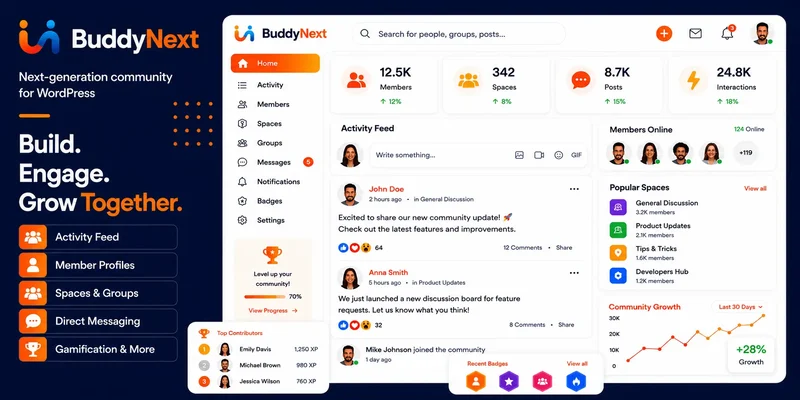
When it comes to building a modern social networking website with WordPress, BuddyNext stands out as one of the most comprehensive solutions available in 2026.
Unlike many plugins that focus on only one aspect of community building, BuddyNext combines social networking, member engagement, messaging, notifications, and community spaces into a single platform. Whether you’re launching a niche community, an educational platform, a creator network, or a professional membership site, BuddyNext provides the tools needed to create an engaging user experience.
Its modern interface, fast performance, and deep integration with the Wbcom ecosystem make it an ideal choice for website owners who want flexibility without sacrificing usability.
Key Features
Modern Activity Feed
BuddyNext includes a dynamic activity feed where members can share updates, like posts, comment, mention other users, and participate in conversations. The interface is clean and responsive, built specifically to encourage user engagement.
Member Profiles
Every user gets a customizable profile featuring profile photos, cover images, social information, activity history, and personal details. This helps members build meaningful connections within your community.
Private Messaging
Members can communicate directly through built-in private messaging without relying on third-party plugins. Conversations stay organized and intuitive, accessible directly from user dashboards.
Notifications
Real-time notifications keep users informed whenever someone interacts with their content, sends a message, or mentions them in discussions. These timely updates help maintain active participation.
Community Spaces
BuddyNext allows you to organize your community into dedicated spaces or groups where members with shared interests can collaborate, discuss topics, and build stronger relationships.
Extend Your Community Beyond Social Networking
One of BuddyNext’s biggest strengths is its seamless integration with the broader Wbcom ecosystem. As your community grows, you can expand your website without switching platforms.
For example, you can integrate:
- Discussion forums
- Member directories
- Job boards
- Gamification systems
- Learning management systems
- Membership plugins
- WooCommerce
- Event management
- Digital marketplaces
This flexibility makes BuddyNext suitable for startups, educational institutions, online businesses, nonprofits, and professional organizations alike.
Performance and Scalability
Community websites often experience significant traffic as user activity increases. BuddyNext is built with scalability in mind, ensuring that activity feeds, messaging, and user interactions remain responsive even as your community grows.
Its optimized architecture helps deliver a smoother experience for both administrators and members.
Customization
Every community has unique branding requirements. BuddyNext offers extensive customization options that allow you to modify layouts, colors, profile fields, community pages, and integrations to match your website’s identity.
Developers also benefit from WordPress-friendly architecture, making advanced customization straightforward.
Pros
- Complete social networking platform
- Modern and intuitive interface
- Excellent performance
- Activity feeds and messaging
- Community spaces
- Rich member profiles
- Highly customizable
- Integrates with forums, LMS, WooCommerce, and more
- Scalable for growing communities
Cons
- Advanced functionality may require additional Wbcom plugins depending on your specific use case.
Best For
BuddyNext is an excellent choice for:
- Membership communities
- Online learning platforms
- Creator communities
- Professional networks
- Employee communities
- Business organizations
- Educational institutions
- Niche social networks
If you’re looking for a future-ready community platform rather than just a membership plugin, BuddyNext delivers one of the most complete solutions available for WordPress.
2. FluentCommunity
FluentCommunity has quickly gained popularity among creators, coaches, educators, and membership businesses looking for a streamlined community-building solution. Its focus is on simplicity, ease of use, and creating private spaces where members can interact without unnecessary complexity.
Unlike traditional social networking plugins, FluentCommunity emphasizes clean design and straightforward community management, making it especially appealing for businesses that want to build engaged member communities rather than public social networks.
Key Features
- Community spaces for organizing discussions
- Modern and user-friendly interface
- Member profiles
- Discussion threads
- Content organization tools
- Creator-focused experience
- Integration with the Fluent ecosystem
- Responsive design
Pros
- Easy to set up
- Clean interface
- Excellent for creators and educators
- Private community management
- Modern user experience
Cons
- More focused on private communities than full-scale social networking
- Smaller ecosystem compared to long-established community plugins
Best For
FluentCommunity is best suited for:
- Coaches
- Course creators
- Membership businesses
- Private learning communities
- Creator-led communities
3. BuddyPress
BuddyPress has been one of the most trusted community plugins for WordPress for many years. As an open-source solution, it provides a solid foundation for building online communities while giving developers the flexibility to customize almost every aspect of the platform.
Because of its long history, BuddyPress has a large ecosystem of themes and plugins, plus a wide range of integrations. If you’re comfortable configuring plugins and want complete control over your website, BuddyPress remains a reliable option in 2026.
Although its interface isn’t as modern as some newer community platforms, its flexibility and strong community support continue to make it a popular choice.
Key Features
Member Profiles
BuddyPress allows users to create detailed member profiles with custom fields, profile photos, and personal information. Administrators can customize profile fields based on the needs of their community.
Activity Streams
Members can post updates, comment on posts, and interact with other users through a centralized activity stream. This creates a familiar social media experience that encourages engagement.
User Groups
Communities can create public, private, or hidden groups where members can collaborate, share content, and participate in discussions based on shared interests.
Private Messaging
Built-in private messaging enables members to communicate directly with one another, helping foster stronger community relationships.
Extensive Plugin Ecosystem
One of BuddyPress’s biggest strengths is its compatibility with numerous WordPress plugins. Whether you want to add forums, memberships, gamification, online courses, or eCommerce, there are many extensions available.
Pros
- Free and open source
- Highly customizable
- Large community and documentation
- Wide range of third-party extensions
- Supports large communities
Cons
- Requires additional plugins for many advanced features
- Interface feels dated compared to newer solutions
- Initial setup may require more configuration
Best For
BuddyPress works well for:
- Developer-focused projects
- Open-source communities
- Educational websites
- Nonprofit organizations
- Membership communities that require extensive customization
4. Ultimate Member
Ultimate Member is primarily known as a membership and user profile plugin rather than a complete social networking solution. However, if your website’s main focus is user registration, member directories, and profile management, it remains one of the strongest choices available.
Many businesses, schools, directories, and membership websites use Ultimate Member because of its easy setup and flexible user management features.
If you don’t need activity feeds or advanced social networking tools, Ultimate Member offers a clean and professional solution.
Key Features
User Registration
Create fully customized registration forms with drag-and-drop fields, built-in validation, and approval workflows for gatekeeping new members.
Member Profiles
Users can manage their own profiles with avatars, cover photos, custom information, and privacy settings.
Member Directory
Display searchable member directories with filters, making it easy for users to find other members based on different criteria.
Role Management
Assign custom user roles with different permissions and access levels for various types of members.
Login and Account Management
Ultimate Member provides customizable login pages, password recovery, account settings, and profile editing without requiring users to access the WordPress dashboard.
Pros
- Easy to configure
- Excellent profile management
- Powerful registration forms
- Flexible role management
- Great documentation
Cons
- Not designed as a full social networking platform
- No built-in activity feed
- No native messaging system
- Advanced features require extensions
Best For
Ultimate Member is ideal for:
- Membership websites
- Business directories
- Professional organizations
- Alumni communities
- Customer portals
- User registration websites
5. wpForo
If discussions are the heart of your community, wpForo is one of the best forum plugins available for WordPress. Instead of trying to replicate social media, wpForo focuses on creating structured discussions where members can ask questions, share knowledge, and build long-term conversations.
It offers a modern forum experience while remaining lightweight and highly customizable.
Key Features
Discussion Forums
Create multiple forums with categories, subforums, permissions, and moderation tools.
User Profiles
Members receive personalized profiles displaying activity, forum participation, achievements, and reputation.
Notifications
Users receive notifications when someone replies to their topics, mentions them, or interacts with their posts.
Reputation System
wpForo includes badges and rankings, plus reputation points, to encourage quality participation and reward active members.
Moderation Tools
Administrators can manage spam, moderate discussions, assign moderators, and organize forum content efficiently.
Pros
- Excellent discussion forum experience
- Modern interface
- Good performance
- Strong moderation tools
- Active development
Cons
- Primarily forum-focused
- Limited social networking features
- Activity feeds are less comprehensive than dedicated social networking plugins
Best For
wpForo is best suited for:
- Support communities
- Technical forums
- Gaming communities
- Educational discussion boards
- Product support websites
- Hobby forums
Which WordPress Social Network Plugin Should You Choose?
Every community has different goals, so the right plugin depends on the type of experience you want to create.
Choose BuddyNext if…
- You want an all-in-one social networking platform.
- You need activity feeds, messaging, profiles, notifications, and community spaces in one solution.
- You plan to expand your website with forums, job boards, LMS integrations, directories, or gamification.
- You want a modern interface with excellent scalability.
Choose FluentCommunity if…
- You’re building a private creator community.
- You manage online courses or coaching programs.
- You want a clean, modern platform that’s easy to actually use.
Choose BuddyPress if…
- You prefer an open-source solution.
- You need complete customization.
- You’re comfortable adding plugins and configuring your own ecosystem.
Choose Ultimate Member if…
- Your priority is user registration and member management.
- You need professional member directories.
- Social networking isn’t your primary focus.
Choose wpForo if…
- Your website revolves around discussions and forums.
- You want structured conversations instead of social media feeds.
- Community knowledge sharing is your main objective.
Migrating Between Social Network Plugins Later
A question that comes up after the initial decision, usually months in: what happens if the plugin choice turns out wrong and the community needs to move to something else?
This is harder than picking correctly the first time, and it’s worth weighing before committing rather than after. Activity feed history and group memberships, along with private messages, are generally tied tightly to each plugin’s own database structure, and there’s no universal export format that moves cleanly between BuddyPress, BuddyNext, or FluentCommunity. Member accounts themselves (WordPress users) always carry over, since they’re core WordPress data, but the social layer built on top rarely does without a manual migration project.
This is one more reason the initial decision matters more than it might seem on a quick feature comparison. Test the plugin seriously on a staging site with real content and a handful of test accounts before rolling it out to actual members, rather than discovering a dealbreaker limitation after the community has already built up months of activity history inside it.
Performance at Scale: What Actually Slows These Plugins Down
Every plugin on this list handles a small community fine. The differences show up once a community grows into the thousands of members with genuinely active daily engagement, and it’s worth understanding what typically causes slowdown before it happens rather than diagnosing it under pressure later.
Activity feeds are usually the first bottleneck, since a feed query pulling recent activity across thousands of members and their connections gets expensive without proper caching and database indexing behind it. Notification systems are the second common culprit, particularly on plugins that check for new notifications on every single page load rather than using a more efficient polling or push-based approach.
Ask directly, before committing to a plugin for a community you expect to grow significantly, what caching and database optimization the plugin handles natively versus what depends on a separate caching plugin layered on top. A plugin that’s genuinely built with scale in mind bakes performance into its own architecture rather than leaving it entirely to whatever caching setup the site happens to have installed.
Frequently Asked Questions
What is the best WordPress social network plugin in 2026?
The best plugin depends on the type of community you want to build. If you’re looking for a complete social networking solution with member profiles, activity feeds, private messaging, notifications, and community spaces, BuddyNext is one of the strongest choices available. For private creator communities, FluentCommunity is a solid option, while BuddyPress remains a popular open-source solution. If your focus is memberships or forums, Ultimate Member and wpForo are also worth considering.
Can I build a Facebook-like website with WordPress?
Yes. WordPress allows you to build a social networking website with features similar to popular social platforms. Using the right plugin, you can add:
- User registration
- Member profiles
- Activity feeds
- Private messaging
- Notifications
- Groups or community spaces
- Media sharing
- Member directories
Many plugins also integrate with learning management systems, eCommerce platforms, forums, and gamification tools, allowing you to create a feature-rich community tailored to your audience.
Which plugin is best for membership communities?
If your goal is to build a membership-based community where members can interact, share updates, and communicate with each other, BuddyNext offers the most complete experience. It combines social networking features with support for memberships, online courses, directories, and additional community tools.
If you only need user registration and profile management without social networking, Ultimate Member is another strong option.
Is BuddyPress still a good choice?
Yes. BuddyPress continues to be a reliable solution, especially for developers and website owners who want maximum flexibility. Its open-source nature and large ecosystem make it suitable for highly customized community websites.
However, compared to newer platforms, it may require additional plugins and configuration to achieve the same level of functionality and user experience.
Can I add forums to my community website?
Absolutely. Several community plugins support forum functionality either natively or through integrations. If discussions are your primary focus, wpForo is an excellent choice. If you’re using BuddyNext or BuddyPress, you can also extend your website with forum integrations to provide both social networking and structured discussions.
Which plugin is easiest for beginners?
For beginners, FluentCommunity and Ultimate Member offer straightforward setup processes and user-friendly interfaces. If you’re looking for a complete community platform with room to grow, BuddyNext provides an intuitive experience while offering advanced features as your community expands.
Final Verdict
The best WordPress social network plugin depends on your community’s needs.
- BuddyNext – Best overall for a complete social networking platform.
- FluentCommunity – Ideal for creators and private communities.
- BuddyPress – Best for developers who want flexibility.
- Ultimate Member – Great for membership sites and user management.
- wpForo – Perfect for discussion-based communities.
If you’re looking for an all-in-one solution with member profiles, activity feeds, private messaging, notifications, and community spaces, BuddyNext is our top recommendation. Its modern interface and scalability, backed by extensive integrations, make it an excellent choice for building and growing a successful WordPress community in 2026.















