How to Build a Private Online Community with WordPress: Complete Guide
A practical guide to building a private WordPress community: the three real privacy levels, how to set up registration and groups without killing early momentum, and the ten plugins worth comparing.
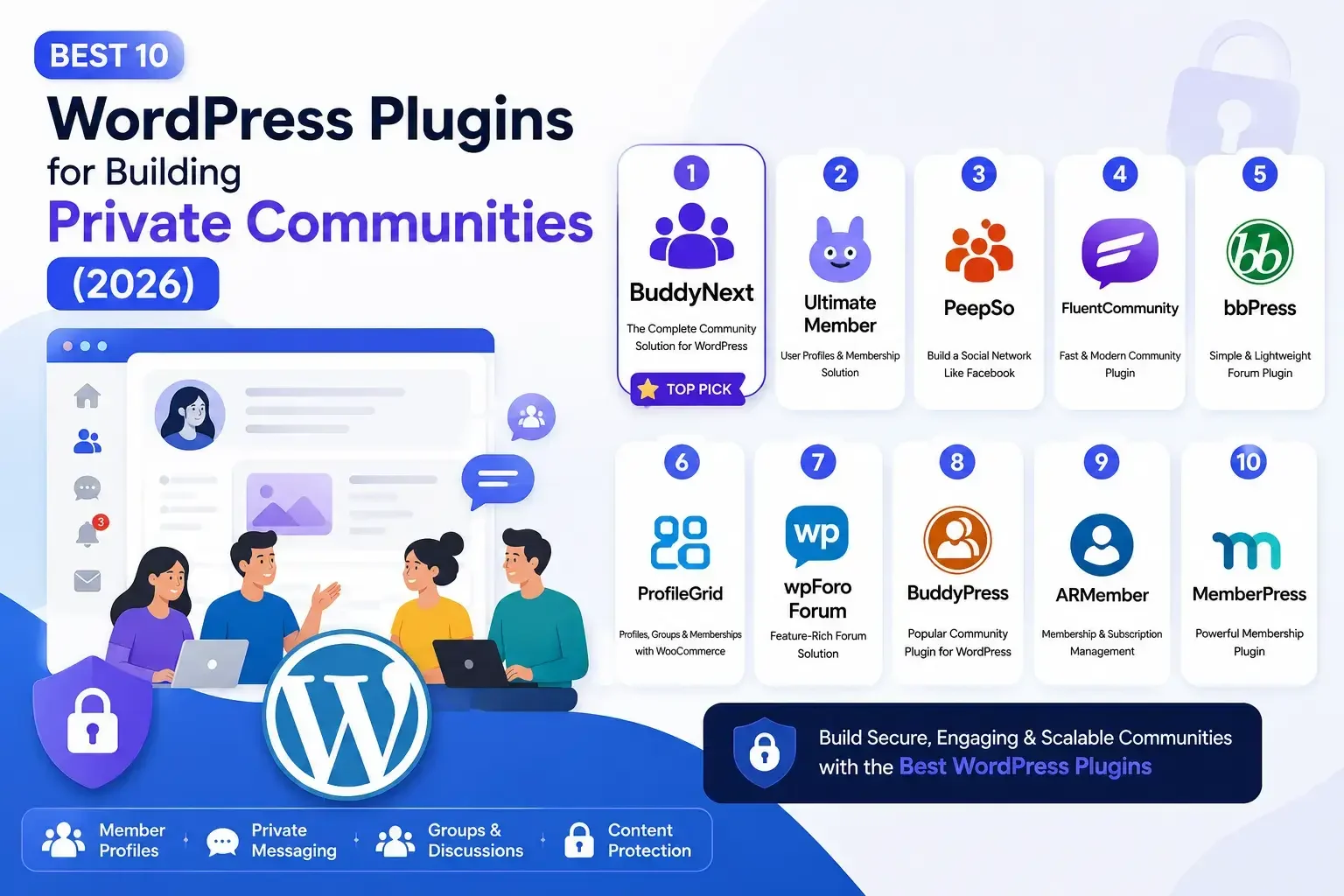
Building a private online community allows businesses, creators, educators, and organizations to connect with their audience in a dedicated space. Whether you want to create a membership site, online course community, coaching platform, or company network, WordPress provides powerful tools to build and manage your own community.
With the right WordPress community plugin, you can add features like member profiles, activity feeds, groups, private messaging, notifications, and content access controls.
In this guide, we’ll cover how to build a private online community with WordPress, the key features you need, and the best plugins to create an engaging member experience in 2026.
What Is a Private Online Community?
A private online community is a members-only platform where users can interact, share content, and access exclusive resources.
Unlike public social networks, private communities give you control over membership access, content visibility, and user engagement. Nobody stumbles into a private community from a public search result. They join deliberately, usually through an invitation, an application, or a paid membership, which changes the tone of what happens inside.
Common examples include membership communities, online course communities, and coaching groups. Customer communities and professional networks follow the same model, just with a different reason for keeping the gate closed.
Why Build a Private Community with WordPress?
WordPress is a flexible platform for creating private communities because it gives you complete ownership, customization options, and access to thousands of plugins.
Complete Control
You control your website and member data, plus design and community features, without relying on third-party platforms. If a social platform changes its algorithm or shuts down a group feature overnight, that’s not your problem, since nothing about your community depends on a company you don’t control staying in business the way you expect.
Custom Features
WordPress allows you to add features like profiles, discussions, groups, messaging, memberships, and integrations based on your needs.
Monetization Options
You can monetize your community through memberships, subscriptions, courses, premium content, and other revenue streams.
Essential Features of a Private WordPress Community
Member Profiles
Allow users to create profiles, share information, and connect with other members.
Activity Feeds
Enable members to share posts, updates, comments, and discussions.
Groups and Spaces
Create dedicated areas for different topics, interests, courses, or teams.
Private Messaging
Help members communicate directly and build stronger connections.
Privacy Controls
Manage member access, private content, and user permissions.
Notifications
Keep members engaged with updates about community activities.
Watch: Best 10 WordPress Plugins for Building Private Communities (2026)
Prefer watching instead of reading? Check out our video where we compare the Best 10 WordPress Plugins for Building Private Communities in 2026 and look at the strongest solutions for creating engaging WordPress communities.
Privacy and Access Control: What the Settings Actually Mean
Before picking a plugin, it helps to understand the actual privacy levels most community plugins offer, since the terminology varies but the underlying options tend to be the same three.
A public group or community is visible and joinable by anyone, useful for the top of a funnel but not private in any real sense. A private group is visible in a directory (people can see it exists and request to join) but its content stays hidden until membership is approved. A hidden group doesn’t appear in any directory at all; members only find it through a direct invitation, which is the tightest privacy setting available and the right choice for anything sensitive, a paid mastermind, an internal company space, or a community where even the existence of the group shouldn’t be public knowledge.
Decide which of these three actually matches your goal before configuring anything. A common mistake is setting a community to “private” when “hidden” was actually the intent, which leaves the group’s existence publicly searchable even though its content is locked.
Setting Up a Private Community: The Practical Steps
Once you’ve picked a plugin from the list below, the setup sequence is broadly similar across most of them, even though the exact menu labels differ.
Start with registration. Decide whether membership is open (anyone can register instantly), application-based (a form that an admin reviews before approving), or invitation-only (no public registration path at all, members are added directly or invited by existing members). This single decision shapes the tone of the whole community more than almost any other setting, an open community grows faster but is harder to keep focused, while an application-based one grows slower but tends to have stronger member engagement per person.
Configure the member profile fields next. Resist the urge to ask for everything up front. A long registration form is one of the more common reasons people abandon signup before finishing it; ask for what you genuinely need at signup and let members fill in the rest of their profile once they’re already inside and invested.
Set up groups or spaces around actual member needs, not a guess at what might be useful someday. A new community with fifteen members doesn’t need twelve different topic groups, most of them will sit empty and make the community feel quieter than it actually is. Start with two or three broad groups and split them later once a specific topic is clearly generating enough activity to deserve its own space.
Turn on moderation tools before you need them, not after a problem forces the issue. Even a small, trusted community benefits from having a reporting mechanism and a clear (even if simple) set of community guidelines members can see, since disputes are far easier to resolve when there’s an existing written standard to point to rather than making a judgment call in the moment with no precedent.
Best 10 WordPress Plugins for Building Private Communities (2026)
Choosing the right WordPress community plugin depends on the type of community you want to build, the features you need, and how you want members to interact. From social networking features and private discussions to memberships and content management, these plugins provide different solutions for creating engaging private communities.
Here are the top WordPress plugins to help you build a private online community in 2026.
1. BuddyNext
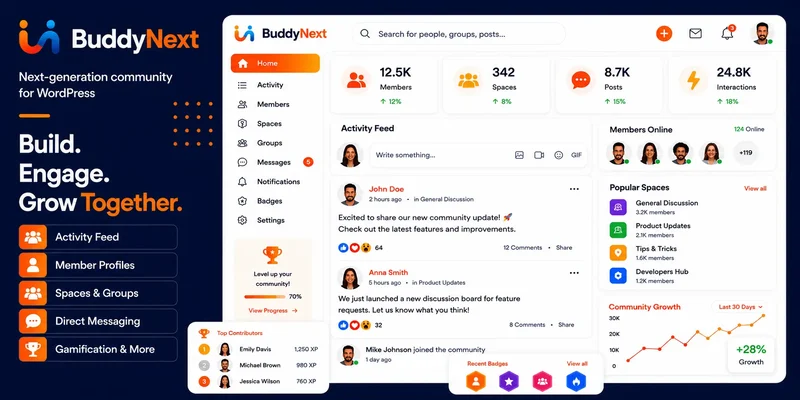
BuddyNext is a modern WordPress community plugin designed to help businesses, creators, educators, and organizations build engaging private communities directly on their WordPress websites.
It provides essential community features like member profiles, activity feeds, groups, private messaging, notifications, and more, making it suitable for membership websites, online learning communities, coaching platforms, and private networks.
Key Features:
- Member profiles and directories
- Social activity feeds
- Groups and community spaces
- Private messaging
- Notifications and engagement tools
- WooCommerce integration
- LMS integrations with LearnDash, Tutor LMS, and LifterLMS
- Complete ownership of community data
With BuddyNext, you can create a customizable community experience while keeping full control over your website and members.
2. Ultimate Member
Ultimate Member is a popular WordPress membership and user profile plugin that helps you create member-based websites with registration forms, user profiles, and access control features.
It is a suitable option for websites that need a simple membership system combined with community features.
Key Features:
- Custom user profiles
- Registration and login forms
- Member directories
- User role management
- Content restriction
- Extensions for additional functionality
3. PeepSo
PeepSo helps you build a social networking website similar to Facebook with features designed for member interaction and engagement.
It includes tools for creating user profiles, activity streams, groups, messaging, and media sharing.
Key Features:
- Member profiles
- Activity streams
- Private messaging
- User groups
- Media sharing
- Notifications
4. FluentCommunity
FluentCommunity is a modern WordPress community plugin built for creators and educators, along with businesses, looking for a clean and engaging community experience.
It focuses on creating organized spaces where members can interact and access community content.
Key Features:
- Community feeds
- Member discussions
- Spaces and groups
- Course community features
- User engagement tools
5. bbPress
bbPress is a lightweight forum plugin created by the WordPress team. It is a simple solution for adding discussion forums to WordPress websites.
It works well for websites that mainly need private discussion boards rather than a full social networking experience.
Key Features:
- Forum creation
- Discussion topics
- Replies and conversations
- User management
- WordPress integration
6. ProfileGrid
ProfileGrid is a WordPress user profile and membership plugin that helps you create member groups and profiles, then build full community websites around them.
Key Features:
- User profiles and member directories
- Groups and communities
- Private messaging
- Membership features
- WooCommerce integration
7. wpForo Forum
wpForo Forum is a powerful WordPress forum plugin for creating discussion-based communities with advanced forum features.
Key Features:
- Private forums
- User badges and reputation
- Discussions and replies
- Moderation tools
- File attachments
8. BuddyPress
BuddyPress is one of the most popular WordPress community plugins for creating social networking websites.
Key Features:
- Member profiles
- Activity streams
- Groups
- Private messaging
- Community interactions
9. ARMember
ARMember is a membership plugin that helps create private communities with subscription plans, user profiles, and restricted content.
Key Features:
- Membership plans
- Content restriction
- User profiles
- Payment integrations
- Subscription management
10. MemberPress
MemberPress is a powerful membership plugin that allows you to create paid communities with protected content and subscription options.
Key Features:
- Membership management
- Content protection
- Subscription plans
- Online course support
- Payment integrations
Common Mistakes When Launching a Private Community
Opening registration to everyone when the actual goal was a small, focused group. A community that grows too fast before its culture is established often ends up feeling generic, and it’s much harder to tighten access after the fact than to loosen it gradually.
Building out a dozen groups or spaces before there are enough members to fill even two or three of them. Empty spaces make a new community feel quieter and less alive than it actually is; start narrow and expand as real conversation demands it.
Skipping a written set of community guidelines because the group feels small and friendly at launch. The guidelines matter most exactly when the community has grown past the point where everyone already knows and trusts each other personally, and retrofitting rules after a dispute already happened is a much harder conversation than setting expectations up front.
Choosing a plugin based purely on its feature list without checking whether it integrates with tools you’re already using, an LMS for course content, WooCommerce for payments, or an existing membership system, since retrofitting that integration later is considerably more work than confirming it up front.
Keeping a Community Active Once It’s Launched
Launching the community is the easy part. Keeping it active months later is where most private communities actually struggle, and it’s rarely a plugin or feature problem when engagement fades.
A regular rhythm helps more than a big feature set. A weekly discussion prompt, a monthly member spotlight, or a scheduled live session gives members a reason to check back on a predictable cadence, rather than relying on organic activity that tends to fade once the initial launch excitement wears off.
Give members something to actually do, not just something to read. A community built purely around one-way announcements from the admin functions more like a newsletter than a community, and it will feel that way to members too. Discussion prompts, member-submitted content, and small group projects all give people a reason to participate rather than just consume.
Identify and support your most active members early. A handful of genuinely engaged members who reply to others, welcome new joiners, and start conversations do more for a community’s atmosphere than any admin-posted content ever will. Recognize them, whether through an informal badge, a shoutout, or just direct thanks, since that recognition tends to reinforce exactly the behavior that keeps a community feeling alive.
Migrating From a Social Platform to a Self-Hosted Community
A meaningful number of private communities start on a platform like a Facebook Group or a Discord server and later move to a self-hosted WordPress community once the group has proven itself and the limitations of a rented platform start to bite.
Plan the migration in stages rather than a single cutover. Announce the move well in advance and explain why, ownership, better moderation control, freedom from a platform’s algorithm are the honest reasons members will actually understand and support. Run both spaces in parallel for a transition window, gradually shifting activity to the new home rather than expecting everyone to switch on day one.
Import what you can. Some platforms allow exporting member lists or post history; check what’s technically possible before assuming you’re starting from zero. Even without a full data export, a warm introduction post welcoming existing members by name into the new space does more for retention than a cold, generic “we’ve moved” announcement.
How This Compares to Just Using a Facebook Group
The honest question worth asking before building anything: why not just use a free Facebook Group? The answer usually comes down to control and longevity. A Facebook Group lives entirely inside Meta’s infrastructure, subject to whatever changes Meta makes to its algorithm, its group tools, or its terms of service, none of which you have any say over.
A WordPress-based community is slower to set up and does cost something in hosting and plugin fees, but it’s yours in a way a Facebook Group never is. If the community becomes a real part of a business, a paid membership, a customer support hub, a course platform, that durability stops being a nice-to-have and becomes the actual reason to build it properly from the start rather than migrating later under pressure.
FAQ
What’s the real difference between a private community and a Facebook Group?
Ownership. A WordPress-based private community lives on infrastructure you control, with member data you own outright. A Facebook Group can be limited, deprioritized in the algorithm, or removed by the platform at any point, and you have no recourse if that happens.
Do I need coding knowledge to set up a private community in WordPress?
No. Most community plugins, BuddyNext included, are configured through the WordPress admin dashboard with no code required for standard setup. Custom design work or deeper integrations may need developer help, but the core community features don’t.
How many members do I need before a private community feels active?
There’s no fixed number, it depends heavily on how engaged those members are rather than the raw count. A tightly focused group of thirty genuinely active members often feels livelier than a loosely engaged group of three hundred. Start narrow, and let growth follow real demand rather than chasing a number.
Can I charge for access to a private community built with WordPress?
Yes. Most of the plugins above integrate with WooCommerce or their own subscription systems to gate access behind a paid membership, a one-time purchase, or a recurring subscription.
Final Thoughts
Building a private online community with WordPress gives you complete control over your members and content, and how engagement between them actually happens. The right plugin depends on your goals, whether you need social networking features, membership tools, forums, or a complete community platform.
For a modern community experience with profiles, activity feeds, groups, messaging, notifications, and powerful integrations, BuddyNext is a strong choice for building a scalable private WordPress community.
















