Best WordPress LMS Plugins for Creating a Powerful E-Learning Platform
How to build an e-learning platform on WordPress in 2026: Learnomy, LearnDash, Tutor LMS, LifterLMS, Sensei and FluentCommunity, checked 21 November, with WooCommerce and API notes.
The best way to build a powerful e-learning platform on WordPress in 2026 is to start from an LMS that already handles the platform parts, not only the lessons. Our pick is Learnomy, the LMS our team at Wbcom Designs builds: its free version sells courses with Stripe and PayPal, runs membership plans, exams and verifiable certificates, pays other instructors, and ships a full REST API with webhooks, so you can grow it into an academy or a mobile app without swapping plugins. If you need the largest market of add-ons, themes and freelance developers, LearnDash is the safer platform to build on, and if your platform is really a WooCommerce shop that also sells courses, Sensei LMS with Sensei Pro fits that shop better.
This guide looks at the platform around the LMS: payments, WooCommerce, community, interactive content, developer access and what happens when you reach thousands of students. If you only want a ranked shortlist of LMS plugins, see our ranking of the 10 best LMS plugins for WordPress. We checked every plugin and price below on 21 November 2026.
What do you need to build an e-learning platform on WordPress?
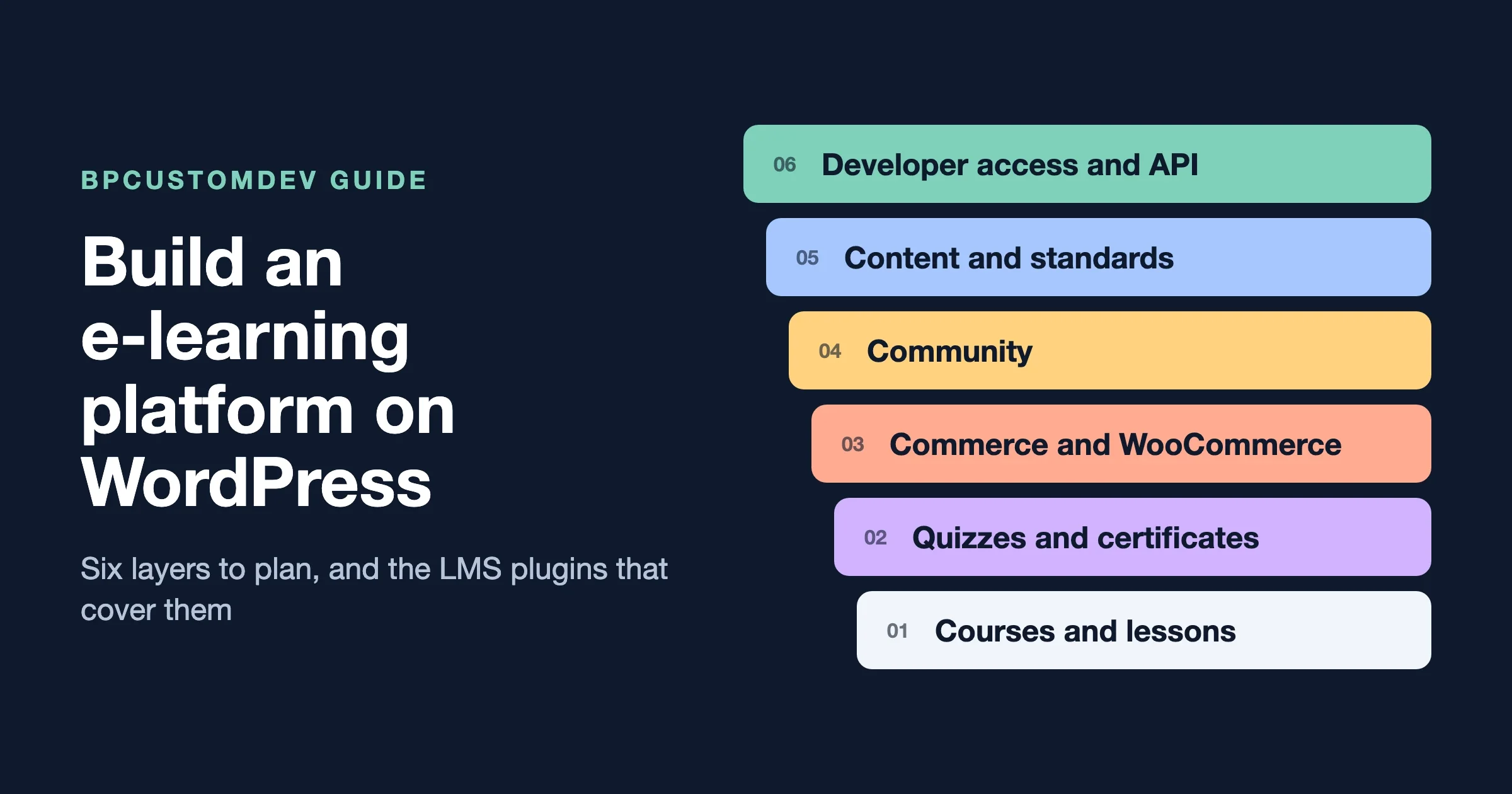
An e-learning platform is more than a course plugin. When we scope one for a client, we plan six layers, and the LMS you pick decides how many of them you have to add yourself:
- Courses and learning: lessons, sections, drip schedules, progress tracking and a student dashboard.
- Assessment: quizzes, exams, assignments, grading and certificates that someone outside your site can verify.
- Commerce: one-off sales, subscriptions, memberships, coupons, tax and, for marketplaces, instructor payouts.
- Community: somewhere students talk to each other, ask questions and stay after the course ends.
- Content and standards: video, interactive content, and SCORM, xAPI or LTI if you bring material from other systems.
- Developer access: a REST API, webhooks and hooks so your platform can talk to a CRM, a mobile app or your own code.
The table shows which layers each LMS in this guide covers on its own and which need an add-on or a second plugin.
LMS | Commerce | WooCommerce role | Community | Standards | Developer access |
|---|---|---|---|---|---|
Learnomy | Free: Stripe, PayPal, memberships, coupons | Optional payment gateway | BuddyNext Pro integration | Pro: SCORM, xAPI, LTI, QTI, H5P | REST API, JWT, webhooks (free) |
LearnDash | Built-in payments | Free integration add-on | BuddyPress and others via add-ons | Via add-ons | REST API and hooks reference |
Tutor LMS | Free native checkout and subscriptions | Optional monetization option | BuddyPress integration | Pro | REST API (authentication support listed) |
LifterLMS | Stripe or PayPal add-ons | Paid add-on | Integrations listed | Not listed | Developer docs and REST API |
Sensei LMS | Through WooCommerce (Sensei Pro) | The sales layer | Not a focus | Not listed | Standard WordPress hooks |
FluentCommunity | Paid plans | Not the main route | Built in (community first) | Not listed | Fluent ecosystem integrations |
Checked on 21 November 2026 against each vendor page or WordPress.org listing. “Not listed” means we could not find it on the vendor’s own page, so ask before you plan around it.
Which LMS plugins are best for an e-learning platform?
These six cover the platform shapes we are asked to build most often. They are ordered by how much of the platform each one covers without extra plugins, with our own first.
1. Learnomy (our pick for a platform you can grow)
Learnomy is our own LMS, so read this entry with that in mind and weigh the cons. We built the free version as a complete platform core rather than a trial: unlimited courses and students, Stripe and PayPal checkout with coupons and guest checkout, unlimited paid membership plans with monthly or yearly billing and free trials, graded exams, certificates with a public verification page, and instructor commissions. It needs neither WooCommerce nor a membership plugin, and subscriptions renew through the bundled Action Scheduler.
The part that matters most for a platform is the developer layer. Per the Learnomy site on 21 November 2026, every install ships more than 200 REST endpoints under learnomy/v1 with JWT authentication, a Batch API that takes up to 25 sub-requests in one call, and offline progress sync for apps. Pro adds the learnomy-pro/v1 routes and 147 webhook events with a delivery log. Learnomy stores its data in its own custom tables rather than post meta, and registers 54 LMS actions with the WordPress Abilities API so AI assistants can call them under your site’s permission rules.
Learnomy Pro adds the institution layer: selling seats to companies, a gradebook with assignments and rubrics, SCORM, xAPI, LTI, QTI and H5P, drip, learning paths and cohorts, Stripe Connect payouts to instructors, Open Badges 3.0 and Credly, white label and analytics. On 21 November 2026 it listed $149 a year (or $399 lifetime) for one site, $249 a year for five sites and $399 a year for unlimited sites.
Good for: creators who expect to grow into an academy, marketplaces that need commissions from day one, and teams who plan a mobile app or CRM integration.
Real cons: Learnomy is not in the WordPress.org directory, so there are no public ratings or install counts yet, and it is far younger than LearnDash or Tutor LMS, with fewer third-party themes and developers who know it. Its own pricing page lists what Pro does not do yet: single sign-on (SAML or OIDC), selling courses as WooCommerce products (WooCommerce works as a payment gateway only), AI grading, plagiarism checks and peer review. Webhooks, SCORM and the gradebook are Pro.
2. LearnDash
LearnDash from StellarWP is the platform with the deepest bench of add-ons, themes and developers, which is often the deciding factor for agencies.
It has a strong quiz engine, drip content, certificates, groups for team training and built-in payments, plus a free WooCommerce integration for shops that want course access tied to WooCommerce orders. Developers get a code reference with hooks, functions and REST API documentation. On 21 November 2026, LearnDash was sold in a bundle with The Events Calendar, Give and Kadence at $350 a year for one site or $599 for ten.
Good for: agencies and training businesses that want the most proven paid LMS and a large pool of people who already know it.
Real cons: there is no free version or WordPress.org listing, so you cannot read public reviews there, and the bundle price is high if you only need the LMS. Community, membership and marketplace features usually mean extra plugins.
3. Tutor LMS
Tutor LMS by Themeum is the most installed free LMS here, with 90,000+ active installs on WordPress.org, version 4.2.1, updated 9 November 2026.
The free plugin has its own native eCommerce with coupons, tax, orders and refunds, built-in subscriptions, and also works with WooCommerce, Easy Digital Downloads and Paid Memberships Pro if you prefer those. Its listing names a multi-instructor system, Zoom integration, certificate verification and REST API authentication support. On 21 November 2026, its pricing page listed Tutor LMS Pro for one site at $199 a year, discounted to $99.50 in a sale.
Good for: creators and small marketplaces that want to start free and keep course sales inside the LMS.
Real cons: certificates, drip and many advanced features are Pro, and a July 2026 review called it a turnkey product with a hard developer experience.
4. LifterLMS
LifterLMS has a free, open-source core with 10,000+ active installs, version 11.1.0, updated 17 November 2026, rated 4.8 from 393 reviews.
The core plugin covers courses, quizzes, memberships, certificates and achievements with no limits on courses or students. Payments come from Stripe, PayPal or Authorize.Net add-ons, or from its WooCommerce add-on, and it has a dedicated developer site with REST API documentation. On 21 November 2026, its pricing page listed the Earth Bundle (one site, with the Stripe, PayPal and WooCommerce add-ons) at $398 a year, discounted to $159.20 in a November sale.
Good for: nonprofits, schools and membership sites that want a well-documented free core and add payments only when they start selling.
Real cons: you cannot take online payments on the free core alone, and a June 2026 reviewer wanted stronger reporting.
5. Sensei LMS
Sensei LMS by Automattic has 9,000+ active installs, version 4.27.0, updated 10 November 2026, rated 3.5 from 40 reviews. It is a clean, block-based LMS, and Automattic says it uses Sensei for its own employee training. It is the natural fit when the platform is a WooCommerce shop: Sensei Pro sells courses through WooCommerce and works with WooCommerce Subscriptions, Memberships and Affiliates. On 21 November 2026, its pricing page listed Sensei Pro at $179 a year.
Good for: shops that already run on WooCommerce and want courses to be ordinary products in the same cart.
Real cons: selling needs Sensei Pro plus WooCommerce, the rating is the lowest here, and reviewers say its styling is hard to change. Multi-instructor marketplaces are not its focus.
6. FluentCommunity
FluentCommunity starts from the other end: it is a community plugin with a built-in course module. It has 8,000+ active installs, version 2.15.0, updated 18 November 2026, rated 4.8 from 99 reviews. Spaces, feeds and courses live in one fast front end that fits the wider Fluent suite (FluentCRM, Fluent Forms, FluentCart). On 21 November 2026, its pricing page listed a single site at $199 a year, discounted to $119 in a sale.
Good for: cohort programs and coaching communities where the conversation matters as much as the course, especially if you already use FluentCRM.
Real cons: its course layer is lighter than a dedicated LMS, so check grading, certificates and standards against your needs, and one October 2026 reviewer disliked Pro-only options showing up in the free version.
Which LMS plugins integrate with WooCommerce?
Search Console shows people reaching this page looking for WooCommerce LMS integration, so here is the direct answer. There are three ways an LMS can work with WooCommerce, and they suit different platforms:
- Courses as WooCommerce products: the course is a product, the order grants access, and WooCommerce Subscriptions handles renewals. Sensei Pro and LearnDash (through its free integration add-on) work this way, and LifterLMS does through its paid WooCommerce add-on. Choose this if your shop sells physical or digital products alongside courses.
- WooCommerce as a payment gateway only: the LMS keeps its own checkout and records, and WooCommerce just takes the payment. Learnomy uses WooCommerce this way, which keeps enrolment data inside the LMS but means courses do not appear as WooCommerce products.
- No WooCommerce at all: Learnomy and Tutor LMS have their own checkout with coupons and subscriptions, which removes a large plugin from the stack. This is the simpler route for a course-only platform.
If your course sales and shop sales must share one cart, reports and tax setup, pick an LMS from the first group. If courses are the whole business, the third route is lighter and has fewer moving parts to update.
WordPress LMS plugin development: what can you build on each LMS?
The other query this page gets is about LMS plugin development. Most platforms we build need custom work at some point: a CRM sync, an enrolment from another store, a mobile app or a custom report. Before you commit to an LMS, check four things:
- An API you can authenticate against. Learnomy documents JWT tokens (15-minute access, 30-day refresh) and Application Passwords. LearnDash and LifterLMS publish REST API references on their developer sites, and Tutor LMS lists REST API authentication support.
- Webhooks for outgoing events, so enrolments, completions and payments reach other systems without polling. Learnomy Pro lists 147 webhook events; for other LMSs, check whether you need Zapier or custom code.
- Hooks for in-site code. LearnDash and LifterLMS have searchable hook references. Read the hooks for enrolment, completion and certificate events before you choose.
- Where data lives. LMSs that keep progress in custom tables usually report faster on large sites than ones that store everything in post meta, which matters once you reach thousands of students.
Here is what an enrolment from an outside store looks like on Learnomy, taken from its developer page on 21 November 2026. Test it on staging with your own course and user IDs.
POST /wp-json/learnomy/v1/enrollments
Authorization: Bearer <jwt>
Content-Type: application/json

{ "course_id": 128, "user_id": 42, "source": "purchase" }
A 201 response returns the enrolment ID and its status. The same pattern (authenticate, call an enrolment route, listen for the completion event) is how you connect most LMSs to a CRM or a separate shop; only the route names and the auth method change.
What users say, and our suggestion
Figures from the WordPress.org plugin API and review pages, checked on 21 November 2026. “Resolved” is the share of support threads marked resolved in the last two months. Review points are paraphrased from the last twelve months and linked.
LMS | Rating (reviews) | Active installs | Last updated | Support resolved |
|---|---|---|---|---|
Learnomy | Not on WordPress.org yet | Not published | Current (vendor site) | Not public |
LearnDash | Not on WordPress.org | Not published | Vendor site | Not public |
Tutor LMS | 4.4 (592) | 90,000+ | 9 Nov 2026 | 27 of 28 |
LifterLMS | 4.8 (393) | 10,000+ | 17 Nov 2026 | 1 of 1 |
Sensei LMS | 3.5 (40) | 9,000+ | 10 Nov 2026 | 1 of 1 |
FluentCommunity | 4.8 (99) | 8,000+ | 18 Nov 2026 | 1 of 1 |
Learnomy
Too few public reviews to summarise, because it is not on WordPress.org yet, and we would rather say that than quote our own customers. The fair test for a platform is a staging site: sell a course in Stripe test mode, enrol a student through the REST API, take an exam and check the certificate’s verification page.
LearnDash
LearnDash is sold outside WordPress.org, so there is no directory review base to summarise the same way. Ask in its community how updates have gone over the past year, and use the refund window to test it.
Tutor LMS
- Praised: patient, responsive support, named in several late-2026 reviews, and a Pro version that covers subscriptions, drip and quizzes.
- Complaints: a July 2026 reviewer found the developer experience hard, and others reported updates that changed menus and broke customisations.
LifterLMS
- Praised: flexible, easy to use and very well documented, per its reviews.
- Complaints: a June 2026 reviewer wanted better reporting.
Sensei LMS
Too few recent reviews: none in the last twelve months on its review page. Older reviews complain that selling needs the paid WooCommerce integration and that styles are hard to edit.
FluentCommunity
- Praised: speed, a clean interface and fast support, with an October 2026 reviewer saying they moved from LearnDash and WooCommerce to the Fluent suite, per its reviews.
- Complaints: an October 2026 reviewer disliked empty Pro-only options in the free version and the plugin installing other add-ons.
Our suggestion
- A course platform you expect to grow into an academy, a marketplace or an app: Learnomy, because checkout, memberships, exams, certificates, commissions and the REST API are all in the free version. Choose LearnDash instead if a large add-on market and a deep pool of developers matter more to you than a free core.
- A free LMS with a big user base and its own checkout: Tutor LMS.
- A nonprofit or school that sells little or nothing at first: LifterLMS.
- A WooCommerce shop adding courses to the same cart: Sensei LMS with Sensei Pro, or LearnDash with its WooCommerce add-on.
- A community-first program: Learnomy with BuddyNext, our community engine, or FluentCommunity if you already run the Fluent suite.
How do you add community and interactive content to the platform?
Students finish more courses when they can ask each other questions. For our own stack, BuddyNext is the free community engine from our team: feed, spaces, members, messaging and moderation. With BuddyNext Pro and Learnomy together, the Learnomy integration posts course completions and certificates to the community feed, links certificate cards to their verification page and routes course alerts into the notification bell. It needs BuddyNext Pro, and it adds no community search for course content. If you run Tutor LMS on BuddyPress instead, our Tutor LMS and BuddyPress guide covers that route.
For interactive content, the free H5P plugin (40,000+ active installs, version 1.17.10) adds interactive video, drag and drop, flash cards and quiz content types you can reuse across courses. Learnomy Pro lists H5P support, so H5P items can count inside a course. Two 2026 reviewers reported unstable 1.17.x updates, so test H5P updates on staging before you push them to students.
How do you plan an e-learning platform for thousands of students?
Platforms rarely fail at launch. They slow down when enrolments pass a few thousand and every page is a logged-in page that caching cannot help. Plan for scale on day one:
- Hosting: logged-in students bypass most page caching, so choose managed WordPress hosting with enough PHP workers and an object cache, not the cheapest shared plan.
- Data storage: ask where the LMS keeps progress and quiz attempts. Custom tables with indexes stay fast as rows grow; large post meta tables do not.
- Reports: make sure the admin student list and gradebook paginate, filter and export rather than loading every row.
- Background jobs: renewals, certificates and emails should run in the background (Action Scheduler or a real cron), not on page load.
- Video: host lessons on a video service and embed them; never serve course video from your WordPress uploads folder.
- Progress tracking: decide what you will measure before launch. Our course progress tracking guide compares the options.
What does an e-learning platform on WordPress cost?
Budget for the LMS licence, the add-ons your platform needs, hosting for logged-in traffic and payment fees. On 21 November 2026, the published starting prices we could confirm for one site were Learnomy Pro at $149 a year (free version available), Sensei Pro at $179 a year, Tutor LMS Pro at $199 a year list price, FluentCommunity at $199 a year list price, LifterLMS Earth Bundle at $398 a year list price and LearnDash at $350 a year in its bundle. Tutor LMS, LifterLMS and FluentCommunity were running sales that day, so check the current price.
A plugin that bundles checkout, memberships and certificates replaces several paid add-ons, so compare the full first-year stack, not the headline price. If you are weighing WordPress against a hosted course platform altogether, our Teachable vs WordPress comparison covers the trade-offs.
Which LMS plugins should you avoid right now?
Two notes from our check on 21 November 2026. Academy LMS was closed on WordPress.org on 11 October 2026, with the directory saying the closure is temporary pending a full review, so we left it out until it returns. And any LMS whose last update is more than a year old is a risk for a platform you plan to run for years; every plugin in this guide was updated in November 2026.
Frequently asked questions
What is the best LMS plugin for building an e-learning platform?
Our pick is Learnomy, because the free version already covers commerce, memberships, exams, certificates, instructor commissions and a REST API. Choose LearnDash if you want the biggest add-on market and developer pool, or Sensei LMS with Sensei Pro if your platform is a WooCommerce shop.
Can I build a course marketplace with multiple instructors?
Yes. Learnomy (free commissions, Stripe Connect payouts in Pro) and Tutor LMS (multi-instructor system) are built for it; LearnDash needs add-ons. Our guide on building your own course marketplace covers the business side.
Do I need WooCommerce to sell courses?
No. Learnomy and Tutor LMS have their own checkout, LifterLMS has Stripe and PayPal add-ons, and LearnDash has built-in payments. You need WooCommerce only if courses must be WooCommerce products, as with Sensei Pro.
Which WordPress LMS has the best API for custom development?
Learnomy documents more than 200 REST endpoints with JWT auth and, in Pro, 147 webhook events. LearnDash and LifterLMS have mature developer sites with hook and REST references. Check the specific events you need before choosing.
Is Academy LMS still available?
Not on WordPress.org at the moment: it was closed on 11 October 2026, pending a review the directory describes as temporary.
Need help building your e-learning platform?
Our team builds course, membership and community platforms on WordPress, from a first course to multi-instructor academies with apps. For the wider set of tools, see our WordPress e-learning plugins guide, or talk to us about your platform.