Teachable vs WordPress for Course Website
Teachable vs WordPress for a course website in 2026: real Teachable prices and fees, what WordPress costs instead, LMS plugin options, community, data ownership and how to move.

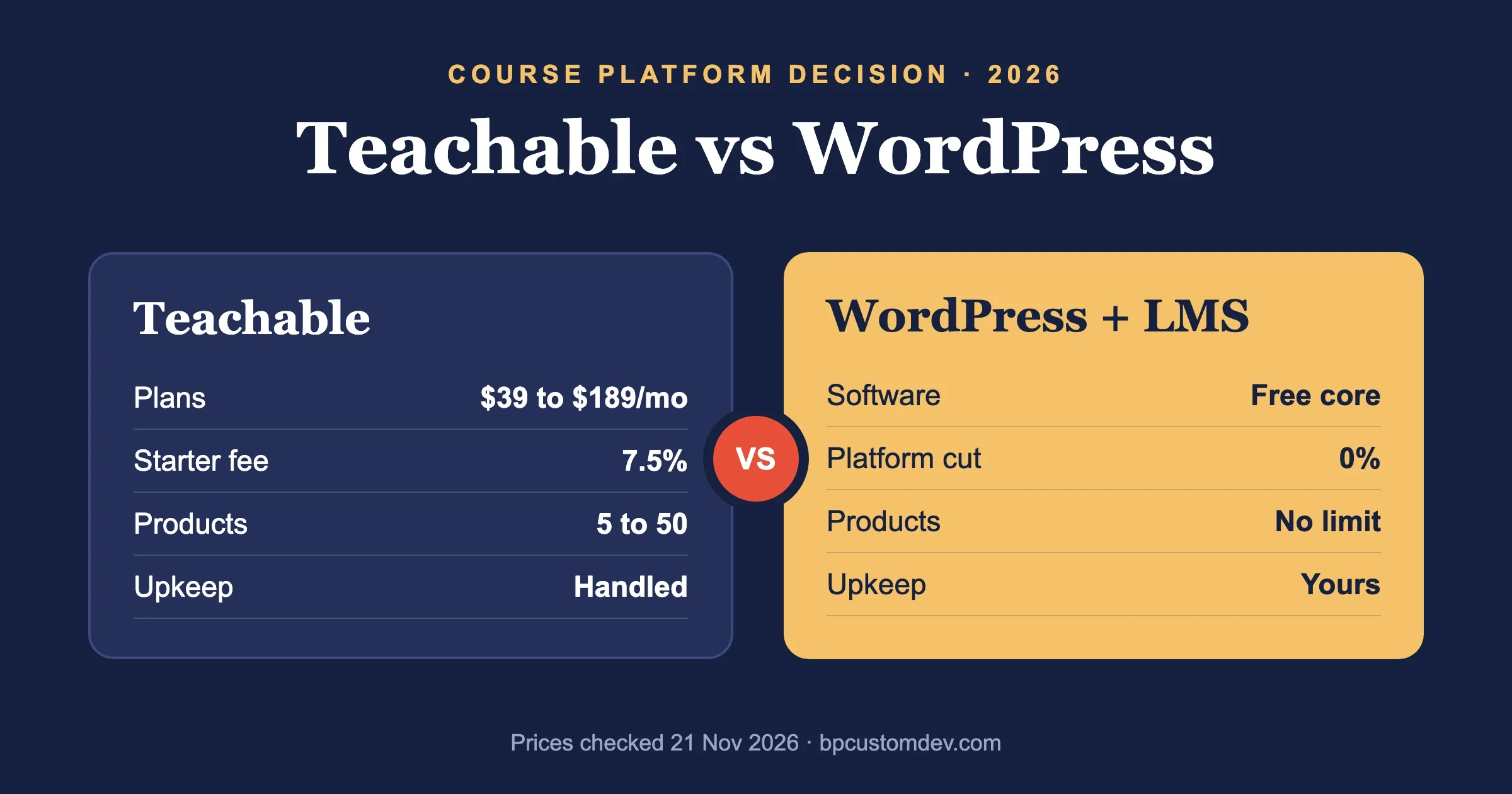
Teachable is better if you want to sell a course this week without touching hosting, plugins or updates. WordPress is better if you want to own the site, keep every sale without a platform cut, and add things Teachable does not do well, such as a real member community, unlimited products or a custom design. The trade is simple: Teachable sells you convenience by the month, and WordPress asks for setup time in exchange for control.
We rewrote this comparison on 21 November 2026. Teachable prices come from teachable.com/pricing in US dollars on that day, and the WordPress plugin figures come from the WordPress.org plugin API on the same day. Where we could not confirm a number from a US source, we give a range or leave it out.
Teachable vs WordPress: which is better for a course website?
Neither wins for everyone. Teachable is the better course website for a solo creator who wants zero technical work and sells a handful of products. WordPress is the better course website for anyone who wants to grow past a few courses, run a community around them, or stop paying a monthly fee that rises with their success.
Teachable | WordPress + an LMS plugin | |
|---|---|---|
What it is | Hosted course platform, monthly or yearly subscription | Open-source CMS you host yourself, plus a learning management plugin |
Setup time | Hours | Days to a few weeks for a polished site |
Plan prices (21 Nov 2026) | Starter $39/mo, Builder $89/mo, Growth $189/mo billed monthly; $29, $69, $139/mo billed yearly | Free software; you pay for hosting, a theme and any premium plugins |
Transaction fee | 7.5% on Starter, 0% on Builder and Growth with Teachable Payments | None from WordPress or the plugin |
Product limits | 5 products on Starter, 10 on Builder, 50 on Growth | No limit set by the software |
Design control | Templates and CSS snippets | Any theme, any layout, full code access |
Community | Lesson comments | Full social network with BuddyPress, BuddyNext or forums |
Who maintains it | Teachable | You or your developer: updates, backups, security |
Your data | Stored on Teachable; you work through its export tools | In your own database, on your own server |
If you are weighing other hosted platforms too, our comparison of BuddyPress, Circle, Mighty Networks and Skool looks at the community-first side of the same decision.
How much does Teachable cost in 2026?
Teachable costs $39, $89 or $189 a month billed monthly, or $29, $69 or $139 a month billed yearly, for its Starter, Builder and Growth plans. A Custom plan for high-volume schools is priced by Teachable’s sales team. There is no free plan; Teachable offers a 7-day free trial and a 30-day money-back guarantee.
Plan | Monthly billing | Yearly billing (per month) | Products | Transaction fee |
|---|---|---|---|---|
Starter | $39 | $29 | 5 | 7.5% |
Builder | $89 | $69 | 10 | 0% with Teachable Payments |
Growth | $189 | $139 | 50 | 0% with Teachable Payments |
Custom | Contact sales | Contact sales | Flexible | Negotiated |
Payment processing is charged on top. Teachable’s pricing page listed 2.9% + 30 cents for US card sales, 3.9% + 30 cents for international cards, 3.49% + 49 cents for US PayPal sales and 4.99% + 49 cents for international PayPal sales, plus a $15 chargeback fee. Course certificates and removing Teachable branding start on the Growth plan.
Teachable was running Black Friday offers when we checked. Promotions like that come and go, so we used the standard list prices above.
Is WordPress cheaper than Teachable?
Usually yes, once you sell more than a little. WordPress has no platform fee and no cut of your sales, so your costs stay roughly flat as revenue grows. Teachable’s costs climb with your plan tier, and on Starter with every sale.
Here is a simple first-year comparison for a creator selling $2,000 of courses a month. We left out payment processing because you pay a processor either way.
Setup | Platform cost per year | Fees on $24,000 of sales | First-year total (before processing) |
|---|---|---|---|
Teachable Starter, monthly | $468 | $1,800 (7.5%) | $2,268 |
Teachable Builder, yearly | $828 | $0 | $828 |
WordPress + free LMS plugin | Hosting only (in our experience $100 to $600 a year for decent managed hosting) | $0 | Hosting plus your time |
WordPress + premium LMS | Hosting plus a licence (for example Learnomy Pro $149/yr or LearnDash $350/yr for one site) | $0 | Roughly $250 to $950 plus your time |
Two costs do not show in that table. The first is setup: a designer or developer to build a good-looking WordPress course site can cost more than several years of Teachable. The second is upkeep: someone has to apply updates, test checkout after them and keep backups. If you value your own hours highly and do not enjoy that work, Teachable’s fee buys you something real.
Is WordPress or Teachable easier to use?
Teachable is easier on day one. You sign up, pick a template, upload videos and connect payments, all inside one dashboard, with hosting, security and video streaming handled for you. WordPress needs a host, a theme, an LMS plugin and a payment setup before your first lesson goes live.
The gap narrows after launch. A modern WordPress LMS gives you a drag-and-drop course builder that feels much like Teachable’s, and you get the whole WordPress ecosystem for email, SEO, forms and community. Where WordPress stays harder is maintenance. Plugin updates can break things, and on Teachable that is somebody else’s problem.
Can WordPress do everything Teachable does?
Yes, with the right plugins, and quite a bit more. Teachable’s plan features include memberships, drip content, auto-graded quizzes, certificates, coupons, upsells, an affiliate program and iOS and Android student apps. WordPress LMS plugins cover the course side of that list; the mobile app is the one area where Teachable has a clear head start for a small creator.
- Courses, lessons, quizzes and certificates: every major WordPress LMS covers these.
- Drip content and memberships: built into most premium LMS plugins, or added with a membership plugin.
- Checkout: Stripe and PayPal directly, or through WooCommerce or Easy Digital Downloads.
- Affiliates and email: separate WordPress plugins or services you connect.
- Native student apps: Teachable includes them. On WordPress you would use a progressive web app, a third-party app builder or a custom app.
Where WordPress pulls ahead is everything around the course: a blog that ranks in search, a community, events, a job board or a store, all on one domain and one login.
What do you need to run a course website on WordPress?
You need seven pieces: hosting, a theme, an LMS plugin, a payment method, a video host, reliable email and a backup plan. Teachable bundles all seven into one bill. On WordPress you choose each one, which is where both the savings and the work come from.
Piece | What it does | What to look for |
|---|---|---|
Hosting | Runs the site and the database | Managed WordPress hosting with staging, daily backups and enough PHP workers for logged-in students |
Theme | Controls the look of course and lesson pages | Built for your LMS, tested on mobile, no heavy page builder unless you need one |
LMS plugin | Courses, lessons, quizzes, progress, certificates | Active development, good support response, the checkout style you want |
Payments | Takes the money | Stripe or PayPal direct, or WooCommerce if you already run a store |
Video host | Streams lessons | A streaming service with player privacy settings; never the media library |
Receipts, password resets, course updates | An SMTP or transactional email service so messages reach inboxes | |
Backups and updates | Keep the site safe | Automatic off-site backups and a staging site to test updates |
Logged-in students are the part most new course sites underestimate. Page caching speeds up public pages, but lesson pages are personal to each student, so they hit the server and the database every time. A host that is fine for a brochure site can feel slow once fifty students take a quiz at the same time. Pick hosting for logged-in traffic, not for page views.
The good news is that every piece can be swapped later. If your video host raises prices or your theme falls behind, you change that one piece. On Teachable you take the whole package or leave it.
When should you stay on Teachable?
Stay on Teachable if the course is a side project, your sales are small and steady, and nobody on your team wants to own a website. Paying $69 to $89 a month to never think about servers, updates or broken checkouts is a fair deal in that situation.
Stay too if you rely on Teachable’s iOS and Android student apps, its built-in tax handling or its affiliate program, and you have no budget to replace them. Rebuilding those on WordPress is possible, but it costs time and money that a small course may never earn back.
Move when the numbers or the limits start to hurt: the Starter fee is eating real money, you have hit the product cap, or you want a community and a blog on the same site as your courses.
Which WordPress LMS plugin should you use instead of Teachable?
Pick by the kind of course business you run. We pulled the WordPress.org data on 21 November 2026; ratings are converted to five stars and “resolved” is the share of support threads from the last two months marked resolved.
LMS plugin | Version | Active installs | Rating (reviews) | Last updated | Resolved threads |
|---|---|---|---|---|---|
4.2.1 | 90,000+ | 4.4 (592) | 9 Nov 2026 | 26 of 27 | |
4.5.0 | 60,000+ | 4.3 (597) | 20 Nov 2026 | 2 of 9 | |
11.1.0 | 10,000+ | 4.8 (393) | 17 Nov 2026 | 1 of 1 | |
3.7.60 | 10,000+ | 4.5 (488) | 9 Nov 2026 | 0 of 1 | |
4.27.0 | 9,000+ | 3.5 (40) | 10 Nov 2026 | 1 of 1 | |
Premium only | Not on WordPress.org | Not listed | Not listed | Not listed | |
Free + Pro | Not on WordPress.org | Not listed | Not listed | Not listed |
LearnDash: the long-running premium choice
LearnDash has no free version. On its pricing page on 21 November 2026, one site cost $350 a year, and that plan bundled The Events Calendar, Give and the Kadence theme. It is mature, with a large pool of add-ons, themes and developers who know it. The cost is the downside for a small creator, and the bundle includes tools you may never use.
Tutor LMS and LearnPress: big free bases
Both have a free version on WordPress.org with tens of thousands of active installs, and both sell Pro add-ons. Tutor LMS had the best support response rate in our table. LearnPress resolved only 2 of 9 recent threads, and a fatal error after its 4.4.14 update showed up in two separate threads in mid-November 2026, which is a good reminder to test updates on staging.
Learnomy: our LMS
Learnomy is built by Wbcom Designs, the team behind this site, so weigh our view accordingly. It was designed as a direct answer to the Teachable question: a course platform inside WordPress with no platform cut and no limits on courses or students. The free version includes unlimited courses and students, Stripe and PayPal checkout without WooCommerce, membership plans, quizzes, certificates with PDF and verification, instructor commissions and a full REST API. Pro (from $149 a year or $399 lifetime for one site, checked 21 November 2026) adds drip schedules, learning paths and cohorts, a gradebook with assignments, SCORM and xAPI support, Stripe Connect instructor payouts and selling seats to companies.
The real cons. Learnomy is not on WordPress.org, so there are no public install counts or reviews to judge it by, and you download it from its own site. It is much younger than LearnDash or Tutor LMS, so there are fewer third-party tutorials, themes and freelancers who already know it. And drip content, which Teachable includes on every plan, is a Pro feature in Learnomy.
For a wider view of the LMS market, our roundup of WordPress plugins for e-learning compares more options, including quiz and video tools.
Which is better for building a community around your course?
WordPress, by a wide margin. Teachable’s plan features list lesson comments, which is useful for questions on a single lesson, but there is no member profiles, activity feed, groups or forums built in. Many Teachable creators bolt on a separate community tool, which means a second login and a second monthly fee.
On WordPress the community lives on the same site and the same account as the course. BuddyNext, our community platform, includes an activity feed, spaces, member profiles, messaging and courses as part of one stack. If you already run BuddyPress, Reign and BuddyX are our themes built for BuddyPress plus an LMS. BuddyPress itself was at version 14.5.6 (17 November 2026) with 90,000+ active installs; it is mature but its growth has slowed, which is why we point new builds at BuddyNext.
Membership and course communities often overlap. If you plan to sell access to both, our guide to WordPress membership plugins covers the plugins that handle recurring billing and content rules.
Who owns your students and data on Teachable vs WordPress?
On WordPress your student records, progress data and payment customers sit in your own database and your own Stripe or PayPal account. On Teachable they sit on Teachable’s servers, and you rely on its export tools and its terms. You can leave Teachable, but moving progress data, quiz results and certificates to another platform is rarely clean.
Ownership also covers your web address and search rankings. A course site on your own domain builds search traffic that belongs to you. Teachable supports custom domains, so this is not a lock-in on its own, but the pages, blog and structure still live on Teachable’s platform and leave with you only as content you copy out.
How do you move a course from Teachable to WordPress?
Plan the move as a short project, not a weekend task. The order below keeps students from losing access in the middle.
- Pick and install your LMS on a staging copy of your new WordPress site, with your theme and payment gateway.
- Move video first. Host lesson videos on a streaming service such as Vimeo, Bunny Stream or similar, not in the WordPress media library. Your web host is not built to stream video to hundreds of students.
- Rebuild courses and quizzes. Most LMS plugins do not import Teachable courses directly, so plan time to recreate lessons, quizzes and certificate templates.
- Export and import students. Export your student list from Teachable and import it into WordPress with course enrolments. Decide how to handle progress: many creators simply give existing students full access.
- Move recurring subscriptions carefully. Active Teachable subscriptions do not transfer automatically. You will usually need students to re-subscribe on the new checkout, so tell them early.
- Test the whole purchase flow with a real card: buy, receive the email, log in, open a lesson, pass a quiz, get the certificate.
- Switch and redirect. Point your domain at the new site and redirect old course URLs to their new addresses.
Common mistakes people report
These problems came up repeatedly in WordPress.org support threads for LMS plugins we checked on 21 November 2026. None of them are reasons to stay on Teachable; all of them are things Teachable handles for you, so you need a plan for them on WordPress.
- Students not enrolled after paying. A Tutor LMS user reported buyers who paid through WooCommerce but were not enrolled (October 2026 thread). Test a real purchase after every LMS or checkout update.
- Updating straight on the live site. LearnPress 4.4.14 threw a fatal error for some sites in mid-November 2026 (thread). Update on staging first, or at least have a one-click backup ready.
- Leaving registration open to bots. One course site owner was left with 10,000 spam sign-ups to delete (October 2026 thread). Add a CAPTCHA or email verification before launch.
- Relying on default WordPress email. A LearnPress user reported that no emails went out when new users registered at checkout (August 2026 thread). Use an SMTP or transactional email service so login and receipt emails arrive.
- Not testing video progress tracking. A Tutor LMS user found playback time was not saved with an embedded Bunny Stream player (November 2026 thread). If course completion depends on watching, check that your video host and LMS work together.
Our suggestion: Teachable or WordPress?
Your situation | Our pick | Why |
|---|---|---|
First course, no budget for help, want to sell this month | Teachable (Builder if you can, to avoid the 7.5% fee) | Fastest route to a working checkout with nothing to maintain |
Selling steadily and tired of the monthly bill or product limits | WordPress with an LMS | Costs stay flat as revenue grows; no cap on products |
Course plus a member community | WordPress with BuddyNext, or BuddyPress with Reign or BuddyX | Community, courses and one login on your own site |
Multi-instructor academy or selling seats to companies | WordPress with LearnDash or Learnomy Pro | Instructor payouts, cohorts and group seats |
No interest in hosting, updates or backups, ever | Teachable | The fee is paying for exactly that |
If you go the WordPress route and want to sell access in more than one way, our breakdown of community monetization models shows how courses fit next to memberships, sponsorships and paid spaces.
Frequently asked questions
Does Teachable have a free plan?
No. On 21 November 2026 Teachable’s pricing page said it is a paid service with a 7-day free trial and a 30-day money-back guarantee. Its lowest plan, Starter, was $39 a month billed monthly or $29 a month billed yearly.
Does Teachable take a cut of my sales?
Only on Starter, which charges a 7.5% transaction fee. Builder, Growth and Custom charge 0% when you use Teachable Payments. Payment processing fees apply on every plan.
Can I use Teachable and WordPress together?
Yes. Many creators keep their marketing site and blog on WordPress and link to a Teachable school for the courses. It works, but you pay for both and students move between two sites with two designs.
Is WordPress good for selling online courses?
Yes. With an LMS plugin, WordPress runs course sites from a single coach to large academies. The extra work is hosting, updates and testing, which a hosted platform does for you.
What is the cheapest way to sell courses on WordPress?
A free LMS plugin with built-in Stripe or PayPal checkout, on modest managed hosting. Learnomy Free, Tutor LMS and LearnPress all have free versions. Expect to pay for good hosting and a video service before anything else.
Can I move my students from Teachable to WordPress?
Yes. Export students from Teachable and import them into your LMS with enrolments. Progress data and active subscriptions usually need manual handling, so plan the switch and tell students in advance.
If you want a course site with a community built in and would rather not stitch it together yourself, our team builds these on WordPress every week and can scope one with you.