How to Pin Community Post and Group Activities in BuddyPress Website
BuddyPress Sticky Post pins important activity updates to the top of the feed, overriding BuddyPress's default reverse-chronological order. Here's how to configure it, why pin discipline matters more than any setting, and where site-wide versus group-level pinning fits.
BuddyPress Sticky Post lets admins and group moderators pin specific activity updates to the top of the activity stream, so they don’t get buried under the constant scroll of new posts. BuddyPress’s default activity feed is purely reverse-chronological, the newest thing always wins, no matter how important the older post was.

The problem with pure reverse-chronological feeds
Reverse-chronological is a reasonable default. It’s predictable, it’s fair, and nobody feels like the algorithm is hiding things from them. The tradeoff is that a genuinely important announcement, a policy change, a scheduled maintenance window, a welcome message for new members, has the same shelf life as a random status update. Post it Monday morning, and by Monday afternoon it’s three pages deep, seen only by whoever happened to be scrolling in that narrow window.
Sticky posts fix that specific problem without changing how the rest of the feed works. Everything else stays reverse-chronological. One or a handful of pinned items simply refuse to sink.
Compare it to how a physical bulletin board works in an office break room. Most notes come and go, get buried under newer flyers, eventually get taken down. A handful of things, the fire exit map, the emergency contact list, stay pinned at eye level permanently, because everyone understands those specific items don’t follow the normal churn. A sticky post is that same distinction, applied to a digital feed.
Key features of BuddyPress Sticky Post
1. Pin any number of activities. No hard cap baked into the concept, pin one critical announcement or several, depending on what your community needs surfaced at any given time. In practice, most admins keep the number low; a feed with ten pinned items isn’t really “pinned” anymore, it’s just a second feed sitting on top of the first.
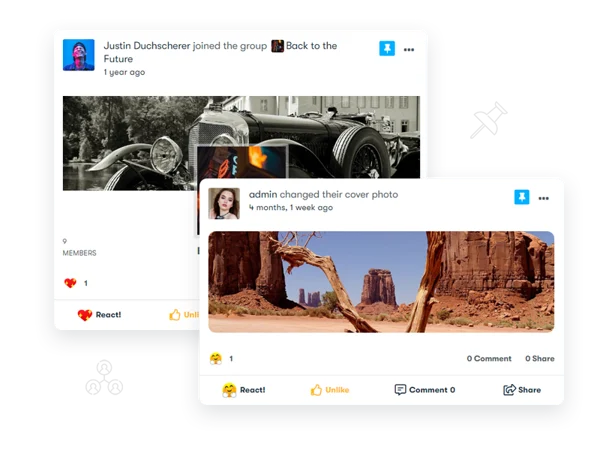
2. Automatic bumping to the top. A pinned item stays at the top of the stream regardless of when it was originally posted or how much new activity has since piled up beneath it.
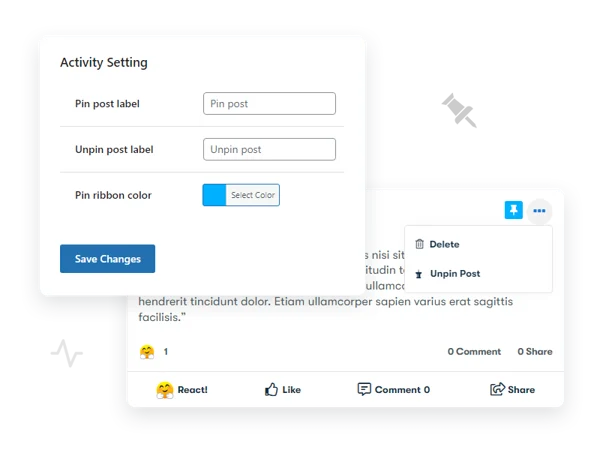
3. Customizable pin label. The text used for the pin/unpin action can be changed to match your community’s voice, some sites keep it simple (“Pinned”), others get more specific (“Admin Notice,” “Important”).
4. Customizable ribbon color. The visual marker that flags a post as pinned can be recolored to match your site’s branding rather than sitting there as an obviously default, unstyled element. Pick a color with enough contrast against your theme’s background that it actually reads as a flag rather than blending in, a pale ribbon on a pale theme defeats the entire purpose of a visual marker.
5. Group-level pinning. Group admins and moderators can pin activities within their own group, independent of site-wide pins. A group organizing an event can keep the event details pinned at the top of that group’s feed without needing site-wide admin involvement.
6. Backend settings for pin behavior. Admins configure the label and ribbon color from the standard WordPress backend, without touching any code.
7. Unpinning at any time. Nothing stays stuck. An admin or group moderator can remove a pin the moment it’s no longer relevant, restoring the post to its natural position in the chronological order.
Setting it up and picking your first pins
Install and activate like any WordPress plugin, then set your label and ribbon color under the plugin’s settings before pinning anything, visitors seeing a pinned post with an unstyled default ribbon read it as unfinished, even if the functionality works fine. A few minutes on the visual settings makes the feature look intentional rather than bolted on.
Then be deliberate about what earns a pin. Good candidates: community guidelines, a welcome message for new members, a time-sensitive announcement, an event that’s coming up. Bad candidates: general updates that would be fine sitting in normal chronological order, or anything you’re pinning because you personally think it’s interesting rather than because the community needs guaranteed visibility on it.
Write the pinned content itself differently than a normal post, too. A status update that’s fine as a fleeting piece of chronological content often reads oddly when it’s sitting at the top of the feed for weeks, “excited to announce” language ages badly under sustained visibility. Pinned copy should read more like a durable notice: clear, dated if relevant, written to make sense to someone reading it on day one and someone reading it on day thirty with equal clarity.
The discipline problem: why pins fail over time
The single biggest failure mode for this feature isn’t technical. It’s behavioral. Pins start meaningful, one critical announcement, clearly flagged, genuinely worth the guaranteed placement. Then a second pin gets added for something slightly less critical. Then a third. Within a few months, some communities end up with five or six “pinned” items competing for the same top-of-feed real estate that was supposed to be reserved for the truly important thing.
At that point the feature has quietly failed, even though nothing is technically broken. Members stop reading pinned posts carefully because there are too many of them and they’ve started blending into normal content. The fix isn’t a plugin setting, it’s admin discipline. Set an internal rule for your team: a maximum of two or three site-wide pins at any time, and a habit of actually unpinning things once they’re no longer relevant instead of letting them accumulate indefinitely.
This is the same failure pattern that shows up with browser notifications, badge counts, and every other attention-grabbing UI element ever invented. Scarcity is what gives a signal meaning. The first pin any member sees genuinely stands out. The sixth one blurs into wallpaper.
Site-wide pins versus group-level pins
These operate independently, and understanding that distinction matters for how you delegate the feature. Site-wide pinning should probably stay restricted to site admins, it’s a broadcast to your entire community, and giving that power to every group moderator invites exactly the pin-proliferation problem described above. Group-level pinning is a different story: letting a group’s own moderators pin content within their group is low-risk, since the blast radius is contained to members who already opted into that specific group.
A large multi-group community with hundreds of active groups genuinely benefits from group-level pinning being widely available, since a group organizing a regular meetup or discussion thread needs the ability to keep that context visible without escalating every pin request to site admin.
Think about the two failure modes on opposite ends of this spectrum. Give pinning power to nobody but a single site admin, and every group loses the ability to surface its own important context without filing a request and waiting. Give it to every member, and the entire concept collapses, a feed where everyone can pin their own content isn’t pinned content anymore, it’s just a second, competing chronological feed layered on top of the first. Group-moderator-level access sits in the sensible middle: enough autonomy for groups to manage their own visibility needs, without opening the door to the free-for-all outcome.
Three scenarios where sticky posts earn their place
Onboarding a steady stream of new members. A pinned “start here” post with links to community guidelines, how to complete a profile, and how to find relevant groups gives every new member the same starting point, regardless of when they joined or how deep the activity feed has scrolled since.
Running a time-boxed campaign or event. A conference, a fundraiser, a seasonal challenge, anything with a start and end date benefits from a pinned post that stays visible for the campaign’s duration and then gets unpinned the moment it’s over. This is the cleanest use case, because the pin has a natural expiration built into the scenario itself.
Crisis or urgent communication. A site outage, a policy violation being addressed publicly, a security notice, situations where you genuinely need every active member to see one specific message regardless of when they log in. This is the rare case where pinning multiple things temporarily is justified, since the situation itself is temporary.
How this compares to sticky posts in blogging platforms
The concept borrows directly from blog CMS conventions, WordPress itself has had “sticky posts” for the blog for as long as most people can remember, keeping a featured article at the top of a homepage regardless of publish date. The activity-stream version does the same job in a fundamentally different context. A blog homepage is browsed occasionally, by visitors expecting a curated front page. An activity feed is checked constantly, often multiple times a day, by members expecting a live, moving conversation. A pin in that second context needs to earn its place far more aggressively than a featured blog post does, because the audience is looking at the exact same screen repeatedly and will notice clutter far faster than an occasional blog visitor would.
Measuring whether a pin actually worked
The simplest gut check: did engagement on the pinned item, comments, reactions, click-throughs on any linked content, noticeably exceed what a normal post from the same author would typically generate. If a pinned welcome message gets roughly the same engagement a regular post would have gotten anyway, the pin isn’t adding visibility, it’s just occupying space. That’s a signal to either rewrite the content to be more actionable, or reconsider whether it needed to be pinned in the first place.
For time-boxed pins tied to events or campaigns, the more useful metric is whether the relevant action, RSVP clicks, sign-ups, whatever the pin was driving toward, tracked meaningfully higher during the pin period than a comparable unpinned announcement would have generated. If your community platform or an integrated form tool gives you that data, it’s worth checking after a campaign wraps, both to justify the feature and to calibrate how you use it next time.
Don’t over-engineer this measurement step, though. Most communities running this plugin are small or mid-sized, and formal A/B comparisons between pinned and unpinned posts usually aren’t worth the setup effort. A rough before-and-after read of engagement numbers, checked casually, is enough to tell you whether the feature is pulling its weight.
Handling disagreement about what deserves a pin
On communities with more than one admin or a team of moderators, disagreement about pin priority is common and worth planning for before it becomes a recurring friction point. A simple written policy, who has final say on site-wide pins, how many can be active at once, a rough guideline for what qualifies, heads off the slow pin-creep described earlier, where each admin adds “just one more” pin for something they personally think is important. Put the discipline in writing once, rather than relitigating it every time someone wants to pin something new.
Frequently asked questions
Does a pinned post get pushed further down as more pins get added, or do all pins stay at the very top? Multiple pins typically stack at the top in some defined order, check your settings for whether that’s pin date or a manual priority order, since this affects which pinned item members see first if you’re running more than one at a time.
Can a regular member pin their own activity update? No. Pinning is an admin or moderator capability, not something available to a standard member account, that restriction is what keeps the feature meaningful rather than turning into a free-for-all where everyone tries to pin their own content.
Does pinning affect notification behavior, does everyone get notified when something is pinned? Pinning changes display position, not notification logic. A post that was already published and seen by some members doesn’t retroactively re-notify everyone just because it gets pinned afterward.
What happens to a pinned post’s position if a member comments on it? New comments on a pinned post don’t unpin it or change its position, comment activity and pin status are handled independently.
Can I schedule a pin to automatically expire on a certain date? Check your specific version’s settings for scheduled unpinning. If that’s not available, treat unpinning as a manual task and set yourself a reminder for campaign or event end dates, since a stale pin left up past its relevance is one of the more common ways this feature degrades over time.
Will a pinned post look different on mobile than on desktop? The ribbon and pin styling should render consistently across both, but always check on an actual phone screen after customizing the ribbon color and label, a color choice that reads clearly on a wide desktop layout can look cramped or low-contrast squeezed into a narrower mobile activity card.
Does pinning work the same way inside a group’s activity feed as it does site-wide? The mechanics are the same, bump to top, ribbon display, unpin at will, but the scope is contained to that group’s feed rather than the whole site, and the permission to do it typically sits with that group’s own moderators rather than site admins.
If I deactivate the plugin, do previously pinned posts stay pinned? No, deactivating removes the plugin’s display logic, so previously pinned activities revert to their natural chronological position. The underlying activity content itself isn’t deleted, only the pinned display behavior stops.
What this doesn’t replace
Sticky posts are not a substitute for a proper announcements page, a dedicated resources section, or an actual onboarding flow. They’re a visibility mechanism for the activity feed specifically, useful precisely because the activity feed is where members’ attention naturally lands, but not a place to dump everything a new member needs to know. If your onboarding requires five separate pieces of information, one well-organized pinned post linking out to a proper resource page beats five competing pins fighting for the same slot. The pin is the pointer. The actual depth belongs somewhere with more room to breathe than an activity card.

BuddyPress Sticky Post solves one narrow, real problem: important things drowning in a feed that treats everything equally. It does that job well, on the condition that whoever’s holding the pin button treats it as scarce. The moment pinning becomes routine instead of exceptional, the feature stops working, not because the code broke, but because the whole point of a pin is that it’s rare enough to notice.
Pin sparingly. Unpin promptly. That’s the entire discipline the feature requires, and it’s worth more than any setting in the plugin itself.
Every feature that grants special visibility runs the same risk over time, it starts precise and gets diluted the moment it’s easy to reach for. A ribbon and a top-of-feed slot cost nothing technically to add. The scarcity that makes them mean something has to come from the humans deciding when to use them, not from the plugin.
Set the rule now, before the first pin goes up, and revisit it every few months. It’s a five-minute conversation that saves the feature from quietly becoming background noise a year from now.














