Trust Levels Explained: How to Auto-Promote Active Members in Your Forum
Trust levels are the permission system that makes forums self-moderating. New users start with limited abilities and automatically earn more as they contribute. Here is how to configure the thresholds for your community.

Every community faces the same tension: you want new members to participate freely, but you also want to protect the community from spam, abuse, and low-quality content. Most forums resolve this by either requiring admin approval for every post (too restrictive) or letting everyone do everything (too permissive).
Trust levels offer a third path: graduated permissions that new members earn through genuine participation. The system is automatic, transparent, and meritocratic. Members see exactly what abilities they have, what abilities they can unlock, and what they need to do to get there.
The Five Trust Levels
Jetonomy implements a 0–5 trust level system inspired by Discourse’s approach but tailored for WordPress communities:
Level 0: New
Who: Just registered, no track record.
Abilities: Read all public content. Post topics and replies with rate limits (3 topics/day, 10 replies/day). No links, images, or private messages.
Purpose: Allow participation while preventing spam.
Level 1: Basic
Who: A few posts, been active for ~1 week.
Abilities: Upload images. Send private messages. Post links (up to 2 per post). No rate limits on posting.
Purpose: Reward initial participation with standard member abilities.
Level 2: Member
Who: ~20 posts, has received upvotes, active for ~1 month.
Abilities: Edit own posts. Flag content for moderator review. Create tags. Access to the full emoji picker.
Purpose: Trusted members help maintain community quality.
Level 3: Regular
Who: Sustained quality contributions over several months.
Abilities: Close duplicate topics. Recategorize and move topics. Edit other members’ posts (wiki-style). Mark answers as accepted on any question.
Purpose: Community leaders who actively curate content.
Level 4: Leader (Manual)
Who: Manually granted by admins.
Abilities: Full moderation within assigned spaces. Pin/unpin topics. Silence users temporarily.
Purpose: Trusted moderators who manage specific community areas.
Level 5: Elder (Manual)
Who: Manually granted by admins.
Abilities: Site-wide moderation. Ban users. Access moderation dashboard.
Purpose: Senior community leaders with full moderation authority.
How Auto-Promotion Works
Levels 0 through 3 are automatic. Jetonomy evaluates each member’s activity against configurable thresholds and promotes them when they qualify. The evaluation considers:
Criteria | Level 1 | Level 2 | Level 3 |
|---|---|---|---|
Days active | 7+ | 30+ | 90+ |
Topics created | 1+ | 5+ | 15+ |
Replies posted | 3+ | 15+ | 50+ |
Upvotes received | , | 5+ | 25+ |
Flags received | 0 | Under 3 | Under 2 |
These are the default thresholds. You can adjust them in Jetonomy → Settings → Trust Levels.
Promotion Is Not Demotion
Once a member earns a trust level, they keep it permanently. They are never demoted for low activity. If someone earns Level 3 and then takes a six-month break, they return at Level 3. Trust is earned, not rented.
The exception is flags: if a Level 2 member accumulates multiple content flags (indicating problematic behavior), their promotion to Level 3 is blocked until the flags are resolved. But they are not demoted below Level 2.
Configuring Thresholds for Your Community
The default thresholds work well for most communities, but you may want to adjust them based on your community’s size and activity level:
Small Community (Under 100 Members)
Lower the thresholds so members can progress faster. In a small community, 50 replies might take months. Consider 3 replies for Level 1 and 10 for Level 2.
Large, Active Community (500+ Members)
Keep default thresholds or raise them slightly. Larger communities generate more activity, so the progression feels natural without adjustment.
High-Security Community (Financial, Medical)
Raise thresholds significantly and add manual review gates. Require admin approval for Level 2+ promotions. The additional friction is worth the safety in high-stakes communities.
Trust Levels and Spam Prevention
Trust levels are your most effective spam defense. Instead of adding CAPTCHAs that annoy everyone, trust levels structurally limit what unproven accounts can do. For the detailed spam prevention strategy, see our guide on stopping spam without CAPTCHAs.
Trust Levels and Moderation
Trust levels create a distributed moderation system. Instead of relying on a small team of admins to moderate everything, you have:
- Level 2 members who flag problematic content
- Level 3 members who close duplicates and recategorize topics
- Level 4–5 members who handle full moderation in their areas
This scales naturally. As your community grows, the number of trusted moderators grows with it. For the complete moderation strategy, see our auto-moderation guide.
Trust Levels and Reputation
Trust levels work alongside the reputation system. Reputation points quantify contribution volume and quality. Trust levels gate abilities based on proven reliability. A member can have high reputation (lots of upvoted answers) but moderate trust level (relatively new account). Both signals are visible and both matter.
Making Trust Levels Visible
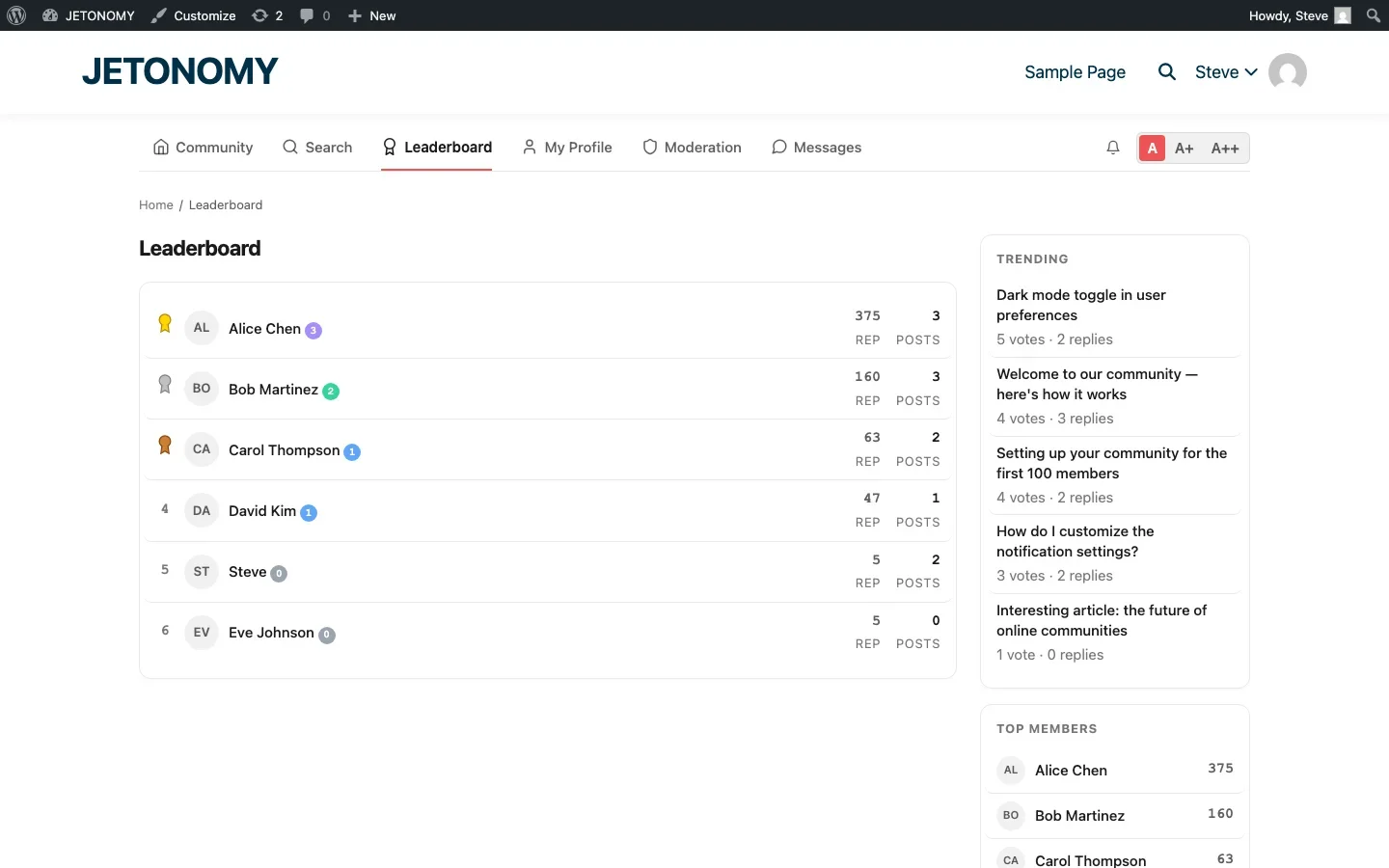
Trust levels only motivate behavior if members can see them. Jetonomy displays trust level badges:
- Next to the member’s name on every post and reply
- On hover cards when you hover over an avatar
- On member profiles (BuddyPress integration)
- On the leaderboard
New members see Level 2 and Level 3 badges on experienced contributors and think: “I want that.” The visible progression creates aspiration.
Getting Started
- Install Jetonomy (setup guide), trust levels are included in the free version
- Review default thresholds in Settings → Trust Levels
- Adjust for your community size (lower for small communities, higher for large ones)
- Do not change Level 0 restrictions unless you have a specific reason (they are your spam defense)
- Communicate the system to your community, post an FAQ topic explaining what trust levels are and how to progress
Trust levels are the invisible infrastructure that makes communities self-moderating. Members never think about them until they earn their next level, and then they feel a genuine sense of achievement. That is exactly how it should work.
Moderation layers worth planning before the community grows
Trust Levels Explained: How to Auto-Promote Active Members in Your Forum fits into the broader forums category through trust systems, moderation controls, and abuse prevention. That matters because the technical setup is only one part of success. The way you structure spaces, roles, onboarding, and follow-up is what determines whether the forum becomes a searchable asset or just another neglected section of the site.
- Use progressive permissions so new members can participate without immediately gaining the ability to flood spaces, mass-mention users, or post risky links.
- Document moderator actions such as warnings, post hiding, suspensions, and appeal handling so your team applies rules consistently.
- Combine rate limits, keyword filters, and role-based visibility rules to reduce spam pressure without making legitimate members fight the interface.
Why teams evaluating this setup should look at Jetonomy Pro
Jetonomy Pro is especially relevant when moderation matters, because it gives you trust-level controls, space moderators, gated participation, and practical community-management features without handing broad WordPress admin access to every helper. If you want to know more and try Jetonomy, take a closer look at Jetonomy Pro. It is the most direct next step for teams that want to move from theory to an actual working WordPress community experience.
For articles like this one, the practical question is not only whether the approach works in theory. It is whether your chosen forum stack gives you the moderation depth, user experience, and extensibility to keep the system useful six months after launch. That is where a more complete product decision starts to matter.













