Do you want to give your BuddyPress members the ability to add status and moods to activities, just like Facebook?
The major role of social media accounts is letting users build an online presence so they can share their interests, beliefs, and opinions with the world. These days, most social platforms also let people attach a status or mood to whatever they post. In this article, we’ll show you how to add status and moods to your BuddyPress website.
Pros Of Posting Status Updates And Moods On Social Media
A social network like Facebook lets members post their thoughts as status updates, update pictures, add moods to certain updates, and share anything else they want their friends to see.
These posts, likes, and moods appear in the activity feed and stay visible to their friends. A few benefits of posting status updates and moods on a social network:
1. Status updates reach a lot of people at the same time.
2. Letting members post status updates and moods improves engagement, since they tend to spend more time in the community.
3. It offers a richer social experience than emails and private messages.
4. Adding moods makes your community more fun, interactive, and engaging.
Out of the Box Website Design Ideas to Boost Conversion
Adding Status Updates To A BuddyPress Community
By default, BuddyPress lets members post updates to their profile, which then appear in the activity stream for their friends in the community. But it doesn’t let members set a status or attach moods and smileys beside their username.
To add that, install and activate the BuddyPress Status plugin. It’s a dedicated BuddyPress add-on that lets community members update their status and post emoji that appear beside their username on their profile. To install it, see this guide: how to install BuddyPress Status.
Once the plugin is installed, configure its settings. You’ll find two main sections:
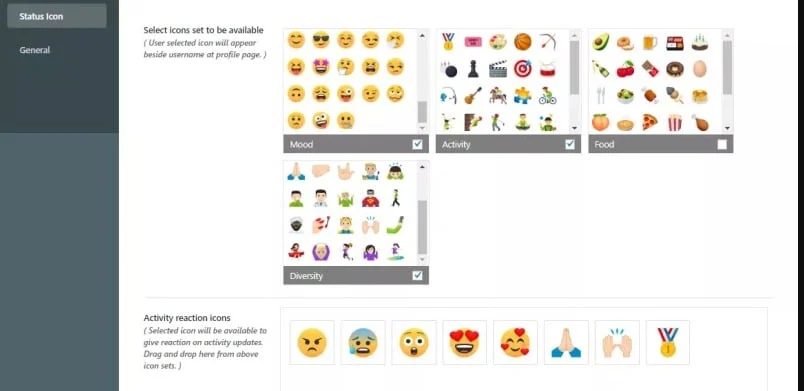
Status icons: lets an admin choose which emoji members can pick from on the front end.
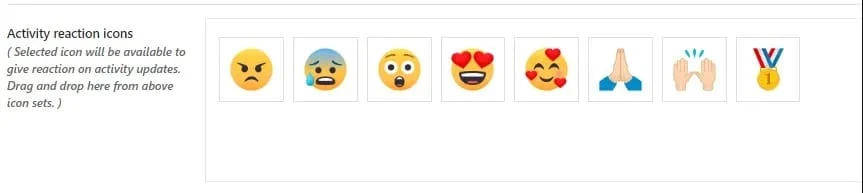
Activity Reaction Icons: lets you set which reaction icons members can use on activity updates.
General Settings: lets an admin disable status icons for specific components, including:
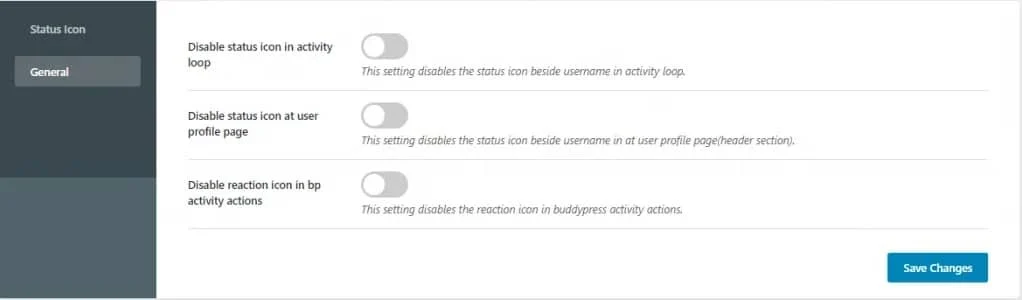
- Disable status icon in the activity loop
- Disable status icon on the user profile page
- Disable reaction icon in BuddyPress activity actions
Front-end Options:
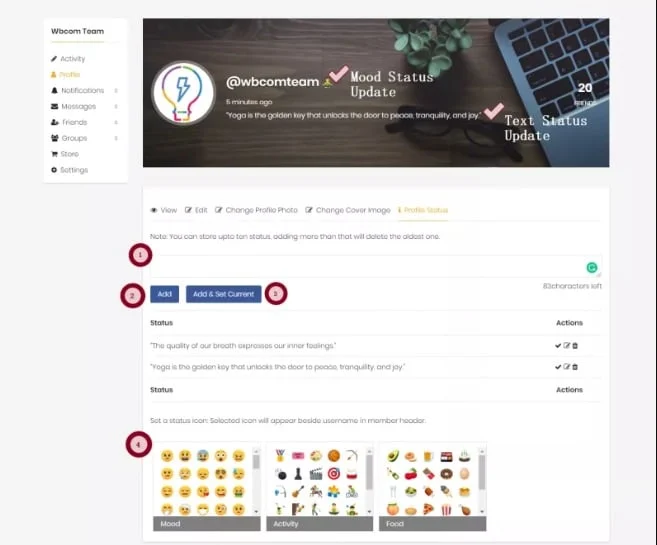
Members can update their status from their profile page, where a status tab lets them do so.
Write the status in the text box and click Add to save it for later. You can store up to ten statuses, and adding an eleventh deletes the oldest one.
Click Add and Set Current to update the status instantly.
Set a status icon and it appears beside the username in the member header.
See the plugin live in action:
We hope you found this article on BuddyPress Status and Reactions useful. If you have any suggestions, let us know in the comments below.
Interesting Read: How To Use Hashtags On Your BuddyPress Website?
















