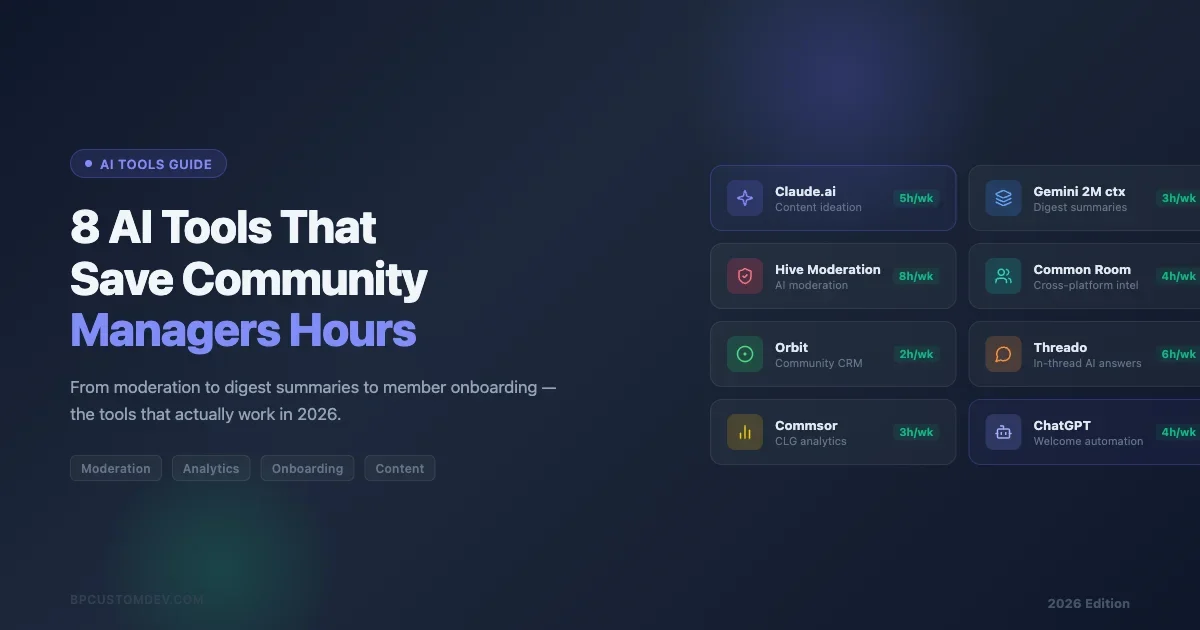
Community managers spend a surprising chunk of their week on tasks that never touch a single member: writing summaries, triaging spam, drafting welcome messages, tagging forum threads, and chasing metrics that live in three different dashboards. AI tools have started to chip away at that pile. Not in a “replace the community manager” way, but in a “free up two hours on Tuesday” way. This post covers eight tools that working community managers are actually using in 2026 to reclaim time without losing the human texture that makes communities worth joining.
Why the Shift to AI in Community Work Is Happening Now
The timing is not accidental. Community platforms matured fast between 2022 and 2025. Circle, Discord, Slack, Mighty Networks, Discourse, BuddyPress, and Skool each added thousands of new communities. The people running those communities did not scale at the same rate. A solo community manager handling 5,000 members cannot do the same manual work that worked with 500. AI is the practical response to that gap.
There is also a tooling maturity question. First-generation community AI features (2022-2023) were mostly keyword filters and spam detectors. Useful, but narrow. The 2025-2026 generation understands context better. It can read a thread, identify the emotional tone, suggest whether something needs moderation or just encouragement, and draft a reply that sounds like the brand rather than a chatbot. That shift in quality is what is pulling more community managers toward these tools.
None of these tools are set-and-forget. Every one of them needs a human to review outputs, catch edge cases, and make judgment calls. Think of them as fast, tireless assistants who are confident but not always right. The communities where AI tooling works best are the ones where the community manager has clear processes and good judgment to begin with. The tools amplify what is already there. They do not compensate for a lack of strategic clarity or poor community design. If the onboarding experience is broken, no AI tool fixes that. If the moderation policy is unclear, automated flagging just creates confusion. Get the fundamentals right first, then layer in AI to handle volume.
What “Actually Saves Time” Means in Practice
Before the list, a quick note on how to evaluate any AI tool for community work. The test is not whether the tool can do something. Most can. The test is whether the output quality is high enough that you spend less time fixing AI mistakes than you would have spent doing the task yourself.
For moderation decisions: does the AI flag the right posts often enough that your queue is shorter, not longer? For content generation: is the first draft 70% usable, or does it need a full rewrite? For analytics: does the summary surface insights you would have missed, or does it state the obvious in more words? Keep that bar in mind as you evaluate each tool below.
The honest answer for most community managers in 2026 is that two or three of the eight tools below will generate real time savings for their specific workflow. The others may be useful eventually or for different community types. Do not try to adopt all eight at once. Adoption fatigue is real, and every new tool requires setup time, a learning curve, and ongoing maintenance. A tool you half-implement and forget is not saving you anything.
1. Claude (Anthropic) for Long-Form Community Work
Claude handles the tasks that require sustained context. Summarizing a week of forum threads. Writing a member spotlight from a raw interview transcript. Drafting a conflict-resolution message that acknowledges both sides. Turning a pile of member feedback into a structured feature request brief.
What sets Claude apart for community work is the long context window. You can paste an entire month of Discourse threads and ask for a thematic summary. You can feed it your community guidelines and a flagged post, then ask whether the post violates them and why. The answers are usually precise enough to act on without extensive editing.
The practical workflow most community managers use: keep a Claude conversation open during their morning review. Paste anything that needs more than a quick read, get a summary or draft, edit lightly, move on. Estimated time saving: 30-45 minutes per day on writing and synthesis tasks.
Where It Falls Short
Claude does not have live access to your community platform. You are always copy-pasting content in, which creates friction. There is no native integration with Circle, Discourse, or BuddyPress. For high-volume communities, that paste-review-edit loop gets tedious at scale. It works best for thoughtful, one-off tasks rather than bulk processing. If you need AI that connects directly to your platform data, look at the purpose-built tools further down this list.
2. Hive Moderation for Automated Content Filtering
Hive Moderation is a dedicated trust-and-safety API that uses computer vision and text classification to flag harmful content. It is not a general AI assistant. It is purpose-built for one job: decide whether content should stay, be reviewed, or come down, and do it fast.
Community managers using Hive typically integrate it with their platform’s webhook system. A member posts something. The post goes to Hive. Hive returns a confidence score across categories: hate speech, adult content, spam, violence. If the score is above your threshold, it gets queued for human review or removed automatically. If below, it publishes normally.
The accuracy rates on text classification are high enough that most communities running it see a 60-80% reduction in manual moderation queue volume. The remaining queue is the genuinely ambiguous content that needs human judgment. That is the trade you want.
Platform Compatibility
Hive works via API, so it can connect to any platform with webhooks or a developer layer. BuddyPress and Discourse communities running on their own infrastructure can integrate directly. Hosted platforms like Circle and Mighty Networks require custom middleware unless they build the integration natively. Check your platform’s developer docs before committing. If you are running a private community on self-hosted infrastructure, Hive is one of the cleanest trust-and-safety layers to add without disrupting existing workflows.
3. Common Room for Member Intelligence
Common Room aggregates member activity across platforms and uses AI to surface what is actually happening in your community. It pulls from Slack, Discord, GitHub, Twitter/X, LinkedIn, and community forums, then builds unified member profiles and surfaces signals: who is becoming more active, who is churning, which topics are heating up, which members are influencing others.
The time savings are on the analytics side. Instead of pulling reports from four different dashboards and spending two hours building a picture of community health, you get a summary. Common Room’s AI layer highlights the signals that need attention this week rather than burying them in raw data.
For communities with a community-led growth model, Common Room is particularly strong. It can flag when a high-value member has gone quiet or when a thread is generating the kind of engagement worth amplifying. Understanding which members drive outsized value is especially important when diagnosing why your community growth has plateaued after an initial burst of activity.
Pricing Reality
Common Room is enterprise-priced. The free tier is limited. Mid-size communities under 10,000 members may find it difficult to justify. Orbit.love is a lighter alternative that covers similar ground at lower cost, though the AI features are less developed. For very small communities, even Orbit may be more than you need, a well-structured spreadsheet updated weekly can serve the same function until you hit a scale where automation is genuinely worth the setup cost.
4. Threado for Automated Member Onboarding
Threado automates the first week of a member’s journey. You define the sequence: welcome message, resource links, introduction prompt, first check-in. Threado handles the sending and tracks whether members are engaging. Its AI layer personalizes the sequence based on what the member mentions in their introduction or what tags they selected when joining.
The onboarding problem is a consistent pain point across nearly every community platform. Members who do not engage in the first week are far less likely to become regulars. But sending manual welcome messages to every new member does not scale. Threado sits in the middle: automated enough to be sustainable, personalized enough to not feel like a newsletter. This matters especially when you are building a customer support community where first-week activation directly affects whether members ever return to help each other.
The Personalization Claims
To be honest about the personalization: it works best when you have structured onboarding data. If members fill out a detailed intake form or select specific interest tags, Threado can route them differently and the personalization is noticeable. If your onboarding is light (just an email address), the “personalization” is closer to basic segmentation. Set expectations accordingly when evaluating it against manual alternatives.
5. Orbit for Community Member Scoring
Orbit uses an “orbit model” framework to score member engagement and categorize members into tiers based on activity level, contribution quality, and recency. The AI layer identifies who is at risk of churning, who is ready to become a moderator or advocate, and which threads are generating the highest-value interactions.
The practical use case for most community managers is prioritization. You cannot give equal attention to all members. Orbit’s scoring helps you identify the 5% of members who are driving a disproportionate amount of value and make sure they are being nurtured. It also surfaces the members who were active six weeks ago and have gone quiet, which is your signal to reach out before you lose them entirely.
Integration Depth
Orbit integrates natively with Discord, Slack, GitHub, and several community platforms. For BuddyPress and self-hosted communities, you typically push data via the API. The setup is not trivial. Budget a few hours to connect all your data sources and calibrate the scoring model for your community’s behavior patterns before expecting accurate signals. Do not evaluate Orbit after one week of data. The scoring model needs at least 30 days of activity to produce useful tier distinctions.
6. ChatGPT for Daily Writing Tasks
ChatGPT (particularly the GPT-4o model with memory and custom instructions) is the general-purpose daily driver that most community managers default to. It handles the volume of small writing tasks that accumulate throughout the week: drafting replies to member questions, writing newsletter blurbs, generating FAQ answers, summarizing support threads, brainstorming event topics.
The key to making ChatGPT useful for community work is the system prompt and custom instructions. Feed it your community’s voice guidelines, your platform name, your typical member personas, and examples of your best-performing posts. The output quality jumps significantly when it has that context to work from. Without that setup, the output tends toward generic and requires more editing than it saves.
The Volume Play
ChatGPT is most cost-effective when you have high-volume, lower-stakes writing needs. If you are running a community that generates 50+ new threads per week and you need to respond to a meaningful fraction of them, ChatGPT with good templates can cut your response time by 50-60%. The output is not always polished, but it is usually a solid first draft.
One underused application: using ChatGPT to draft knowledge base articles for a self-service community. Give it a sample of your most common member questions, your product documentation, and your community voice guide. It can generate a first draft of a FAQ article in minutes. For teams building out a support community, this is one of the fastest ways to populate the knowledge base without hiring a dedicated content writer for the first 50 articles.
7. Commsor for Community Revenue Attribution
Commsor answers a question that community managers have historically struggled to answer for their leadership teams: what revenue is the community generating? It connects community activity data to CRM and sales data, then uses its analysis layer to attribute deals, renewals, and expansions to community touchpoints.
This is not directly a time-saving tool in the way the others are. It is a time-saving tool for a specific, high-stakes task: making the case for community investment. Community managers who can show that members who engage with the community have 40% higher retention rates, or that community-sourced leads close at twice the rate of outbound, have much shorter budget conversations with leadership.
Who Needs This
Commsor is most relevant for B2B SaaS companies running customer communities, developer relations teams, and agencies managing client communities where business outcomes are the primary success metric. Consumer communities, fan communities, and hobby communities generally do not have the CRM data to make Commsor useful. If you are not tracking revenue or pipeline at all, get that infrastructure in place before evaluating Commsor.
8. Gemini for Research and Competitor Analysis
Google Gemini (particularly with the Deep Research feature) handles the research tasks that used to take community managers two to three hours. Understanding what topics are trending in your niche, finding case studies from similar communities, analyzing how competitor communities are positioning their member value proposition, summarizing academic or industry research on community dynamics.
The Deep Research mode runs dozens of searches, synthesizes the results, and delivers a structured report with citations. For a community manager preparing a strategy document, a member survey analysis, or a response to leadership questions about the community’s positioning, this capability compresses hours into minutes without requiring you to become an expert researcher yourself.
Limitations to Know
Gemini’s Deep Research is strong on publicly available information. It cannot access your private community data, your member analytics, or anything behind authentication. It is a research tool, not an internal analytics tool. Pair it with Orbit or Common Room for the internal picture, and Gemini for the external context. Used together, they cover the full picture: what is happening inside your community and what is happening in the broader landscape your community operates in.
How to Decide Which Tools to Start With
You do not need all eight. The right starting point depends on where your time is actually going. Most community managers can identify their biggest weekly time sink in about five minutes of honest reflection. That is where you start.
- Biggest time sink is moderation: Start with Hive. Clearest ROI for high-volume content environments.
- Biggest time sink is analytics and reporting: Common Room or Orbit depending on budget. Common Room for cross-platform intelligence, Orbit for lighter integration.
- Biggest time sink is writing: Claude for long-form synthesis and nuanced tone, ChatGPT for high-volume shorter content with templates.
- Biggest challenge is onboarding: Threado. Best impact-per-hour-of-setup in community tooling.
- Need to prove ROI to leadership: Commsor. Shorter budget conversations are worth a lot of calendar time.
What These Tools Do Not Replace
None of these tools replace the core judgment work of community management. Which conflict is serious enough to intervene on versus letting members work out themselves. Whether a member’s frustration is about your platform or something happening in their life. Which strategic decisions will shape your community’s culture five years from now. What your best members actually need from you this quarter.
AI tools are pattern-matchers working on what is legible and quantifiable. Community management is substantially about what is not yet legible: the trust that builds slowly, the culture that forms through hundreds of small interactions, the members who are on the edge of leaving before any metric reflects it. That layer stays human.
The practical frame: use AI to handle the work that is high-volume, low-judgment, and pattern-based. Protect your time for the work that requires context, relationships, and discretion. The split that works for most community managers is roughly 60/40: AI handles the volume, humans handle the complexity.
Integrating AI Tools With Your Existing Platform
One challenge that does not get enough attention is the integration layer. These tools work best when they are connected to your actual community data in near real-time. For platforms with strong developer access (Discourse, BuddyPress, Discord, Slack), building those connections is feasible. For more closed platforms (some versions of Mighty Networks, some Circle configurations), you may be limited to manual data exports.
Before committing to any tool in this list, map out your data flow: where does member activity data live, can you get it out programmatically, and can the AI tool ingest it in a format that makes the analysis meaningful. A tool that requires manual CSV exports every week to function is a tool you will stop using by month three. Integration friction kills adoption faster than price does.
If the community runs on WordPress and moderation is the priority, BuddyNext is a free, standalone community platform worth a look, an activity feed, member profiles, Spaces (groups), and deep moderation in one plugin, built as its own modern architecture rather than on top of BuddyPress (so it isn’t a BuddyPress add-on and existing BuddyPress plugins won’t run on it). Because it runs on your own site you keep full ownership of member data, and its Pro tier adds native Stripe memberships when you’re ready to monetize.
Cost Realism for Independent Community Managers
The full stack of tools in this list would cost several thousand dollars per month at list prices. That is enterprise territory. Most independent community managers or small teams will pick two or three tools, not all eight.
The sensible starting stack for a solo community manager or small team:
- Claude or ChatGPT Plus ($20/month each) for writing and synthesis
- Hive Moderation if content volume justifies it (pricing varies by volume)
- Orbit free tier if you are under their member threshold
That is a $40-60/month investment that covers the most common time sinks. Add tools as specific needs become clear and budget allows.
Measuring ROI on AI Tools for Community Work
Before committing budget to any of these tools, it is worth building a simple ROI frame. Community managers often struggle to quantify their own time, which makes it hard to justify tool spend. Here is a practical method.
Start by tracking your time for one week across five categories: moderation (reviewing and acting on flagged content), analytics and reporting (pulling data, building dashboards, writing summaries), member communications (welcome messages, replies, announcements), content creation (newsletters, event promotions, FAQs), and administrative coordination (scheduling, tagging, filing). Most community managers find that two or three of these categories absorb 60-70% of their non-strategic time.
Then estimate how much of each category could be handled with AI assistance at acceptable quality. A realistic rule of thumb: AI can handle 50-70% of moderation triage, 60-80% of routine member communications, and 40-60% of content drafting. Multiply those percentages by your hourly cost and the hours per week you spend on each task. That gives you a monthly value floor for AI tooling.
If the math shows you could reclaim 6 hours per week at a fully-loaded cost of $80/hour, that is $1,920 per month in time value. A tool that costs $200/month and actually delivers 4 of those hours has a clear positive ROI. Track actual time savings after 30 days. Most community managers find the tools that stick are the ones where the time saving is obvious within the first two weeks.
The Honest Verdict on AI in Community Management
AI tools are genuinely useful for community managers in 2026 in ways they were not in 2023. The quality has improved enough to pass the “is this faster than doing it myself” test for a meaningful range of tasks. The integration ecosystem has matured. The cost has come down.
The tools that work best share a common trait: they handle volume tasks where pattern recognition is the core skill. Identifying spam follows patterns. Writing a first draft of a welcome message follows patterns. Summarizing a week of threads follows patterns. These are exactly the tasks where AI is fast and cheap enough to generate positive ROI without requiring you to rebuild your entire workflow around it.
The tasks where AI is not yet reliable are the judgment-heavy ones. Reading the emotional temperature of a conflict before it escalates. Deciding whether to let a controversial thread run or step in. Knowing which member to personally reach out to this week based on context you have accumulated over months. These are pattern-resistant tasks and they are the core of what makes a community manager valuable. AI will not replace that work in 2026.
A community is a group of people who choose to spend time together around something they care about. That choice is renewed constantly. AI can help you show up more consistently, respond faster, and use your time more strategically. It cannot give people a reason to care about your community. That part is still entirely yours.
Pick the tools that address your specific bottlenecks. Test them honestly against the “am I spending less time on this or more” standard. Keep the ones that pass. And keep investing in the human work that no tool is close to replacing.