Cost to Build a Community Platform in 2026
What it costs to build a community website in 2026: hosted platform prices checked 21 Nov 2026, WordPress and BuddyNext costs, developer time, hidden fees and a three-year comparison.

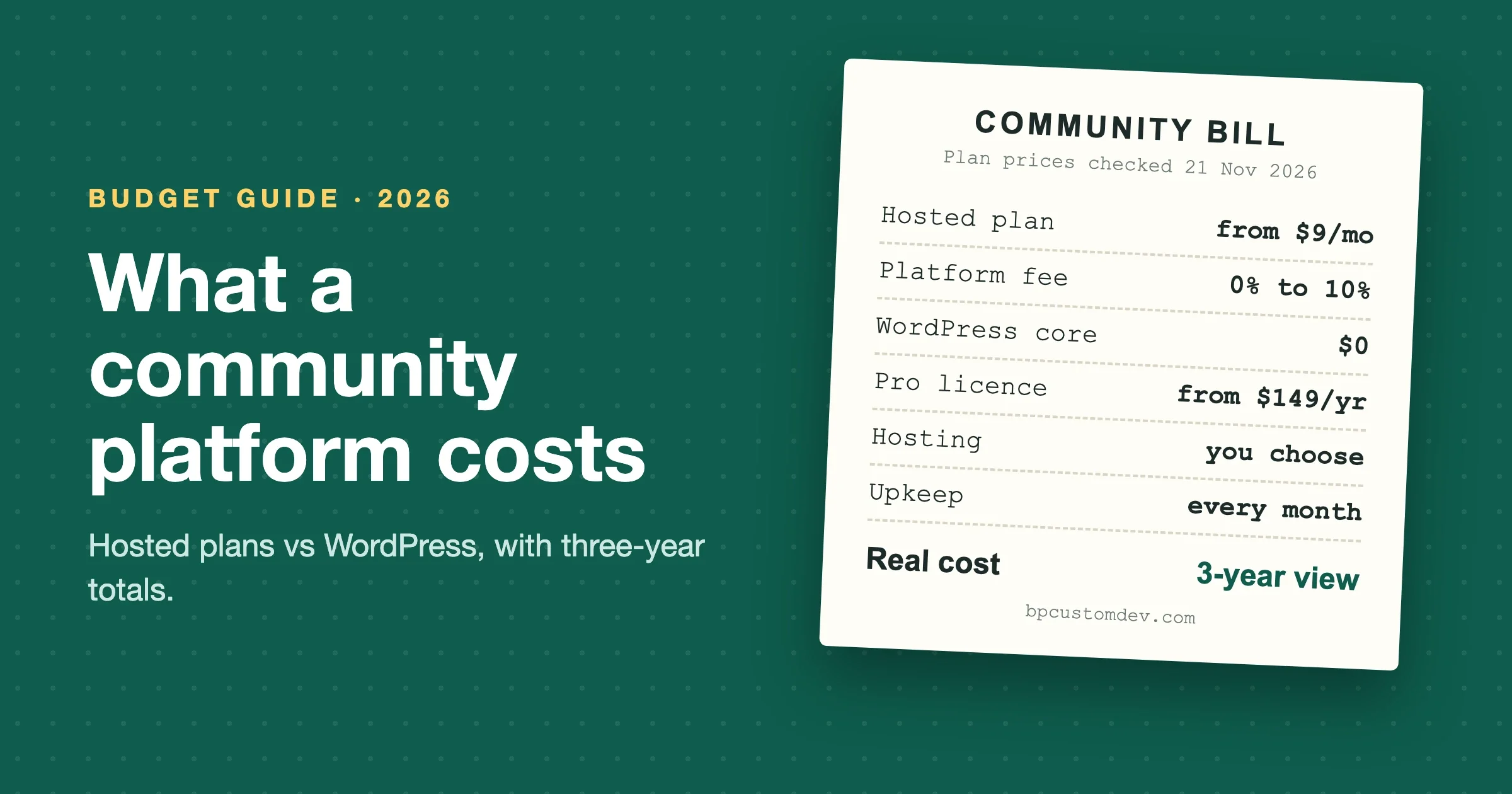
A community website in 2026 costs anywhere from about $100 a year to five figures or more for the first year, depending on which of three routes you take. A hosted platform such as Circle, Mighty Networks or Skool runs roughly $9 to $500 a month plus a transaction fee on lower tiers. A self-hosted WordPress community built on free software costs hosting plus a few premium licences, often a few hundred dollars a year. A custom build adds design and development time on top, and that is where the five-figure numbers come from.
We rewrote this guide on 21 November 2026. Every platform price below was taken from the vendor’s own pricing page that day, in US dollars, and is linked so you can check it. Where a cost depends on your choices, such as hosting or developer time, we give a range and say where it comes from instead of inventing a precise figure.
How much does it cost to build a community website?
Budget by route, not by feature list. The route decides most of the bill.
Route | Typical first-year cost | What you pay for | Best for |
|---|---|---|---|
Hosted community platform (SaaS) | About $100 to $6,000 in plan fees for most plans (enterprise tiers cost more), plus transaction fees on some tiers | A monthly or yearly subscription | Launching fast, small teams, testing an idea |
Self-hosted WordPress, done yourself | Hosting plus licences, often a few hundred dollars | Hosting, a theme, premium plugins, your time | Owners comfortable running WordPress |
Self-hosted WordPress, built by a team | Licences and hosting plus several weeks of design and development time | Developer time, then upkeep | Brands that want their own design, data and integrations |
Fully custom application | The highest; months of engineering | A product team, not a website | Communities that are the product itself |
The first-year figure is misleading on its own. A hosted platform keeps charging the same or more every year, and its fees grow with your revenue. A self-hosted build front-loads the cost and then settles into hosting, licences and upkeep. That is why the three-year view later in this guide matters more than the launch price.
How much do hosted community platforms cost per month in 2026?
Hosted community platforms cost from $9 a month for Skool’s Hobby plan to $500 a month for Discourse Business, and Bettermode’s Growth plan goes higher still at $1,500 a month billed yearly. Most mid-tier plans sit between $99 and $250. Here is what each vendor’s pricing page showed on 21 November 2026.
Platform | Entry plan | Middle plan | Upper plan | Transaction fee (platform) |
|---|---|---|---|---|
Professional $89/mo | Business $199/mo | Scale $419/mo | 2% / 1% / 1% | |
Launch $79/mo | Scale $179/mo | Growth $354/mo | 2% / 1% / 0.5% | |
Hobby $9/mo | Pro $99/mo | None | 10% on Hobby, 2.9% on Pro | |
Basic $179/mo ($143 billed yearly) | Growth $249/mo ($199 billed yearly) | Pro $499/mo ($399 billed yearly) | 0% revenue share | |
Pro $100/mo | Business $500/mo | Enterprise (contact sales) | None listed | |
Starter $149/mo billed yearly ($199 monthly) | Growth $1,500/mo billed yearly ($1,750 monthly) | Premium (contact sales) | None listed |
Circle notes on its page that its prices are based on annual billing and exclude taxes. Payment processing fees from Stripe or PayPal apply on top of the platform fees on every platform; we left them out of the table because you pay a processor on any route, including WordPress. Kajabi and Circle were both running promotions around Black Friday when we checked, so we used list prices.
For a feature-by-feature look at the community-first platforms, see our comparison of BuddyPress, Circle, Mighty Networks and Skool.
What does a WordPress community website cost?
A WordPress community website costs hosting plus whatever premium software you choose. WordPress, BuddyPress and bbPress are free. Many owners add a premium community platform plugin, a theme built for communities and a few add-ons, which together usually run from nothing to a few hundred dollars a year.
Line item | Free option | Paid option (checked 21 Nov 2026) |
|---|---|---|
Community platform | BuddyNext Free, or BuddyPress 14.5.6 with bbPress 2.6.22 | BuddyNext Pro from $149/yr or $399 lifetime for one site |
Theme | A free community theme | A premium community theme such as BuddyX Pro or Reign (check current price on the vendor site) |
Courses, events, directories | Free versions of most plugins | Pro licences, typically priced per site per year |
Hosting | None that we would recommend for a live community | Managed WordPress hosting; in our experience about $20 to $100 a month for a small-to-mid community, more for large ones |
Email delivery | Low-volume free tiers from transactional email services | Paid plans once you send digests to thousands of members |
Video and large media | Embed from YouTube or Vimeo | A streaming service or offloaded storage |
BuddyNext is our own community platform, so weigh our view accordingly. The free version is a complete community: activity feed, spaces, member profiles and directory, messaging, notifications and moderation, on unlimited sites. Pro (from $149 a year, or $399 once for a lifetime licence, on its pricing page on 21 November 2026) adds monetization, AI tools, broadcasts, analytics and real-time features. It charges no per-member fee and takes no cut of your sales. Its cons: it is newer than BuddyPress, so there are fewer third-party add-ons and fewer developers who already know it, and its native iOS and Android apps are still on the roadmap, with an installable web app available today.
If you already run BuddyPress, our themes BuddyX and Reign are built for it. BuddyPress reported 90,000+ active installs on WordPress.org on 21 November 2026, down from 200,000+ a few years ago, and shipped security releases on 9 November and 17 November 2026. It is mature and free, but its momentum has slowed, which is why we point new builds at BuddyNext.
Our step-by-step guide to creating a community-based website walks through the setup itself.
What does it cost to have a developer build your community?
It costs the hours the work takes multiplied by your developer’s hourly rate, and rates vary several times over between countries, freelancers and agencies. Instead of quoting one market rate, here are the planning ranges our team uses for a WordPress community build on a ready-made platform such as BuddyNext or BuddyPress. They are estimates from our own projects, not market statistics.
Piece of work | Rough effort | What drives it up |
|---|---|---|
Platform setup and configuration | 1 to 3 days | Number of member types, privacy rules, registration flow |
Theme customisation to your brand | 3 to 10 days | Custom layouts versus colours and logo only |
Payments and paid membership | 2 to 6 days | Several plans, trials, coupons, tax rules |
Courses, events or directory | 2 to 8 days each | Migrating existing content, custom fields |
Integrations (CRM, email, SSO) | 1 to 5 days each | No ready-made connector, two-way sync |
Migration from another platform | 3 to 15 days | Member count, preserving posts and history, passwords |
Testing, speed tuning and launch | 3 to 7 days | Large member import, heavy media |
As a worked example only: a branded community with paid membership and one extra module might take 15 to 30 working days. At an illustrative $50 an hour that is roughly $6,000 to $12,000; at $100 an hour, $12,000 to $24,000. Swap in the rate you are actually quoted. A fully custom application, built without a community platform underneath, takes many times longer and is rarely the right choice unless the community is your core product.
What are the hidden costs of a community platform?
The hidden costs are the ones that grow with you: transaction fees, plan upgrades forced by limits, add-on tools, and the cost of leaving. On a self-hosted site they are upkeep, hosting upgrades and your own time.
Hidden costs on hosted platforms
- Transaction fees. Circle charges 2% on Professional, Mighty Networks 2% on Launch and Skool 10% on Hobby, before payment processing. On $5,000 a month of member revenue, a 2% fee is $1,200 a year.
- Limits that force an upgrade. Circle’s Professional plan includes 3 admins, 10 moderators and 20 spaces; Business raises those to 5, 15 and 30. Needing one more space can mean a jump of $110 a month.
- Branding and automation behind higher tiers. Removing Circle branding, workflows and APIs start on Business. Mighty Networks lists APIs and third-party integrations from Scale.
- Separate tools. Email marketing, a website, a course tool or Zapier may be extra, depending on the platform.
- Leaving. Moving members, posts and history off a hosted platform is a project in itself, and members have to set new passwords and learn a new place.
Hidden costs on self-hosted WordPress
- Upkeep. Core, plugin and theme updates every month, tested before they go live. BuddyPress alone shipped two security releases in November 2026.
- Hosting that grows with activity. Logged-in members cannot be served from a simple page cache, so a busy community needs more server capacity than a blog with the same traffic.
- Spam and moderation. Open registration attracts bots on day one; someone has to set up protection and review reports.
- Your own time. If you run it yourself, the hours are real even when the invoice is zero.
SaaS vs WordPress: what does a community cost over three years?
Over three years, a self-hosted community usually costs less than a hosted one once member revenue is meaningful, even after paying for a professional setup. Here is one worked example: 500 members paying $20 a month, which is $10,000 a month or $360,000 over three years. Payment processing is excluded from every row because you pay it on any route.
Setup | Plan or licence (3 years) | Platform fees on $360,000 | Setup and hosting (3 years) | Three-year total |
|---|---|---|---|---|
Circle Business ($199/mo, 1%) | $7,164 | $3,600 | $0 | $10,764 |
Mighty Networks Scale ($179/mo, 1%) | $6,444 | $3,600 | $0 | $10,044 |
Skool Pro ($99/mo, 2.9%) | $3,564 | $10,440 | $0 | $14,004 |
Kajabi Growth, billed yearly ($2,388/yr, 0%) | $7,164 | $0 | $0 | $7,164 |
BuddyNext Pro, self-managed ($149/yr) | $447 | $0 | Hosting, for example $50/mo: $1,800 | $2,247 plus your time |
BuddyNext Pro, built by a team | $447 | $0 | Example build $12,000 plus hosting $1,800 and upkeep | About $14,000 to $20,000 depending on upkeep |
Read the example carefully. Hosted plans win on simplicity and on cost at small scale, and the team-built WordPress row costs more in year one than any hosted plan. Over time, though, the self-hosted rows stay flat while platform fees rise with revenue. Double the members and Skool’s fee row doubles; the WordPress rows barely move, apart from hosting.
How you charge members changes this maths too. Our guide to community monetization models covers memberships, paid spaces, sponsorships and courses side by side.
How does member count change the cost of a community website?
On hosted platforms, member count changes cost through plan limits and revenue-based fees. On self-hosted WordPress, it changes cost through hosting. The difference is which line grows and how fast.
Most hosted platforms in our table now advertise unlimited members, so a bigger community does not raise the plan price directly. What rises is everything attached to members: transaction fees on their payments, the number of admins and moderators you need, the spaces you open for them, and the extra tools you add as the team grows. A community that triples in size often moves up a plan tier for those reasons alone.
On WordPress, the software price stays the same whether you have 50 members or 50,000. What changes is server load. A few hundred members barely register on decent managed hosting. Several thousand members active at the same time need more PHP workers, object caching and sometimes a dedicated server. In our experience, hosting is the line that grows, usually in steps rather than smoothly, and it stays well below a percentage of revenue for paid communities.
Community size | Hosted platform: what usually grows | Self-hosted WordPress: what usually grows |
|---|---|---|
Under 500 members | Little; entry plans cover most needs | Little; modest managed hosting is enough |
500 to 5,000 members | Transaction fees, moderator seats, spaces, add-on tools | Hosting tier, object caching, email delivery volume |
5,000+ members | Upper plans or custom pricing, branded apps | Dedicated hosting, a CDN, performance work, a moderation team |
Is it worth paying for a custom-built community?
It is worth it when the community is central to how you make money, when you need your own branding and data, or when you need integrations a hosted platform cannot offer. It is not worth it for a side project, an untested idea or a group that would be happy in a free chat app.
A middle path covers most cases. Build on a ready-made platform such as BuddyNext or BuddyPress and pay a team only for the parts that are truly yours: the design, the payment rules and the integrations. You get ownership without paying to reinvent profiles, feeds and notifications, which are the expensive parts to build from scratch.
Ask any developer you talk to three questions before you sign: which platform the build sits on, who applies updates after launch, and what it costs to move away if you part ways. Clear answers to those three tell you more about the real cost than the quote itself.
Common mistakes people report
These come from recent threads on buddypress.org and WordPress.org that we read on 21 November 2026, plus vendor pricing pages. Each one turns into a cost later if you skip it now.
- Budgeting for launch but not for upkeep. BuddyPress published security releases on 9 November and 17 November 2026. A self-hosted community needs someone to apply and test updates every month.
- Updating the live site without testing. After BuddyPress 14.5.3 and 14.5.4, one owner reported the registration form simply reloading without an error (November 2026 thread); rolling back fixed one site but not another. A staging copy costs far less than a week of lost sign-ups.
- Building on abandoned add-ons. In a November 2026 thread, Wordfence flagged a third-party BuddyPress add-on as abandoned. Every add-on you depend on is a future replacement cost if its developer walks away.
- Leaving registration wide open. One course community owner was left cleaning up 10,000 spam sign-ups (October 2026 thread). Budget for registration protection and moderation from day one.
- Switching on every feature at launch. Advice in a November 2026 buddypress.org thread was to start with profiles and the activity stream and add friends and messaging only when members ask. Fewer features means less to build, test and moderate.
- Ignoring transaction fees on cheap plans. Skool’s Hobby plan is $9 a month but takes 10% of sales (Skool pricing). On paid communities the percentage, not the plan price, is usually the bigger number.
For the moderation side of the budget, our guide to community moderation with AI tools and human teams covers what to automate and what still needs people.
How should you budget for a community platform in 2026?
Budget in three stages, and only spend on the next stage once the previous one has members using it.
- Prove the community (months 1 to 3). Launch with the smallest setup that works: a hosted entry plan, or BuddyNext Free on decent hosting. Spend on content and inviting your first members, not features.
- Pay for what members use (months 4 to 9). Add paid membership, events or courses based on what members actually ask for. This is the stage where a hosted plan’s upgrade path or a self-hosted Pro licence earns its cost.
- Own the long term (month 10 onward). If revenue is growing, run the three-year numbers again with your real member count. That is usually the point where moving to a self-hosted platform pays back.
Keep two lines in every budget: a monthly upkeep line (updates, backups, moderation time) and a contingency of around a tenth of the build cost for surprises. Communities change shape once members arrive, and the budget should expect that.
Which route should you choose?
Your situation | Our suggestion | Why |
|---|---|---|
Testing an idea with under 100 members | Skool Hobby, Circle Professional or BuddyNext Free | Cheapest way to find out if people show up |
Course creator who wants community, email and checkout in one place | Kajabi or Circle | All-in-one, nothing to maintain; you pay for it monthly |
Paid community growing past a few thousand dollars a month | Self-hosted WordPress with BuddyNext Pro | No per-member fee and no revenue share |
Existing BuddyPress site | BuddyPress with BuddyX or Reign, tuned and kept updated | Keep what works; plan a move only if you need features BuddyPress lacks |
Support or product community for a software company | Discourse or Bettermode | Built for Q&A and searchable answers |
Whichever route you pick, a fast site keeps members coming back; our community performance guide covers hosting and caching for logged-in traffic.
Frequently asked questions
What is the cheapest way to build a community website?
BuddyNext Free or BuddyPress on modest WordPress hosting, set up yourself. The software is free; you pay for hosting and your time. Skool’s $9 Hobby plan is the cheapest hosted option, but its 10% transaction fee gets expensive once you sell memberships.
How much does Circle cost in 2026?
On 21 November 2026, Circle listed Professional at $89 a month, Business at $199 and Scale at $419, based on annual billing, with platform transaction fees of 2%, 1% and 1%. Circle Plus is custom priced.
Is a self-hosted community cheaper than Circle or Mighty Networks?
Usually, once you have meaningful revenue. Self-hosting removes platform fees and per-tier limits, but you pay for hosting, setup and upkeep. Under a few hundred dollars a month in revenue, a hosted plan is often cheaper in practice.
How long does it take to build a community website?
A hosted community can launch in a day. A self-hosted WordPress community can launch in a weekend if you do it yourself with defaults, and typically takes several weeks when a team builds a branded site with payments and integrations.
Do I need a mobile app for my community?
Not at launch. Most hosted platforms include apps on some plans, and WordPress platforms such as BuddyNext offer an installable web app. A custom branded native app is a significant extra cost that only pays off for large, very active communities.
What ongoing costs should I expect after launch?
On a hosted platform: the plan fee, transaction fees and any extra tools. On WordPress: hosting, licence renewals, email delivery and someone’s time for updates and moderation every month.
If you want a second opinion on your numbers, our team builds and maintains community sites on WordPress every week and can scope a build with you before you commit to any route.