WordPress Security Update 7.1.5: A Checklist for Community Site Owners
WordPress 7.1.5 fixes 20 items, 4 reachable without login. A patch order, staging test list, custom code review and owner checklist for a custom community site.

Yes, apply this WordPress security update to your community site this week. WordPress 7.1.5, released on 18 November 2026, fixes 20 listed items (18 vulnerabilities and 2 hardening changes), and the release post tells site owners to update immediately. Four of the fixes can be reached by a visitor who is not logged in, and a community site is a place where strangers can register, comment and upload.
This WordPress security update guide is for the owner or product lead of a custom community site: a members area, a feed or forum, profiles, comments, maybe a member blog or a mobile app talking to the REST API. We translate the official fix list into a patch order, a staging test of your member flows, a code review for your custom plugins, and a short answer to “who does what”. Everything about the release itself comes from the WordPress.org announcement, which we read on 25 November 2026. Where we add advice, we say so.
What is in this WordPress security update, in plain words
The release post lists 20 items. The wording of the list matters more than the count, because each line says who can trigger the problem. That tells you how exposed a community site is, since you decide which roles members get.
The post says the release is a short-cycle security release and that sites supporting automatic background updates will start the update on their own. It also says the next major release is 7.2, planned for 8 December 2026. The fixes were backported to every branch that is eligible for security fixes, currently back to 4.7, and those backports “are in progress and will ship as they become ready”.
The post does not say whether any of these issues are being used in attacks, and we found no statement either way. Treat that as unknown, not as safe.
Fixes anyone on the internet can reach (no login)
- Private taxonomy terms exposed through the REST API search endpoint. A visitor can read terms that were meant to stay private.
- Stored XSS through shortcode attributes in comments. A visitor posts a comment and the script is stored.
- Denial of service through batched XML-RPC pingbacks. A visitor can make the site do a lot of work with a single request.
- Privilege escalation through Template Part block attributes, which the post says could lead to remote code execution.
Fixes that need a member-level account
- Subscriber and above: information disclosure through the XML-RPC
wp.getCommentsmethod. - Contributor and above: stored XSS through oEmbed provider responses, through the Comment Date block’s date format, and through media filenames when a media block is converted to a File block.
- Author and above: user email addresses exposed through the REST API comments endpoint, and an authorization bypass when editing comments in the admin.
- Editor and above: information disclosure through post and template author assignment in the REST API.
Fixes that need an administrator, or affect developers
- Administrator: stored XSS through Customizer previews.
- Multisite: a site Administrator can take over a Super Admin account through Customizer menu previews.
- SQL injection in
WP_Meta_Querythrough nested relation values, and in Customizer changeset previews through the front page setting. - XSS in
wp_interactivity_data_wp_context()through the store namespace, in the legacy media library popup (reflected), and in the block editor through Openverse image metadata. - Two hardening changes: a malformed regular expression that broadened JSON media type matching, and the removal of the block editor’s Imgur embed variation, whose server-side provider is already gone.
That is 20 lines. The WordPress.org post also credits each reporter, so the full list with names is worth a read: WordPress 7.1.5 release announcement.
Why a community site is more exposed than a brochure site
Every WordPress security update lands harder on a community than on a brochure site. A brochure site has one or two logged-in people, all staff. A community site has hundreds or thousands of accounts you do not personally know. That changes how to read the list above.
- Your members are the “Subscriber and above” group. Registration is open on most communities, so the Subscriber fix is reachable by anyone willing to sign up.
- Your members may be Contributors or Authors. If you let members publish articles, run a member blog, or give trusted members a higher role, then the Contributor and Author fixes apply to people outside your team.
- Comments and user content are the product. Three of the fixes involve comments, and several others involve stored scripts that run when someone views content. A community is made of content that other members read.
- Email addresses are sensitive. The Author-and-above fix concerns user email addresses exposed through the comments endpoint. Members trust you with those.
- Custom code multiplies the surface. A custom community build usually has its own REST routes, queries and blocks. Some of the fixed code paths are exactly the ones custom code touches, and a core update does not rewrite your code.
That does not mean you are under attack. It means the “update immediately” line in the release post applies to you with more force than to a five-page company site.
Do we need this WordPress security update now, and what could break?
Our advice, in order of urgency:
- Patch now, do not wait for the 7.2 release. 7.2 is planned for 8 December. 7.1.5 is the security release for the line you are on, and 7.2 will be a major update with its own testing needs. Do the small, urgent update first, and plan 7.2 separately. Our earlier guide on checking compatibility yourself covers the larger job: what the BuddyPress “Tested up to” label means and how to check WordPress 7.1 and 7.2 compatibility.
- Test on staging for hours, not days. A security release changes few lines. A two to four hour smoke test of the member flows below is proportionate.
- Keep a rollback. Take a database and files backup before updating, and know how to restore it. If you need a refresher on safe update order, we cover the same discipline for PHP in upgrading PHP under a bbPress forum.
What could break? Honest answer: the release post names no breaking changes, and security releases rarely break things. The realistic risks are small and specific:
- A custom plugin that relied on the old, looser behaviour of one of the fixed functions. This is the main reason to run the code review below.
- A third-party client that reads data the fixes now hide: for example, a mobile app or integration that read private taxonomy terms or user emails through public REST calls without logging in.
- On older branches, the post notes that 1024-bit certificates were removed from the bundled root certificates, a change first made in WordPress 7.0 and now applied to 6.9.12 and earlier. If your site calls an external service whose certificate chain depends on one of those roots, that call could start to fail. Test payments, single sign-on, webhooks and email-sending calls on staging if you are on an older branch.
The WordPress security update patch order we use
Step | What to do | Who | Time |
|---|---|---|---|
1 | Find out whether the site already updated itself. Dashboard, then Updates, shows the version. | Developer or host | 10 minutes |
2 | Back up files and database. Confirm you can restore. | Host or developer | 30 minutes |
3 | Update staging to 7.1.5 and run the member-flow test list. | Developer plus community manager | 2 to 4 hours |
4 | Update production in a quiet hour. Watch the error log. | Developer | 30 minutes |
5 | Re-run a short version of the test list on production. | Community manager | 20 minutes |
6 | Review custom code and recent comments (sections below). | Developer | Same week |
If the site is on a managed host that updates WordPress automatically, step 3 may already be happening to you without a test. The WordPress.org post says that sites that support automatic background updates will begin the update. That is fine for most sites, but you should still run step 5 today. You can read how automatic updates are configured in the WordPress documentation on background updates.
If auto-updates are switched off
Many custom builds turn automatic core updates off on purpose, usually because deployment goes through Git or a build pipeline. In that case nobody is going to update the site unless a person does. Make sure your pipeline picks up 7.1.5 this week, and put the owner’s name against the task. “The pipeline will get to it” is how a security release sits unapplied for a month.
Who owns what on a community site
On a custom community, responsibility is often blurry between the host, the agency, an in-house developer and the community team. Settle it before the next release, not during it.
Task | Owner |
|---|---|
Decide the patch window and approve it | Site owner or product lead |
Backups, restore test, server-level settings | Host or sysadmin |
Staging update, custom code review, production update | Developer or agency |
Member-flow test on staging and production | Community manager (with a script the developer wrote) |
Checking recent comments and reported content for odd markup | Moderators |
Telling members, if there is ever a reason to | Site owner |
The point of the table is the first row. A decision-maker does not need to read the 20 items. They need to say “yes, this week, this window”, and know who is on the hook.
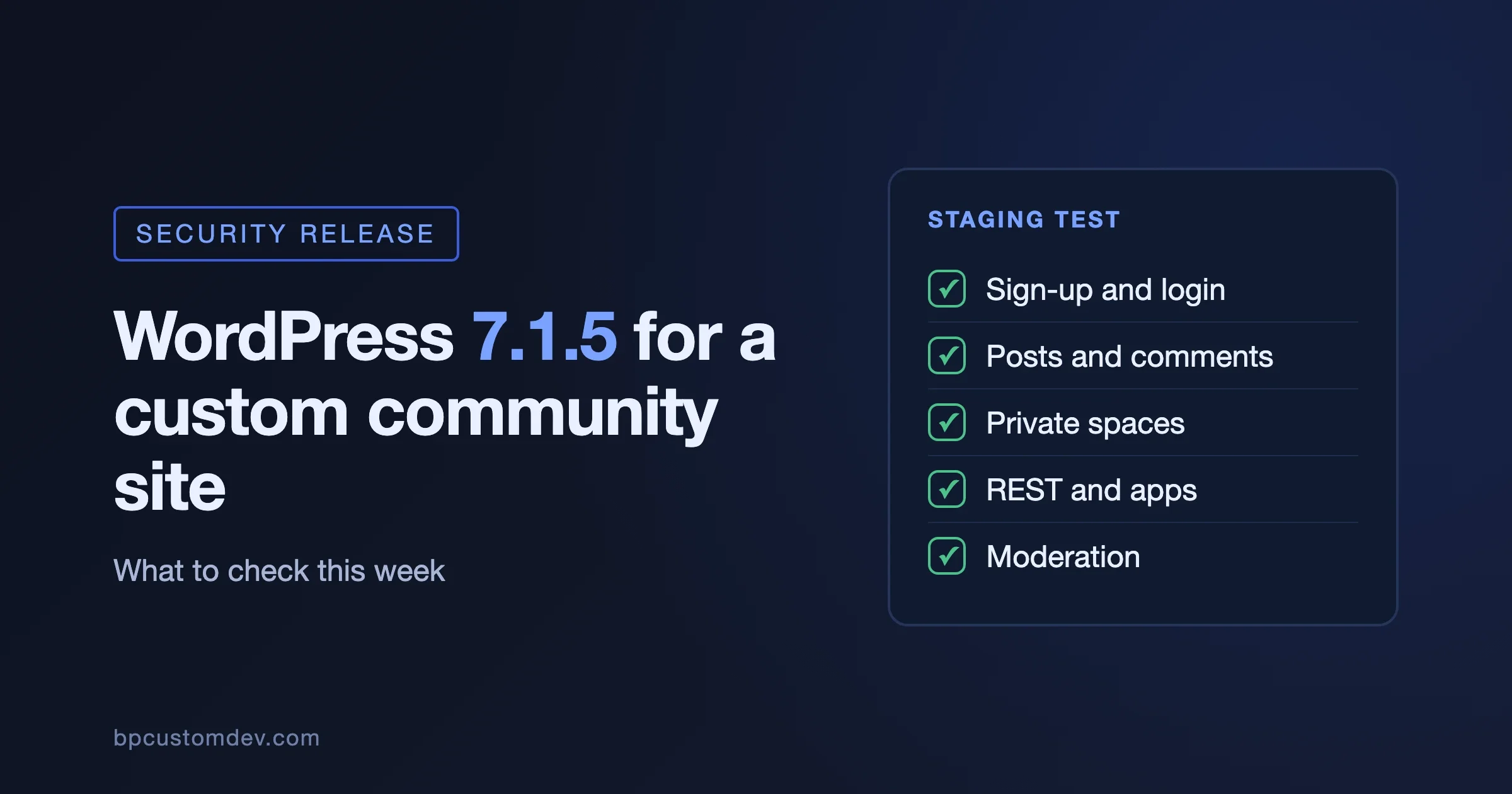
What to test on staging: the member-flow checklist
Run this list on staging after updating to 7.1.5, using accounts at each role you actually use (Subscriber, any member role, Contributor or Author if you have them, moderator, administrator). Keep the list in a shared document and tick it each release.
Sign-up, login and profile
- Register a new member, confirm the email, log in, log out, reset the password.
- Edit profile fields and change the avatar. Upload a file with an unusual filename (spaces, accents, brackets) because one fix concerns media filenames.
- Check the member directory loads and filters work. Directory filters often run meta queries, and one fix concerns
WP_Meta_Query.
Posting and comments
- Post in the feed or forum, reply, edit your own post, delete it.
- Comment as a member. Edit that comment as the member, and as a moderator. One fix concerns comment editing in the admin.
- Post a comment that contains a normal shortcode-looking string such as
[example]and check it displays as plain text and does not break the page. - Embed a link from a site you commonly allow (a video or a social post) and make sure it still previews correctly.
Private areas and visibility
- As a logged-out visitor, open a private group, private space or members-only page and confirm you are turned away.
- As a member without access to a private area, try to open it by URL.
- Check search results as a logged-out visitor and as a member. Nothing private should appear for someone who should not see it.
API and apps
- If you have a mobile app, a PWA or an integration that calls the REST API, run its main screens against staging.
- Call a few of your REST routes as a logged-out visitor and as a Subscriber, and compare to what you expect. Pay particular attention to the comments and search endpoints.
Moderation and email
- Report a post as a member. Open the report as a moderator and act on it. If you run BuddyNext, the front-end Community Admin area holds Moderation and Reports, and the moderation documentation shows where each screen lives.
- Trigger a notification email and a digest. Confirm they arrive and the links work.
If any step fails on staging, roll staging back, note the exact step, and tell the developer before touching production.
Custom code review: the six places to look
A core update fixes WordPress. It does not review your plugin. A short review against the fix list is worth an hour of developer time, because a custom build is where the same mistakes often live. Each check below maps to one of the fixes.
1. User input going into a meta query relation
The SQL injection fix concerns nested relation values in WP_Meta_Query. If your code builds a meta query from request parameters, such as member directory filters, never pass the user’s text straight through as the relation. Allow only two values:
$match    = isset( $_GET['match'] ) ? strtoupper( sanitize_text_field( wp_unslash( $_GET['match'] ) ) ) : 'AND';
$relation = ( 'OR' === $match ) ? 'OR' : 'AND';

$meta_query = array(
	'relation' => $relation,
	array(
		'key'   => 'city',
		'value' => sanitize_text_field( wp_unslash( $_GET['city'] ?? '' ) ),
	),
);
To find candidates, search your custom plugins and theme:
grep -rn "meta_query" wp-content/plugins/your-plugin wp-content/themes/your-theme2. Custom REST routes that return terms, users or comments
Two fixes concern what the REST API exposes: private taxonomy terms and user emails. Your own routes are not changed by the core fix. Open each custom route and ask: who can call it, what does permission_callback say, and what fields come back? A route with 'permission_callback' => '__return_true' that returns user objects deserves a second look.
grep -rn "register_rest_route" wp-content/plugins/your-plugin | head -50
grep -rn "__return_true" wp-content/plugins/your-plugin | head -50
3. Code that outputs comment content or reads comments over XML-RPC
Two fixes touch comment handling, and one touches the XML-RPC wp.getComments method. If your community uses comments, check that custom templates escape output (esc_html, wp_kses_post) and do not run do_shortcode() on comment text. Then ask whether anything on your side actually uses XML-RPC. If nothing does, you can switch it off:
add_filter( 'xmlrpc_enabled', '__return_false' );This is the xmlrpc_enabled filter. Check first: some mobile publishing apps and older integrations use XML-RPC, and turning it off will stop them. Switching it off is your decision, separate from this update.
4. Custom blocks, template parts and Interactivity API code
One fix covers wp_interactivity_data_wp_context() and its store namespace, and the most serious fix involves Template Part block attributes. If your team ships custom blocks or Interactivity API components, check where block attributes and context values come from, and that anything that came from a user is validated when saved and escaped when output.
5. Customizer use
Three fixes involve Customizer previews and changesets. Many custom community builds never use the Customizer. If yours does not, there is nothing to review here. If a staging admin or an agency account uses it daily, keep that in mind and keep the number of administrator accounts small.
6. Multisite and role design
If you run multisite, the Administrator-to-Super-Admin fix applies to you. Review who has Administrator on each site, and remove accounts that are not needed. On any site, review role design: which role do new members get, and have you given Contributor or Author to people who do not need it? Fewer privileges means fewer of the “Contributor and above” fixes apply to you.
After the update: what to look for
The release post gives no indicators of compromise, so we are not going to invent any. What we can do is a sensible check for the issues that involve stored content.
Recent comments with shortcode-style markup
The unauthenticated stored XSS involved shortcode attributes in comments. A simple query lists the most recent comments that contain square brackets with an equals sign, so a moderator can read them. Run this on staging or a copy first:
wp db query "SELECT comment_ID, comment_date, comment_author, LEFT(comment_content, 120) AS snippet FROM $(wp db prefix)comments WHERE comment_content LIKE '%[%=%]%' ORDER BY comment_date DESC LIMIT 50"Most hits will be harmless text. You are looking for anything with script-like attributes that no member would write by hand. If you find something, take a backup, keep a copy of the comment for evidence, remove it, and ask your developer to look at the account that posted it.
Unusual administrator or editor accounts
wp user list --role=administrator --fields=ID,user_login,user_email,user_registered
wp user list --role=editor --fields=ID,user_login,user_email,user_registered
You should recognise every name. A new account you cannot explain is a reason to bring in a developer or a security specialist. Our write-up of a recent community plugin vulnerability has a similar checklist for signs of misuse: BuddyBoss Platform stored XSS via group name.
Server load from XML-RPC and pingbacks
The pingback fix is a denial-of-service fix, so the symptom would be spikes of load or slow responses with a lot of requests to xmlrpc.php. Look at your access log for that path over the last weeks. If it is busy and you do not use XML-RPC, block it at the server or firewall as well as in code.
What about BuddyNext and your plugins?
The release post lists fixes in WordPress core and names no plugin. So the action for every plugin-based community, including one built on BuddyNext, is to update core. We have not seen a statement from any community plugin vendor that this release needs a plugin update, and we would not assume one.
That said, two habits keep a community site calm through releases like this:
- Read the changelogs of your active plugins in the week after a core security release. Vendors sometimes ship a compatibility note.
- Keep your own record of what the site depends on: plugin list, versions, custom code, hosting settings. The one-hour evaluation script in How to test-drive a community platform before you commit works well as a template for your release test, too.
For a custom build, the second habit is the one that saves money. A clear test script lets a junior developer or the community manager run the check, and keeps the senior developer’s time for the code review.
A note on the 7.2 release candidates
The release post says WordPress 7.2 RC 2 “contains all applicable fixes”. Since then, the release schedule shows release candidate 3 on 24 November and the final release on 8 December 2026 (see the WordPress 7.2 development cycle page). If you test 7.2 on a staging copy, those builds already include the security fixes, so you do not need to apply 7.1.5 to a 7.2 test site.
Do not use a release candidate on production. Plan the 7.2 upgrade after the final release, with its own test round.
Frequently asked questions
Is the WordPress 7.1.5 security update safe to install without testing?
It is a short security release with no breaking changes listed, and the post says to update immediately. For a hobby site, updating straight away is reasonable. For a community with members, a custom build or revenue, take a backup and run the checklist above on staging first. A same-day test is better than a same-month delay.
Which of these fixes can a stranger use against my site?
Four of the 20 items are described as unauthenticated: the REST search exposure of private taxonomy terms, the comment shortcode stored XSS, the batched XML-RPC pingback denial of service, and the Template Part block privilege escalation. Others need an account, and on a community site accounts are easy to get.
Will automatic updates handle this for me?
If your site supports automatic background updates, the release post says the update will begin on its own. Check the Updates screen to see the version, because custom deployments often disable core auto-updates. Automatic updates do not review your custom code or test your member flows.
Do I need to tell members?
Not for a routine patch. If your review finds evidence that something was abused, such as odd stored comments or unknown administrator accounts, speak to your developer and, depending on where your members live, your legal advisor about notification duties. We are not lawyers and do not give legal advice.
Should I disable XML-RPC?
If nothing you use depends on it, yes, it removes two of the paths named in this release. Check first with your developer. Some publishing apps and integrations still use it.
I am on an older WordPress branch. Am I covered?
The post says the fixes were backported to all branches eligible for security fixes, currently back to 4.7, and that the backports ship as they become ready. It also says only the most recent version of WordPress is actively supported. If you are on an old branch, check that your site actually received a patched version, and plan a move to the current line.
Does this change the BuddyPress or BuddyNext “tested up to” status?
A “tested up to” label is a version statement by the plugin author and is a separate matter from a core security patch. Our guide on how to check compatibility yourself explains what to do when a label lags: BuddyPress “Tested up to” and WordPress 7.1 and 7.2.
The short version of this WordPress security update for a busy owner
- Update to WordPress 7.1.5 this week. The release post says to update immediately.
- Four fixes are reachable without logging in, and your members are the “Subscriber and above” group for several more.
- Back up, test the member flows on staging for a few hours, then update production.
- Give a developer an hour to review custom meta queries, REST routes, comment output, blocks and XML-RPC use.
- Check recent comments and your administrator list afterwards.
- Put names against each task. Most delays are about ownership, not difficulty.
If you would rather have an experienced team run the review, test and rollout for a custom community, that is what we do at bpcustomdev. Start with the checklist above, and tell us what you find.