Community Portal Requirements: 33 Questions to Send Vendors Before You Sign
A vendor-neutral community portal requirements checklist: 33 questions covering identity, spaces, moderation, data and exit, with why each one matters and what a weak answer looks like.


Community portal demos are optimised to look good in forty minutes. You see a polished feed, an attractive directory, and a dashboard with encouraging numbers on it. What you do not see is what the software is like in year two, when you have 3,000 members, a moderation dispute, a board asking about data protection, and a renewal quote that has gone up.
This community portal requirements checklist exists to surface those problems early. The thirty-three questions below are the ones that do it. They are vendor-neutral, they apply equally to hosted platforms and self-hosted plugins, and most of them can be answered in a demo if you insist on being shown rather than told.
Send them in writing before you take the demo. The response tells you as much as the software does.
Community portal requirements, section 1: identity and profiles
This section decides whether your portal can represent your organisation or only a generic one.
- Can we define our own profile fields, in groups, with our own field types? Watch for products that offer a fixed set plus a few custom text fields. Free text does not filter, so a directory built on it cannot be searched properly.
- Can visibility be set per field, by the member? A member should be able to show their employer publicly and keep their phone number private without an administrator’s help. Per-profile privacy is not the same thing and is not sufficient.
- Can we segment members into types, and does the portal behave differently for each? Fellow, student, retired, staff, contractor. Without this you build one portal for an average member who does not exist.
- Can a member have a genuinely private profile without it leaking counts or activity elsewhere? Ask them to demonstrate. Partial privacy that still exposes post counts or membership lists is common.
- Is the directory filterable on our fields, with our data? Insist on seeing it with a few hundred realistic records rather than the demo dataset. Filtering that feels fine at twenty records is often unusable at three thousand.
- What happens to a member’s profile and content when they lapse or leave? There is no single right answer, but a vendor without a clear one has not thought about it, and you will need to answer it to a member eventually.
Section 2: Structure and spaces
This section decides whether your portal survives past a few hundred members.
- Can we create sub-groups with their own membership and their own feed? Chapters, cohorts, committees, teams, buildings. The member portal guide covers how associations usually structure these. A single shared feed becomes unusable somewhere between 500 and 1,000 members.
- Are there three visibility levels, including one that hides the group entirely? Public and private are common. What you need for committee or disciplinary work is secret: absent from search, returning a not-found rather than a locked door that advertises its own existence.
- Can a volunteer moderate one group without an administrator account on the whole system? If not, every membership change becomes a staff task and the community cannot scale beyond your headcount.
- Can someone be removed from one group without being removed from the organisation? Per-space bans. The absence of this turns every small dispute into an all-or-nothing decision.
- Can groups be categorised or nested? Sixty ungrouped spaces are unbrowsable, and most organisations reach sixty faster than they expect.
- Can a group be archived without deleting its content? Cohort and project spaces go quiet. You want them out of the way and still searchable.
Section 3: Moderation and safety
The section most often skipped in procurement and most often regretted.
- Can members report content, and is there a queue an administrator works through? Reporting into a generic inbox is not a moderation system.
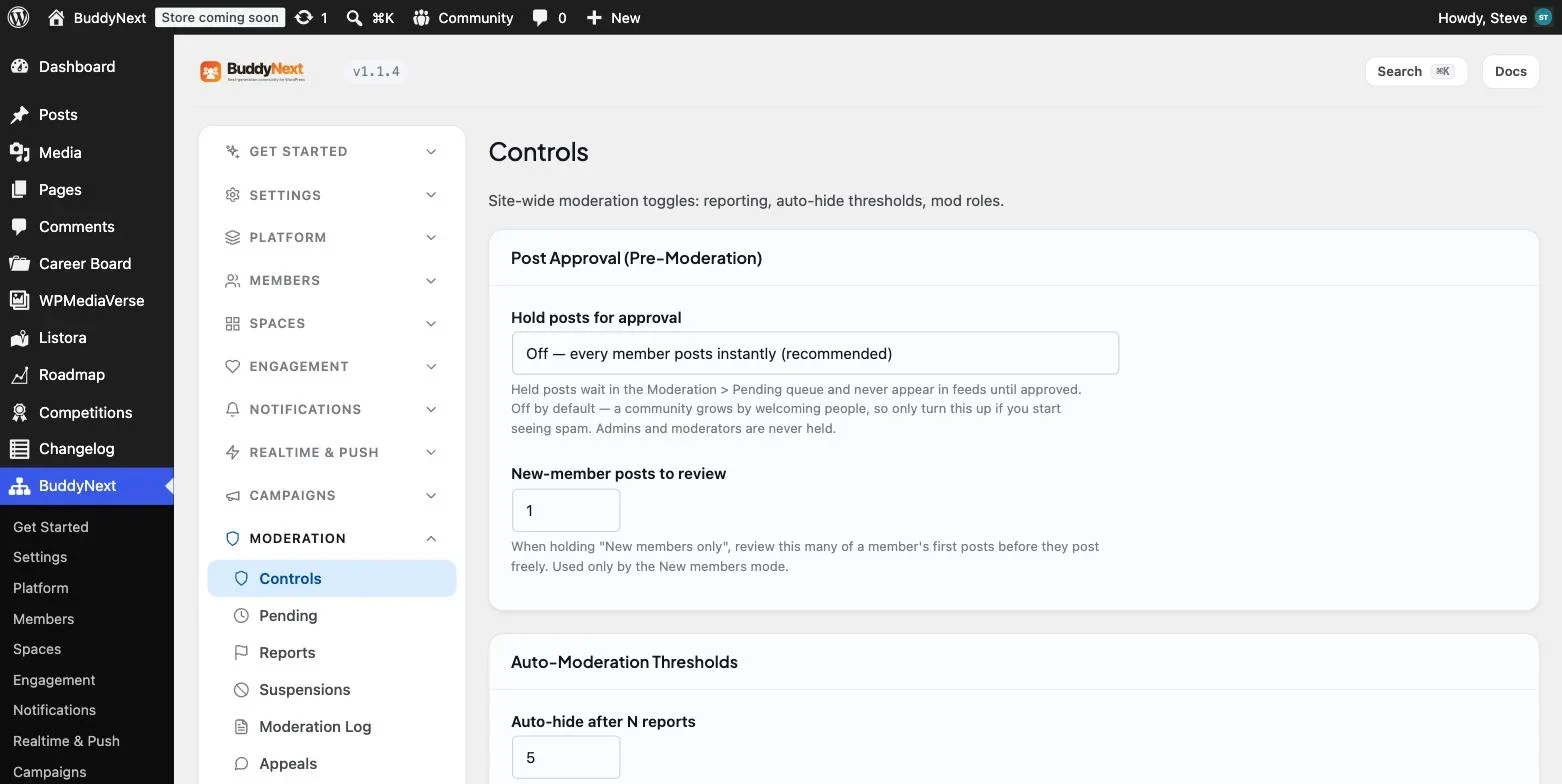
- Are there graduated responses between doing nothing and deleting an account? Warnings, temporary suspension, shadow-banning. A product whose only tool is deletion forces you into disproportionate decisions.
- Is there a moderation log recording who did what and when? This is what makes a decision defensible months later to a committee, an HR process, or a solicitor.
- Can a suspended member still reach an appeals route? Ask for a live demonstration. A system that locks someone out of the mechanism for challenging their exclusion cannot correct its own mistakes, and this is the single most common failure in the category.
- Is there banned-word filtering and rate limiting? Particularly important for any portal open to public registration.
- Can one member block another, and does the block hold everywhere? Feed, comments and private messages. Partial blocking is worse than none because it creates false confidence.
- Is moderation reactive or does everything wait for approval? Reactive should be the default, for the reasons set out in our comparison of portals, forums and chat tools. Pre-moderation reliably kills conversation, though it is useful to have available if spam forces your hand.
Section 4: Communication
- Is there private one-to-one messaging, with attachments? Without it, members exchange email addresses and the relationship leaves your platform along with any evidence you created it.
- Can we control notification frequency, and can members? Notification settings that are too aggressive or too quiet are the most common reason people abandon a portal, well ahead of any feature gap.
- Are transactional and notification emails editable and branded? These are the emails members see most often, and default templates that look like software rather than your organisation undermine the whole thing.
Section 5: Data, exit and cost
The section that determines what happens when the relationship ends, which it eventually will.
- Can we export everything, and can we see a sample export now? Members and posts usually export. Threading, reactions, attachments, private messages, space memberships and permissions frequently do not. Ask for the file, not the assurance.
- Where is the data hosted, and who is the data controller? A question your own governance will ask you eventually, and better answered before signature than during an audit.
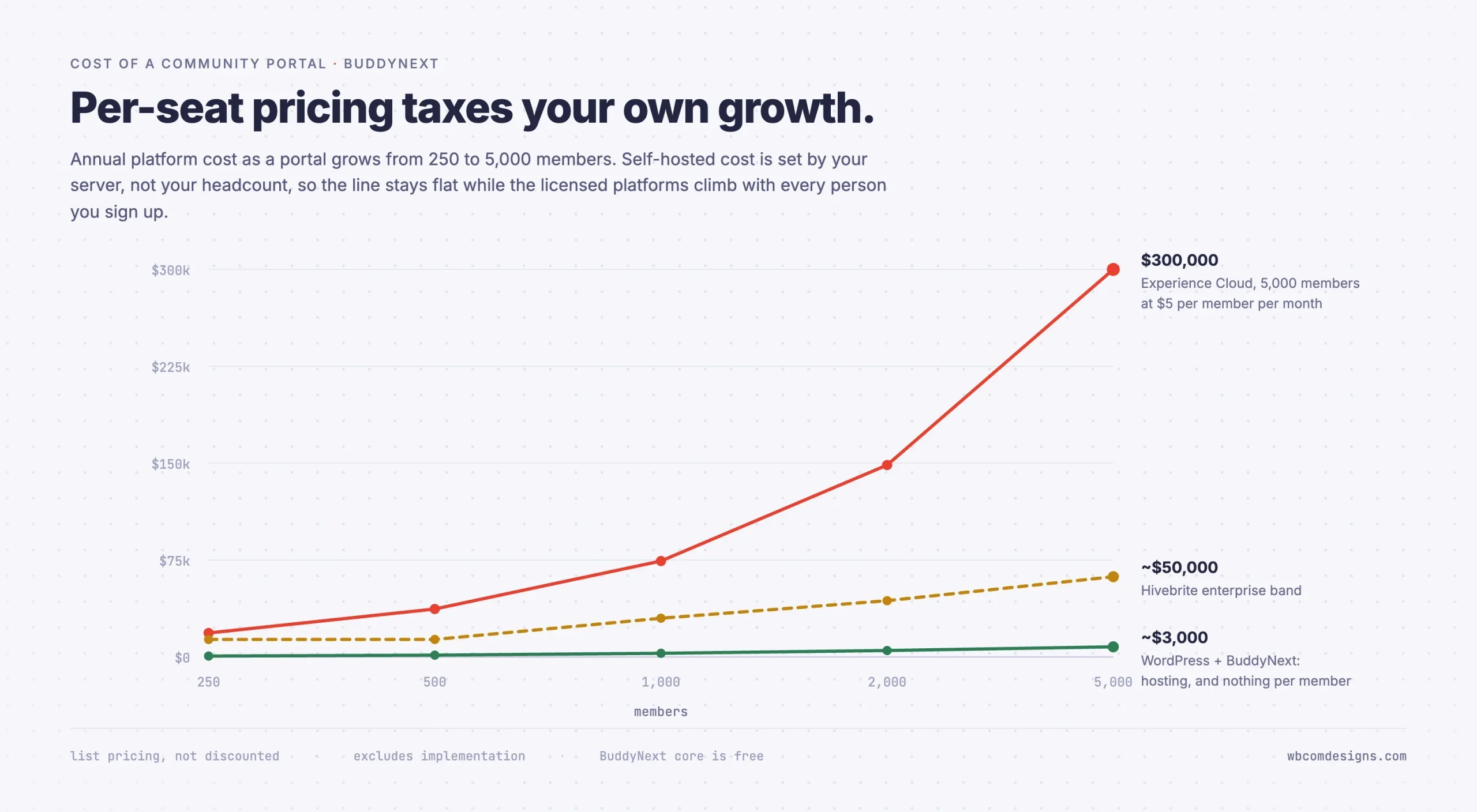
- What is the price at double our current membership, in writing? Per-member and per-seat pricing means growth arrives as an invoice. Get the number for the size you hope to be, not the size you are.
- What is included in the renewal, and what has moved to an add-on since last year? Feature unbundling between renewals is common and rarely announced.
- Is there an API, and is it documented? This determines whether you can integrate a CRM, a membership system or a mobile app later, or whether every future need becomes a feature request into a roadmap you cannot see.
Section 6: Scale, performance and the boring questions
Six more that nobody asks in a demo and everybody wishes they had by month eighteen.
- What is the largest deployment currently running on this product? Ask for a number and, if possible, a reference. A platform whose biggest customer is a tenth of your size is not a platform you should be the largest customer of.
- How do the directory and feed behave at our expected size? These are list views over growing tables and they are where community software falls over. Ask to see a directory with tens of thousands of records rather than the demo set.
- What happens to search as content grows? Search is often fast on a demo dataset and slow on a real one. Find out whether it is a database query or a dedicated index, and what it costs to keep quick.
- How are backups taken, how often, and how do we test a restore? The archive is the asset. “We take backups” is not an answer; “here is how you restore to a point in time and here is how you verify it” is.
- What is the upgrade path, and how often are there breaking changes? For self-hosted software this determines your maintenance burden. For hosted software it determines how often your members find the interface has moved.
- Who do we contact when something breaks, and what is the committed response time? Get the actual contractual number rather than the marketing claim. For self-hosted software the honest answer is you, which is fine as long as you have said so out loud.
Question 31 deserves particular attention. Community platforms accumulate something irreplaceable: years of member conversation that exists nowhere else. Losing a marketing site is an inconvenience. Losing five years of a professional community’s discussion archive is a genuine institutional loss, and it happens more often than vendors advertise.
What a good answer sounds like
Rather than only listing red flags, it helps to know what a strong response looks like, because it is rarely the most enthusiastic one.
Good vendors say no clearly. A product that admits it does not do secret spaces, or that its export omits private messages, is easier to evaluate than one that answers every question affirmatively. Universal yes is not a sign of a complete product. It is a sign of a sales process.
Good vendors show rather than describe, and do not need to schedule a follow-up call to demonstrate a core feature. If showing you a filtered directory requires a second meeting with a solutions engineer, the feature is more complicated than it sounded.
Good vendors are specific about limits. “Our largest deployment is around 12,000 members and performance is comfortable to about 25,000 with the caching tier” is a far more reassuring answer than “it scales.”
Good vendors will put pricing at scale in writing without being pushed. Reluctance here is the single most reliable predictor of an uncomfortable renewal.
Using this checklist for a build rather than a purchase
If you are considering self-hosting rather than buying, the same questions still apply. You are simply answering them yourself, and the honest exercise is more useful than a vendor comparison because there is nobody to oversell you.
Work through the list and mark each item in one of three ways: the software does this out of the box, we would need to add a plugin or write something, or we would be doing without.
The pattern that emerges is usually clear. Sections one to four tend to be well covered by mature community software. Section five answers itself favourably, since export and data control are trivial when the database is yours and there is no per-member pricing to negotiate. What appears in the “doing without” column is almost always the enterprise assurance layer: SAML single sign-on, a compliance certificate, and a support contract with somebody else’s name on it.
That is a genuine gap and it should be recorded as one rather than argued away. For a professional body whose members are individuals it rarely matters. For a portal that a corporate client will audit as part of a contract, it can be decisive. Knowing which of those you are is the point of doing the exercise.
The one column to be most honest about is maintenance. Self-hosting moves updates, backups and incident response onto your organisation. That is a few hours a month rather than a job, but it is a real few hours and it needs a name attached, which is why it appears again in the questions you ask yourselves.
How to read the answers
A requirements list is only as good as your ability to interpret the replies, and community portal requirements attract a particular style of answer.
A few patterns are worth naming, because they recur across vendors.
“That is on the roadmap” means no. Treat it as no when comparing products. If it arrives, that is a bonus. If you buy on the strength of it, you have bought a promise.
“You can do that with a custom development” means no, at your expense. Ask what it costs and who maintains it through upgrades.
A demonstration beats a description every time. This applies especially to questions 5, 8 and 16. Filtering a real directory, a genuinely hidden space, and an appeals route reachable while suspended are all things that sound simple and are frequently absent.
Vagueness about pricing at scale is the loudest signal in the whole exercise. A vendor unwilling to write down what you will pay at double your size has told you what happens at your renewal.
The five requirements almost everyone forgets
Across procurement exercises, the same handful of requirements go unstated and then cause the most trouble. If you add nothing else to your own list, add these.
Requirement | Why it gets forgotten | What it costs to miss |
|---|---|---|
Appeals route reachable while suspended | Nobody imagines suspending anyone during procurement | Your first wrong decision becomes uncorrectable and possibly legal |
Volunteer moderation without admin rights | Staff assume they will run everything | Community growth caps at your headcount |
Secret groups, not merely private ones | Private sounds sufficient until it is not | Confidential work advertises its own existence to everyone |
Notification controls for members | It sounds like a preference, not a requirement | The most common reason members abandon a portal |
Directory filtering on your own fields | The demo dataset always filters beautifully | The feature that justified the budget is unusable at scale |
Each of these is cheap to verify before signing and expensive to discover afterwards. The common thread is that all five are invisible in a forty-minute demo and unavoidable in year two.
Scoring it without fooling yourself
Weighted scoring matrices tend to produce whatever answer the person who set the weights already preferred. A simpler approach works better.
Sort your answers into three piles.
- Must have. Things that would make the portal unusable for your organisation. For most bodies this includes per-field privacy, secret spaces, a moderation log and an appeals route, plus a real export.
- Should have. Things that would cost you real effort to work around. Volunteer moderation without admin rights usually sits here, and so does a documented API.
- Nice to have. Everything else, including most of what gets demonstrated most enthusiastically.
Any product missing a must-have is out, regardless of how it scores elsewhere. This sounds obvious and it is routinely ignored, because a polished demo is persuasive and a missing appeals route is abstract until the day it is not.
Questions to ask yourselves, not the vendor
Four more, and they predict success better than anything on the list above.
- Who owns this after launch? Name a person. A portal needs someone whose job includes welcoming members, asking questions when it is quiet, and working the report queue. Organisations that cannot name them fail on every platform, including the expensive ones.
- Which group already talks to each other? That group is your launch audience. Launching to your entire membership at once is the most reliable way to produce a portal where everyone logs in once and never returns.
- What will we put in it before anyone arrives? Twenty or thirty real posts and several complete profiles. An empty portal at launch is the most common single cause of failure.
- What will we stop doing? If the portal is added to everything else with no capacity freed, it will lose to whatever has a deadline attached.
Where self-hosting changes the answers
Several questions in this list have structurally different answers depending on whether you rent or self-host, and it is worth knowing which before you compare.
Question 23, on export, is close to meaningless for self-hosted software, because the data is already in a database you control. Question 25, on price at double your membership, has no per-member component at all. Question 24, on data control, has a simpler answer: you are the controller and the data is on your infrastructure.
Against that, hosted platforms answer the questions this checklist does not ask, and those matter to some organisations a great deal. Whether the vendor holds SOC 2 or ISO 27001. Whether SAML single sign-on against your identity provider is supported out of the box. Whether there is a support contract with a response time in it. If any of those is a hard requirement, self-hosting will not satisfy it however good the software is.
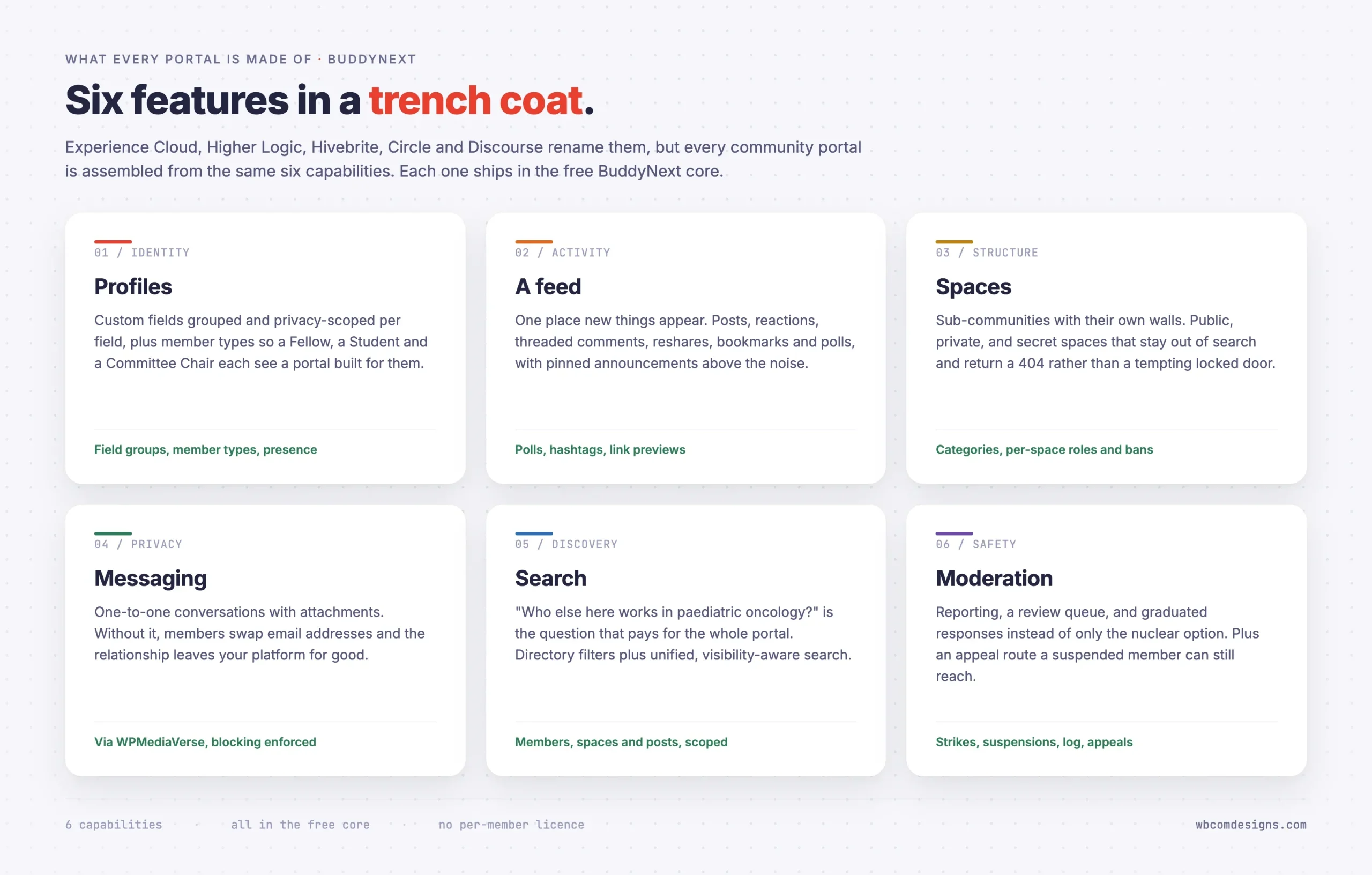
On WordPress, BuddyNext is a free, standalone community plugin that answers most of sections one to four in its core: profile field groups with per-field visibility, member types, spaces with public, private and secret visibility plus per-space roles and bans, a visibility-scoped search index, and moderation with reports, strikes, suspensions, a log and an appeals route that stays reachable while suspended. Membership tiers and billing are the paid tier, and enterprise single sign-on is the gap to establish early.
Frequently asked questions
Is thirty-three questions too many to send a vendor?
No, and the ones who think so are telling you something useful. A vendor selling a platform you will run for five years and populate with your members’ personal data should expect a structured requirements list. Sending it in writing also gives you answers you can compare side by side later, which a demo never does, and it means the person answering has to check rather than improvise.
Should we share our budget with vendors?
Not until you have the answers. Pricing conversations that begin with your budget tend to end at your budget. Get the functional answers first, then discuss cost, and always ask specifically what the price becomes at double your current size rather than what it is today.
How many vendors should we shortlist?
Three is usually right. Two gives you no calibration and five produces a comparison exercise longer than the implementation. Send the questions to five, shortlist the three who answer properly, and demo those.
Should we run a pilot before committing?
Yes, and make it a real one with real members rather than a sandbox. Sixty people from a group that already talks to each other, for a month. That will tell you more than any demo, and free or self-hosted options let you do it at almost no cost.
What if we cannot answer the ownership question?
Then delay the project rather than buying software. An unowned community portal will be quiet within a year regardless of what it cost, and having spent the budget makes the next attempt harder to justify.
How long should procurement take?
Shorter than most organisations make it. The questions here can be sent and answered in a fortnight. The time is better spent on the pilot and on deciding your member types and space structure, which is the work that actually determines whether the portal succeeds.
Where to start
Turn this into your own community portal requirements document by cutting anything that does not apply to your organisation and adding whatever is specific to it.
Send the questions before you book anything. The answers will remove at least one vendor from your list without you needing to watch a demonstration, and they will tell you which parts of your own requirements you have not yet decided.
Then answer the four questions in the last section honestly, because those decide the outcome more than the software will. Our full walkthrough on building a community portal on WordPress covers what implementation actually involves, and the portal plugin comparison covers which category of product you should be shortlisting in the first place.
















