The Employee Portal Nobody Opens (and the Five Things That Change That)
Most employee portals are technically fine and socially dead. The reasons staff stop opening an intranet are behavioural rather than technical, and all five are fixable without a redesign.

Almost every organisation with more than fifty staff has an employee portal, and almost every one of them is disappointing. The pattern is so consistent it is almost a genre: enthusiastic launch, three months of content, a slow fade, then a homepage carrying a message from a Christmas two years ago.
The usual diagnosis is that it needs a redesign. Organisations spend real money acting on that diagnosis and end up two years later with a better-looking portal nobody opens.
The actual reasons are behavioural, and there are five of them. None requires new software to fix, though some are much easier on software built for the job.
1. There is no reason to check it
This is the root cause, and the other four are variations of it.
People check things where something might have changed since they last looked. That is the entire mechanism. A portal organised around documents, policies and static pages offers no such possibility. The expenses policy did not change overnight. The org chart is the same. There is nothing to check, so nobody checks.
Compare that to the tools staff do open unprompted. Email, chat, and whatever social app they use. All three share one property: new things appear without being announced.
The fix is a feed that anyone can post to. Not a news page that internal communications updates on Fridays, which is a newsletter with extra clicks. A running stream where a warehouse supervisor can post that the loading bay is blocked, and forty people see it.
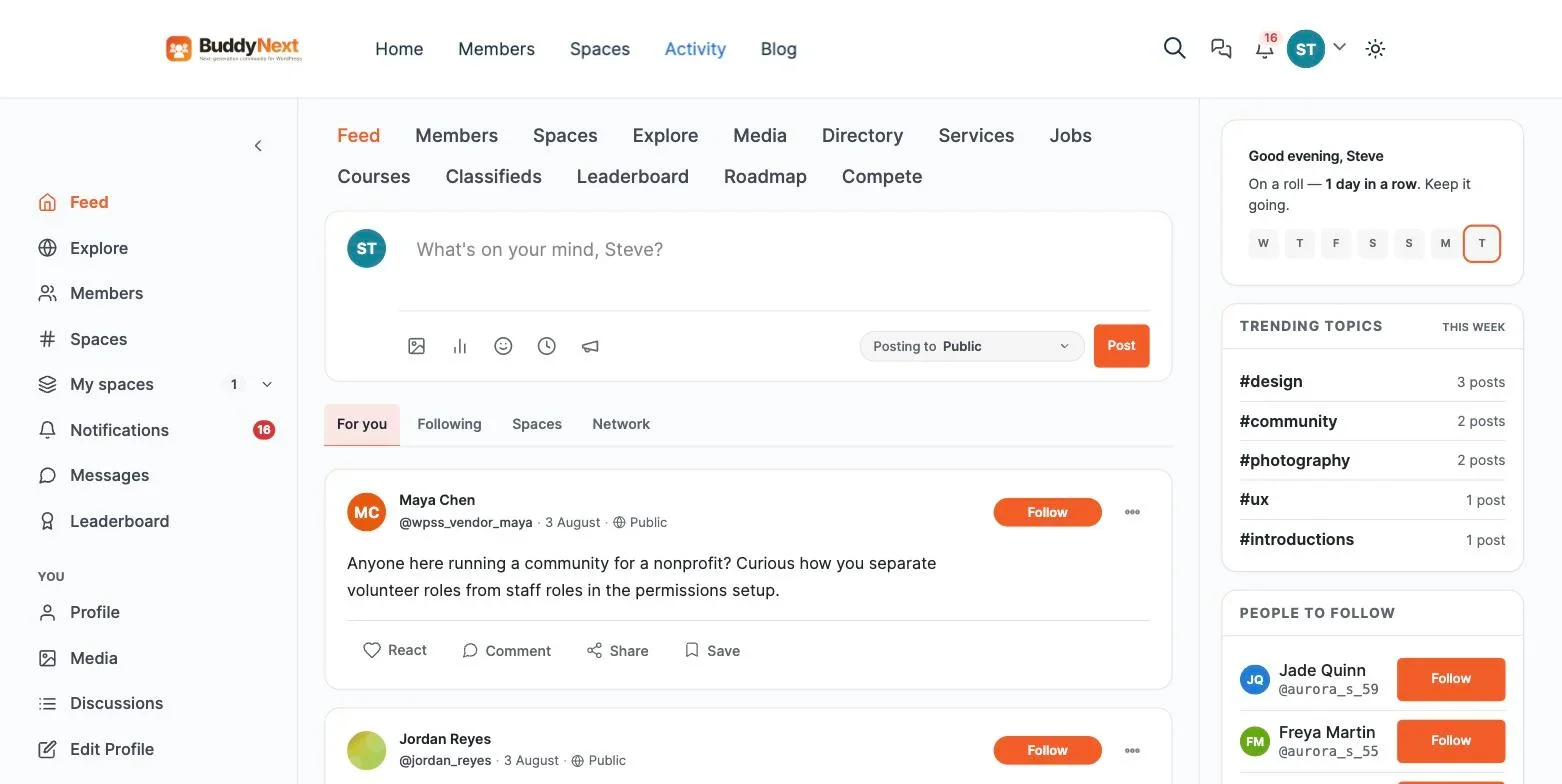
Organisations resist this, usually with a version of “we cannot have people posting whatever they like.” That instinct is understandable and it is what produces dead portals. Moderation is the answer to that concern, not prohibition.
2. It is one room for the whole company
A 400-person organisation with a single company-wide feed has a signal problem in both directions. Post everything and everyone tunes out. Post only things relevant to everyone and you post almost nothing, because very little is genuinely relevant to all 400 people.
The result is a portal where the finance team’s content annoys the warehouse and the warehouse’s content baffles finance, so both stop looking.
The fix is spaces with their own membership. Each team, site, project or interest group gets somewhere that is theirs, with its own feed and its own moderator. The company-wide space then carries only genuinely company-wide news, which restores its signal.
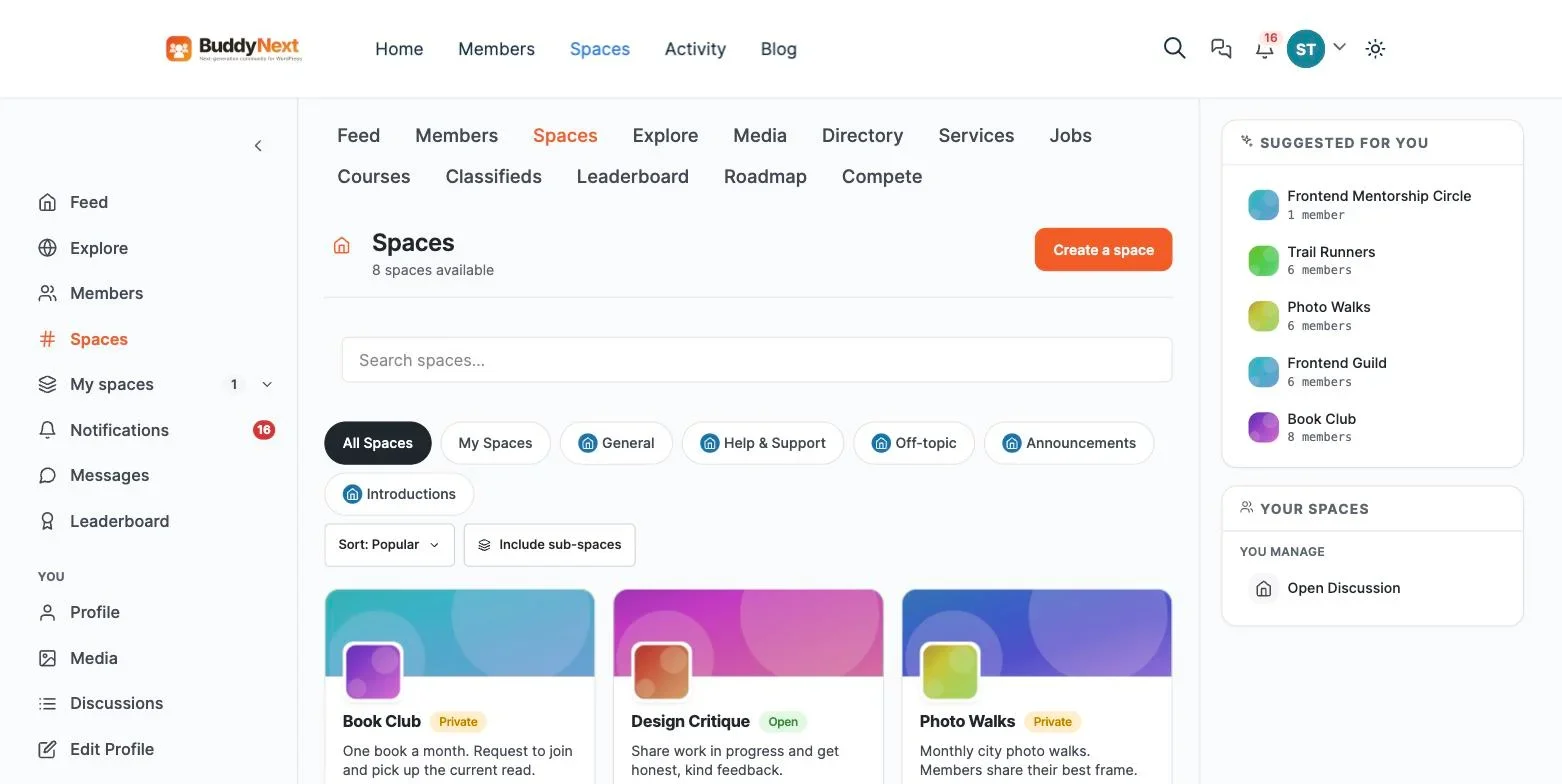
Two details matter more than they sound. Space moderators should be able to run their own space without an administrator account on the whole system, or every membership change becomes an IT ticket and the friction kills it. And some spaces need to be genuinely invisible rather than merely locked, for restructures, disciplinary matters and anything commercially sensitive.
3. It does not know who anyone is
The most valuable page on a mid-sized organisation’s intranet is the one that answers “who do I ask about this?”
Most portals inherit thin profiles from a directory sync: name, job title, email, sometimes a photo. That is enough to find someone whose name you already know and useless for finding someone whose name you do not.
The fix is profile fields with real organisational meaning. Team, site, what this person actually does as opposed to their job title, areas of expertise, systems they administer, languages spoken, and whether they are happy to be asked things by strangers.
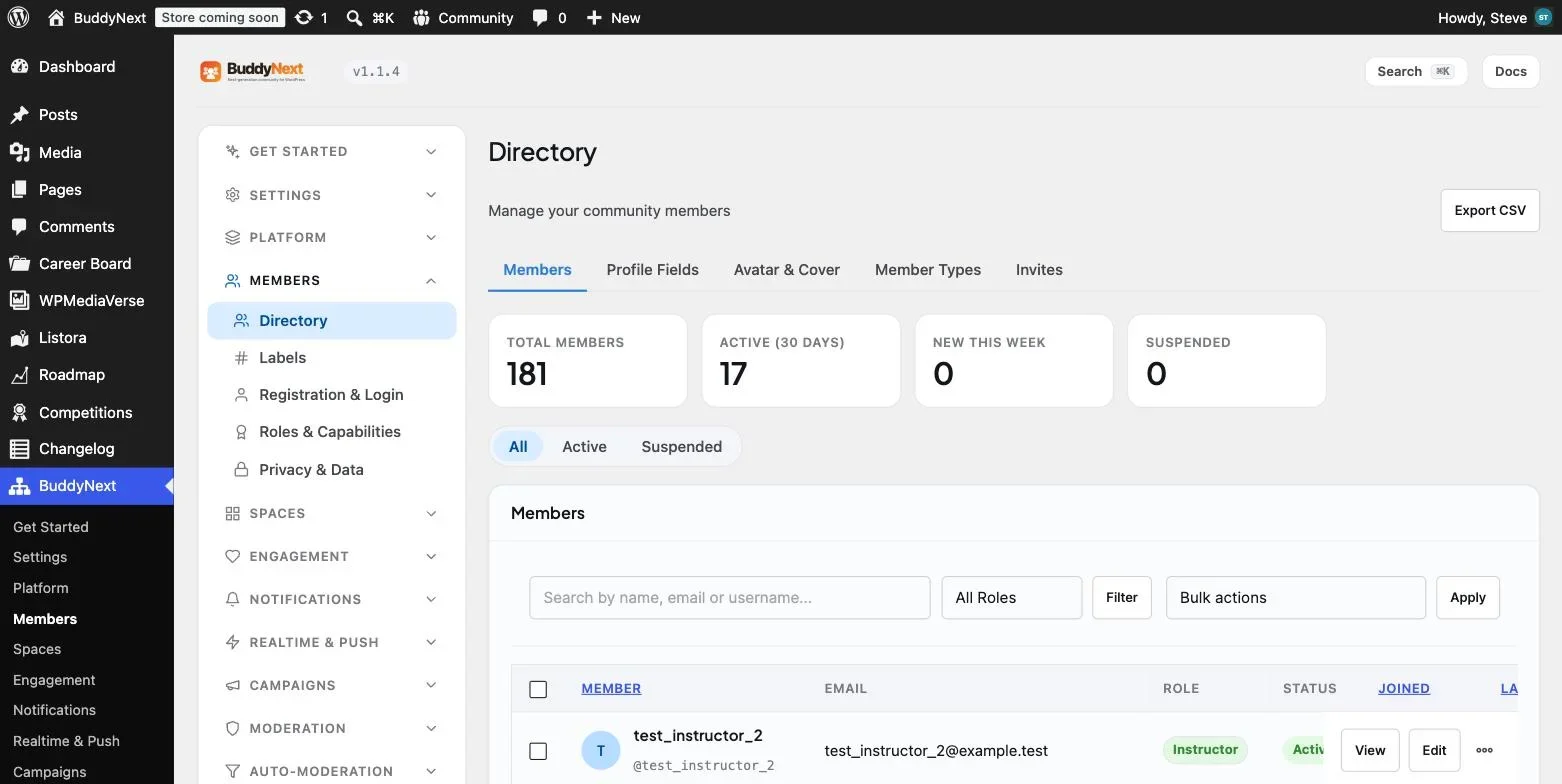
Member types matter here too. Staff, contractor, volunteer and agency worker often need different access, and building one portal for an average employee who does not exist is how you end up excluding half the workforce by accident.
4. Search returns documents when people wanted answers
Intranet search is usually tuned for files, because the portal was built around a document library. But the questions staff actually have are rarely document-shaped.
“Has anyone dealt with this customer before?” “What did we decide about the returns policy?” “Who set up the old reporting system?” Those answers live in conversations, not files, which is why an organisation with an excellent document search still has people asking the same questions repeatedly in email.
The fix is making the conversation searchable and making sure search respects permissions. Every question answered in a searchable space is a question that does not need answering again. Every question answered in a chat tool whose archive expires is a question you will answer again next year.
This is the single strongest argument against letting the company’s real conversation happen entirely in chat. Chat is excellent for the next hour and worthless for the next year.
5. Nobody owns it
The one that quietly kills more portals than the other four combined.
An intranet is not a project that finishes. It needs somebody whose job description includes welcoming new starters, asking a question when it has been quiet for a week, noticing that a team has stopped posting, and working the report queue. A few hours a week, not a full-time role.
The fix is naming that person and putting it in writing. Organisations that do this succeed on almost any platform. Organisations that do not fail on all of them, including the expensive ones, which is why platform choice explains far less about intranet success than vendors imply.
The second half of the fix is delegation. A single owner cannot animate forty spaces. Recruit a moderator per space, brief them in two pages, and let them run their own area.
Building an employee portal on WordPress
Many organisations already run WordPress for their public site, which makes an internal portal a second install rather than a new vendor relationship and a new procurement cycle.
BuddyNext is a free, standalone community plugin that adds the social layer WordPress has never shipped. It does not require BuddyPress. Against the five fixes above it covers the feed with announcements, reactions, comments and polls, spaces with public, private and secret visibility plus per-space roles, profile field groups with per-field visibility and member types, a visibility-scoped search index across people, spaces and posts, and a moderation suite with reports, strikes, suspensions, a log and an appeals route.
Direct messaging comes from the companion WPMediaVerse plugin.
The main thing to establish before committing is identity. BuddyNext offers OAuth social login through Google, Facebook, GitHub, Discord and Apple, which covers Google Workspace organisations. If your IT policy requires SAML against Entra ID or Okta, you will need an additional plugin and you will maintain that integration yourself. Establish that in week one. Our companion piece on what SharePoint now costs per head covers the licensing side of the same decision.
The launch sequence that works
- Lock it down first. Closed registration, invitations only, nothing visible to logged-out visitors. Turn on email verification and two-factor if you handle anything sensitive.
- Model the organisation before importing anyone. Profile field groups and member types are cheap to change at zero records and expensive at four hundred.
- Create four spaces, not forty. Announcements, the largest team, one genuinely non-work space, and one live project. Mirroring the org chart produces a lot of empty rooms.
- Recruit your moderators before launch, and let them post first so the portal opens with familiar names already talking.
- Seed twenty or thirty real posts. An empty feed at launch is the most reliable way to fail, because people judge in the first thirty seconds.
- Launch to one team, not everyone. Fix what annoys them while the audience is small and forgiving, then expand team by team.
The non-work space deserves a note. Committees resist it as frivolous, and it is consistently among the most active spaces in any successful internal community. It is where the habit of checking forms, and the habit is what carries people to the announcements they would otherwise ignore.
Measuring it properly
Launch-week logins tell you nothing except that you sent an email. Three measures actually predict survival.
- Unprompted returning users per week. Strip out sessions that started from an all-staff email link. What remains is the number of people who chose to check, which is the only real evidence a habit formed.
- Staff posts versus internal comms posts. If communications produces most of the content, you have a newsletter with a login. Healthy internal communities cross over within a few months.
- Questions answered by colleagues. Each one is an email a manager did not receive, and it stays searchable for the next person.
Break all three down by team. Adoption is never uniform, and lagging teams almost always have a fixable cause: no space of their own, no active moderator, or no device to read it on.
The teams everyone forgets
The staff who most need internal communication are often the ones an organisation is least willing to buy a licence for. Production floors, care workers in the community, hospitality staff, field engineers, drivers. People without a company laptop and frequently without a company email address.
Per-seat licensing quietly excludes them, because a full productivity licence for someone who needs one page a week is impossible to justify. So they get a WhatsApp group run by a supervisor and a noticeboard in the break room, and the organisation wonders why engagement scores are worse on the floor than in the office.
Two things change this. A portal that installs as a PWA behaves like an app on a personal phone, with no app store review and no device management. And self-hosted software has no per-head charge, so “should this person have access?” becomes a policy question rather than a budget one.
If a large share of your workforce is deskless, this is not a secondary consideration. It is usually the whole business case.
What new starters reveal about your portal
The fastest diagnostic for an employee portal is to watch somebody use it in their first week. New starters have no institutional knowledge to compensate with, so every gap shows immediately.
Give a new joiner three tasks and watch what happens.
- Find out who administers the expenses system. If they cannot answer this from the portal in under a minute, your profiles are too thin. A job title does not tell anyone who actually runs a system.
- Find out what the company decided about remote working and why. If they find a policy PDF but no reasoning, your portal stores decisions without context, which is why the same debates keep restarting.
- Introduce themselves to their team. If there is nowhere obvious to do this, the portal has no social surface and will never be more than a document store.
Every one of those failures is fixable without a redesign, and each maps directly onto one of the five problems above. Run this exercise once a quarter with whoever joined most recently. It is a better health check than any analytics dashboard, because it measures whether the portal answers real questions rather than whether people clicked.
Reviving one that has already died
Most organisations reading this do not have a blank slate. They have a portal that launched two years ago and is now a homepage nobody visits. Relaunching the same thing with a new design almost never works, because staff already have an opinion.
What does work is treating it as a new thing with a narrow purpose.
- Pick one team with a genuine communication problem and solve it for them alone. A team whose shift information is scattered, or a project that lives in an unmanageable email thread. Do not announce anything company-wide.
- Build them a space and move that specific problem into it. Nothing else. No policies, no news, no org chart.
- Let it work for a month. The measure is whether they keep using it when nobody is watching.
- Let the second team come to you. Adoption that spreads by request is durable. Adoption that spreads by all-staff email is not.
- Only then move the official content across, once there is an audience already in the habit of looking.
This is slower than a relaunch and considerably more likely to survive. It also costs almost nothing to attempt, which matters when the last intranet project spent a budget and produced a homepage with a stale Christmas message on it.
What an intranet costs when you self-host it
Item | 50 staff | 400 staff | Scales with headcount? |
|---|---|---|---|
Hosting | $30 to $60/month | $80 to $200/month | With traffic, not headcount |
Community plugin | Free | Free | No |
Object caching | Often included | Worth paying for | No |
Owner time | 2 to 4 hours/week | 4 to 8 hours/week | Slightly |
Per-seat licence | None | None | No |
The bottom row is the structural point. A licensed intranet turns every hire into a recurring cost on a tool most hires barely use. A self-hosted one turns growth into a hosting decision, which is a much smaller number and a much easier conversation with finance.
Where you should spend money instead is on the owner’s time and on backups. The archive is the asset, and an intranet nobody has time to tend will fail regardless of what it cost.
Two objections worth taking seriously
Not every concern about opening an intranet up is corporate nervousness. Two of them are legitimate and deserve a real answer.
“Our staff will use it to complain.” Some will, and that is not automatically bad. Complaints that surface in a visible, moderated place are complaints you can answer, and answering one well in public is worth more than answering ten privately. What you need is a rule about what belongs there and what belongs in a grievance process, published before launch, plus a moderation log so decisions are defensible. The organisations that suppress all criticism end up with a dead portal and the same complaints in an unmoderated WhatsApp group instead.
“Sensitive information will end up in the wrong place.” A real risk, and the mitigation is structural rather than cultural. Secret spaces that do not appear in search, per-space membership so a restructure discussion is genuinely limited to the people running it, and search that respects permissions so nothing leaks through a results page. Check those three behaviours in a demo rather than trusting a feature list, because products vary enormously here and the failure mode is quiet.
Frequently asked questions
Should we let staff post freely, or approve posts first?
Free posting with reactive moderation, in almost every case. Pre-approval reliably kills internal communities, because a post that appears two days later has missed its moment and people stop bothering. Keep pre-approval available as a setting you can switch on if something goes wrong, and leave it off by default.
What happens when somebody posts a complaint about their manager?
Have the process written down before it happens, because it will. Who reviews it, what gets escalated to HR, what stays visible while it is investigated, and what gets recorded. The moderation log matters here in a way it does not on a hobby forum, because employment decisions get challenged and “we deleted it” is not an adequate account six months later.
Does an employee portal replace Slack or Teams?
No, and treating it as a replacement usually produces two half-used tools. Chat is for the next hour. The portal is for the next year: decisions, policies, who does what, and the searchable record. Say that division out loud in one sentence and pin it somewhere, because ambiguity about where to post is what makes people post nowhere.
How long before we know whether it worked?
Three months. Internal communities either reach self-sustaining activity in that window or they do not, and the signal is the crossover point where staff posts overtake comms posts. If you are at month four and communications still writes eighty per cent of the content, change something structural rather than waiting.
How many spaces should a 200-person company end up with?
Fewer than the org chart suggests. Somewhere between eight and fifteen is typical for 200 staff once it settles, and the shape rarely matches the reporting structure. Spaces form around shared work and shared interest, which cut across departments. Let them emerge by request rather than designing the full set in advance, and archive any space that has been silent for three months so the directory keeps meaning something.
Should managers be able to see everything?
Not by default, and this is worth deciding explicitly. A team space where the team knows their director reads every post is a team space where nothing candid gets written. Give leadership access to the company-wide space and to spaces they belong to, the same as everyone else. If a genuine reason arises to look inside a space, that should be a deliberate, logged action rather than a standing permission.
What about staff who simply will not engage?
Expect roughly a tenth of any workforce to post, another portion to comment occasionally, and the majority to read without ever contributing. That distribution is normal and healthy. The mistake is measuring success by participation rate rather than by whether the people who need information are getting it. A portal where 400 people read and 40 people post is working exactly as intended.
Can we migrate our existing intranet content across?
Some of it, and less than you think is worth moving. Policies and current documents, yes. Years of stale news posts, no. A portal that launches carrying an archive of dead content inherits its predecessor’s reputation. Move what is current, keep the old system read-only for a year if you must, and let the new one launch looking alive.
Where to start
Ask ten people across different teams when they last opened the portal voluntarily. Not to find a document, not because a link sent them. The answers will tell you which of the five problems you have, and it is usually the first one.
Then fix that one before considering a redesign, because a beautiful portal with nothing happening on it has exactly the same adoption problem as an ugly one. The full build is covered in our walkthrough on building a community portal on WordPress.
















