phpBB to WordPress: bbPress, Jetonomy or BuddyNext?
How to move an old phpBB forum to WordPress: what the bbPress converter carries over, where Jetonomy and BuddyNext fit, passwords, redirects and a test checklist.

Somewhere on the internet there is a phpBB forum that has been running since 2006. The software has not been updated in a while, the admin panel looks like it, and the host keeps warning about the PHP version. Fifteen years of answers sit in that database, and Google still sends people to them every day. A phpBB to WordPress move is how many owners finally fix that.
Forums are having a small revival, with owners of old Discord servers and Facebook groups asking where their community should live for the next ten years. For the owner of a phpBB board the question is narrower. Can a phpBB to WordPress move keep the content, the members and the search traffic? This guide answers that, using what the bbPress converter really maps, what our own importers do, and the order we work in on migration projects.
Key takeaways
- bbPress has an official importer for phpBB 3.x. It maps users, forums, topics, replies, BBCode, subscriptions and favourites.
- Attachments, private messages and permissions are not in the converter field map we read, so plan them separately.
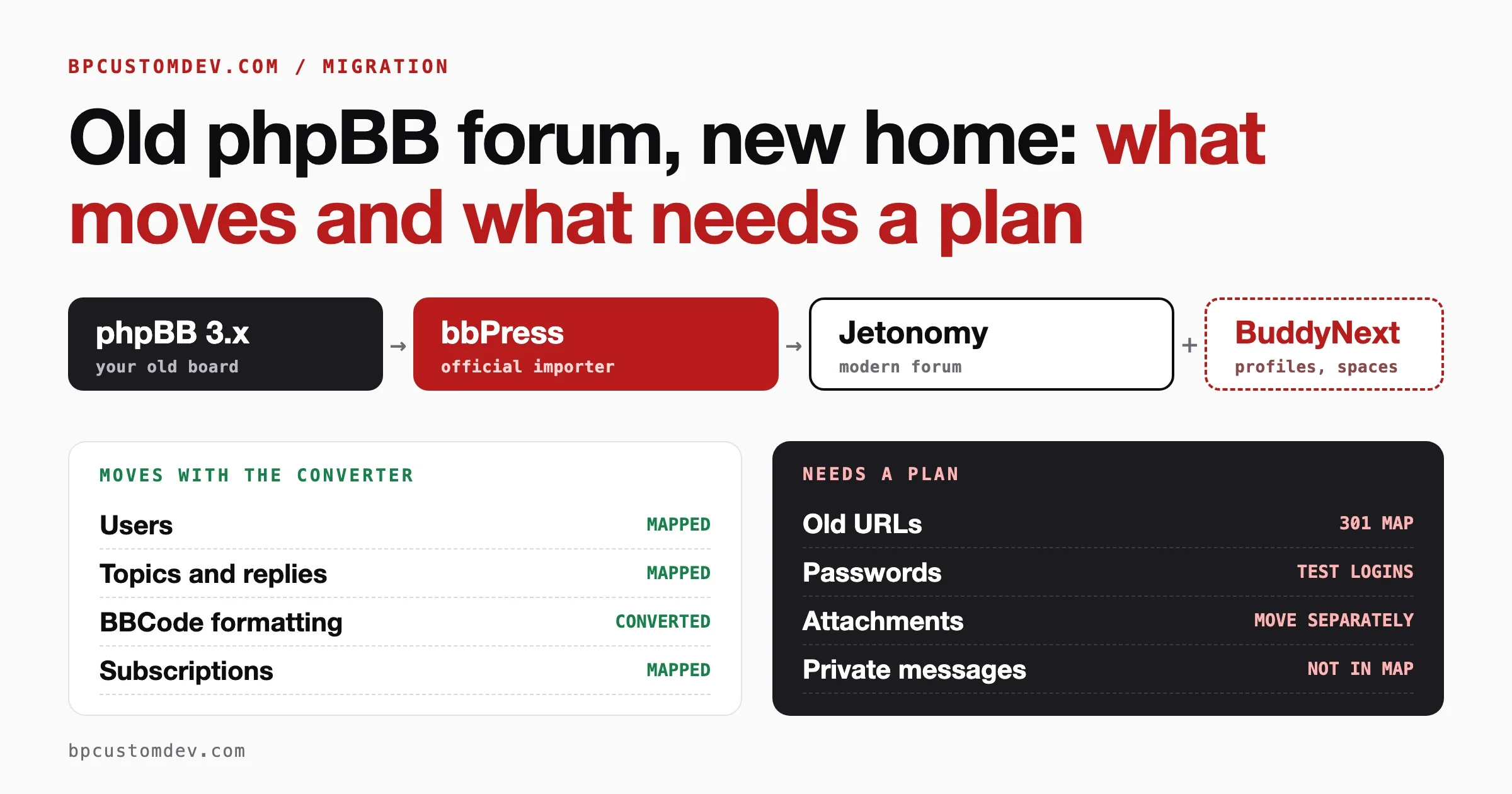
- The route to Jetonomy or BuddyNext runs through bbPress: phpBB to bbPress, then bbPress to Jetonomy, with BuddyNext as the community layer.
- Test member passwords, build 301 redirects before cutover, and rehearse twice on staging with real data.
Can you move from phpBB to WordPress without losing your forum?
Short answer: yes for the core content, and no for everything automatically. Users, forums, topics and replies move with a converter. Passwords, attachments, private messages, permissions and your old URLs each need a decision and, usually, a bit of work.
The official route is the bbPress importer. The bbPress documentation lists phpBB 3.x among the supported sources. It lives under Tools, Forums, Import Forums in the WordPress admin. You choose phpBB as the source, enter the connection details of the old database, and run it in batches. Afterwards you run the Repair Forums tools to rebuild the relationships between forums, topics, replies and users.
That gets a phpBB forum into bbPress. Where it goes from there depends on what you want the community to become, and that is the real decision in this project. We cover it below.
What actually carries over from phpBB?
We read the phpBB converter that ships with bbPress rather than relying on a feature list. Below is what its field mapping covers, and where we found nothing. Treat anything in the “plan for it” column as manual work until your own test run proves otherwise.
| Item | What the converter does | Plan for it |
|---|---|---|
| Forums and hierarchy | Maps names, descriptions, parent forum, order, type and status | Check that categories and sub-forums nest as they did |
| Topics and replies | Maps title, body, author, dates, forum, sticky and closed state | Spot-check the longest and the oldest threads |
| Post formatting | Converts common BBCode (bold, italic, underline, quote, image, link, email, code, colour) to HTML | Look for odd quotes, nested lists and smileys |
| Users | Maps username, email, registration date, website, signature and profile fields such as location and interests | Decide whether inactive and spam accounts come across at all |
| Subscriptions and favourites | Maps forum subscriptions, topic subscriptions and bookmarks | Confirm notification emails still reach the right people |
| Passwords | Keeps the old hash so users can sign in once, then replaces it | Test with a real account, expect reset emails for some |
| Guest posts | Has fields for anonymous authors | Forum threads report mixed results, so test guest posts specifically |
| Topic tags | Not applicable, phpBB has none | Tag after the move if you want them |
| Attachments | We did not find them in the field mapping | Move files and re-link them separately |
| Private messages | We did not find them in the field mapping | Decide whether to archive or drop them |
| Groups and permissions | Not mapped | Rebuild roles by hand on the new platform |
| Old URLs | Not redirected | Build 301 redirects, covered below |
One note on the table. The converter file is long, and the part we could read did not include attachments or private messages. If your forum depends on them, ask for a test import of a sample board before committing to a route.
Two items in that list cause more regret than all the rest together: attachments and URLs. Attachments because members posted screenshots in 2011 that answer questions today. URLs because every inbound link and every Google result points at a phpBB address that will stop working on cutover day.
Which target fits: bbPress, Jetonomy or BuddyNext?
Short answer: bbPress if you want the old forum preserved with the least change, Jetonomy if you want a modern forum, and BuddyNext if members and profiles matter as much as the discussions. They are not exclusive. On our projects they are often stages of one route.
bbPress: the shortest route
bbPress has the official phpBB converter, so this is a single hop. It also keeps content in standard WordPress posts, which is familiar to every WordPress developer. The costs are age and scale. The interface looks like a 2012 forum because it is one, and on very large boards the post-based storage becomes a performance question. Our post on custom tables versus WordPress posts for forum performance explains why.
Jetonomy: a modern forum with its own tables
Jetonomy is our forum plugin. It stores topics and replies in its own database tables and has a built-in importer for bbPress. It also has one for wpForo. It does not read phpBB directly, so the route from phpBB is two steps: convert phpBB into bbPress with the official converter, then import bbPress into Jetonomy. That sounds like extra work, and it is a little, but the intermediate bbPress copy is also your safety net and your verification point. Our guide to migrating from bbPress to a modern forum covers the second step in detail, and our comparison of wpForo, bbPress and Jetonomy helps if you are still choosing.
BuddyNext: the community around the forum
BuddyNext is the community layer: profiles, spaces, connections, activity and messaging. For forums it works with Jetonomy. Its own importer reads BuddyPress and BuddyBoss sites, not phpBB, so phpBB members arrive as ordinary WordPress users through the earlier steps, and the BuddyNext profile layer is built on top of them. Pick this when your members expect profiles and groups and you want one platform for all of it. Our post on community portal versus forum versus Slack helps with that call.
How to choose
| Your situation | Best target | Why |
|---|---|---|
| Archive-heavy board, few new posts, you mostly want to keep the answers | bbPress | One hop, least risk, content stays searchable |
| Active forum, members want a modern feel, mobile use matters | Jetonomy | Faster, custom tables, moderation tools, built-in bbPress importer |
| Forum plus member profiles, groups, messaging or courses | BuddyNext with Jetonomy | One community platform instead of a forum with plugins |
| Very large board and a tight cutover window | Plan with a developer | Batch size, server limits and redirects need tuning |
Want a second pair of eyes on your forum?
Send us the phpBB version, the number of members and topics, and where you want to land. We will tell you which route we would take and what to watch for.
What is the safest order of work?
This is the sequence we follow. It is deliberately boring, because boring is what you want when fifteen years of content is at stake.
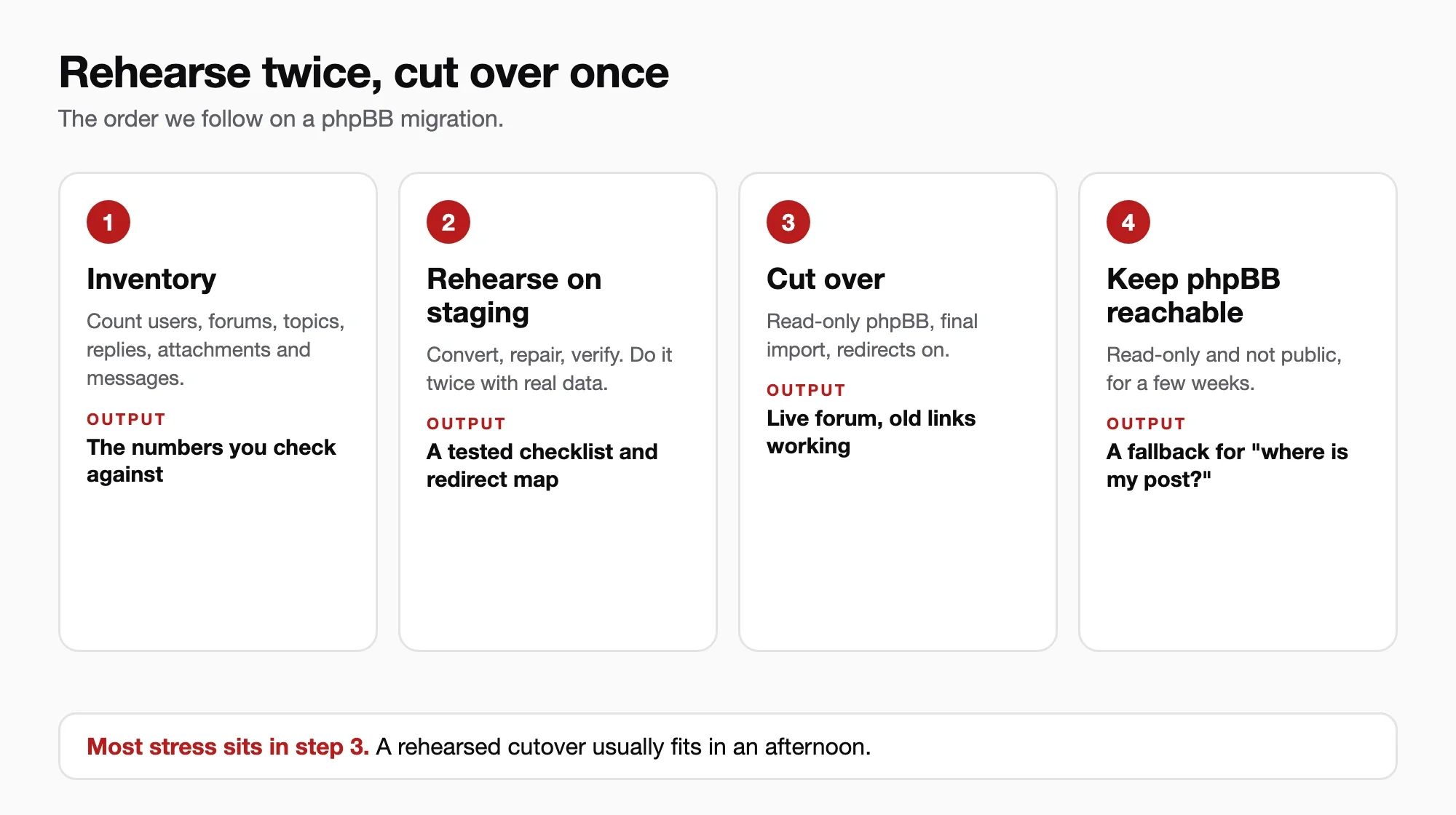
- Inventory the old board. Count users, forums, topics, replies, attachments, private messages and polls. Note the phpBB version, the PHP and database versions it runs on, and any extensions installed. Keep the numbers, because you will compare them at the end.
- Take a full backup and freeze nothing yet. The bbPress documentation itself says to keep a backup until the migration has been validated. Keep the phpBB site live and read-write while you rehearse.
- Build a staging WordPress site. Same PHP version as production, a clean install, bbPress active. Raise the PHP memory limit before large imports, since reports of failed imports on big boards often come down to running out of memory.
- Run the converter on staging. Enter the phpBB database details, enable Convert Users, and start with a conservative batch size. Let it finish.
- Run the Repair Forums tools, one at a time. The documentation specifically says to run each separately because each one puts load on the database.
- Verify against your inventory. Compare counts, then run the checklist later in this guide.
- Import into the target, if it is not bbPress. For Jetonomy, run its importer from bbPress and check that counts match again.
- Build the redirects before cutover, not after. More on that next.
- Cut over. Put phpBB in read-only mode, run a final import to catch the newest posts, switch the domain or path, and turn the redirects on.
- Keep phpBB reachable for a few weeks. Keep it read-only and not public, so you can answer “where did my post go?” from the original.
Step 9 is where most of the stress sits. A migration that is rehearsed twice on staging usually cuts over in an afternoon. One that is run for the first time on production usually does not.
What happens to member passwords?
Short answer: members can often sign in with their old password once, and you should still plan for reset emails.
According to the bbPress documentation, when Convert Users is on, the importer keeps each member’s old password hash in user metadata. On the first successful login, bbPress checks the password against that stored hash, then saves a standard WordPress hash and deletes the old one. A wrong password changes nothing. The documentation adds that some password formats require a reset, and recommends testing an imported account before you retire the source system.
That caveat matters for phpBB in particular. Newer phpBB 3.x installs can store passwords in a modern format, and the converter code we read checks the older phpass-style and MD5 formats. We cannot promise from reading code which of your accounts will pass, so test with real accounts from different eras of your board. Then plan the member message for the ones that do not: a short email before cutover that says “you may be asked to reset your password, here is the link.”
Do not skip that email. A forum that silently locks out half its members on day one loses momentum it will not get back.
How do you keep your Google rankings and old links?
Old phpBB addresses look like viewtopic.php?t=123 and viewforum.php?f=4. After cutover they return errors unless something maps them to the new pages. Each one that errors is a lost visitor, and enough of them looks to Google like a site that vanished.
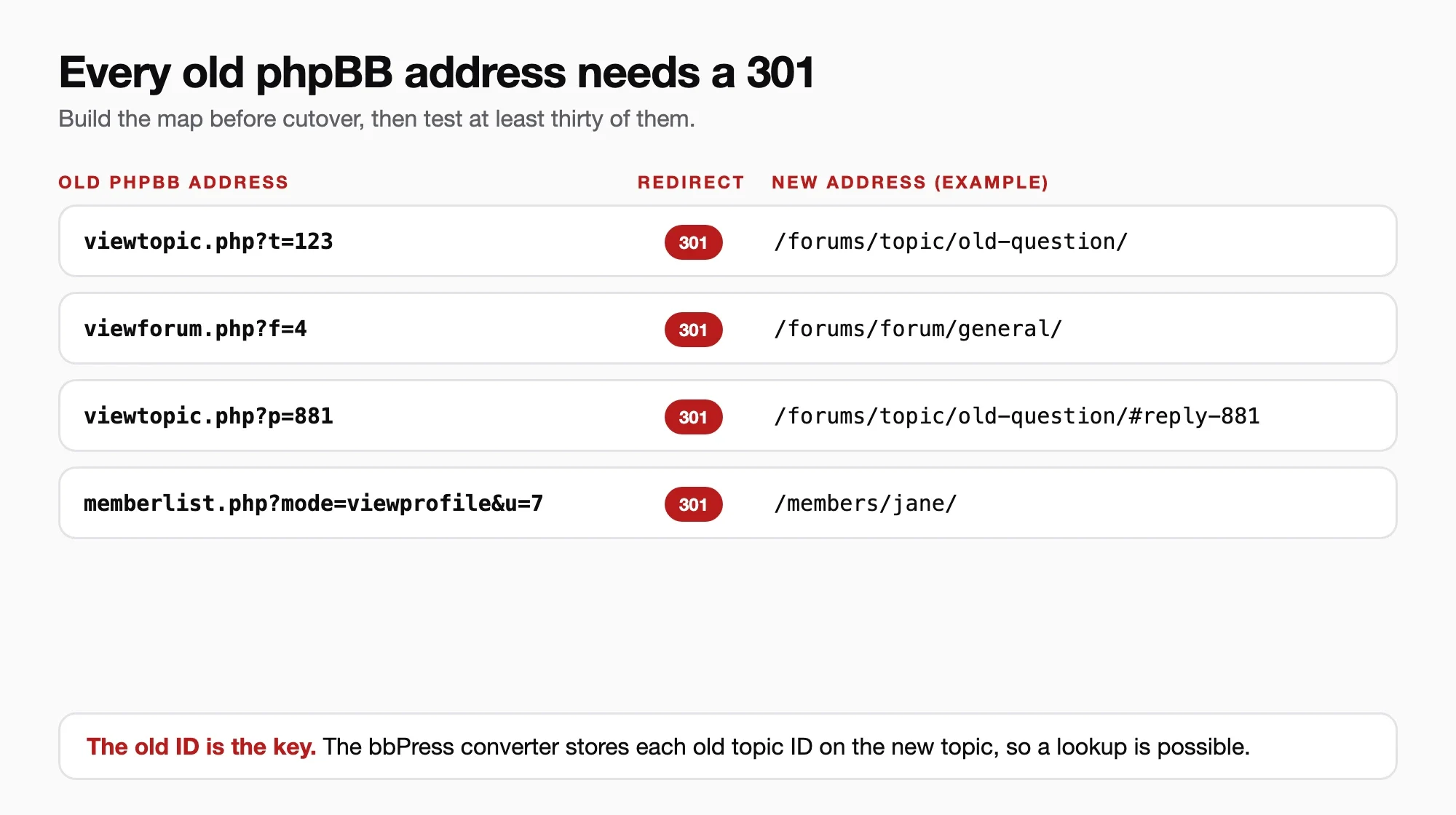
The bbPress converter helps here by recording the old IDs. Its field mapping stores the original topic ID on each imported topic as post meta, under a key named _bbp_old_topic_id. That means a redirect can look up the new page from the old ID. Here is a minimal version for a bbPress target.
add_action( 'template_redirect', 'oldforum_redirect_phpbb_topics', 1 );

function oldforum_redirect_phpbb_topics() {
	$path = isset( $_SERVER['REQUEST_URI'] )
		? wp_parse_url( wp_unslash( $_SERVER['REQUEST_URI'] ), PHP_URL_PATH )
		: '';
	if ( ! $path || false === strpos( $path, 'viewtopic.php' ) ) {
		return;
	}

	$old_id = isset( $_GET['t'] ) ? absint( $_GET['t'] ) : 0;
	if ( ! $old_id ) {
		return;
	}

	$ids = get_posts( array(
		'post_type'      => bbp_get_topic_post_type(),
		'post_status'    => 'publish',
		'meta_key'       => '_bbp_old_topic_id',
		'meta_value'     => $old_id,
		'fields'         => 'ids',
		'posts_per_page' => 1,
		'no_found_rows'  => true,
	) );

	if ( $ids ) {
		wp_safe_redirect( get_permalink( $ids[0] ), 301 );
		exit;
	}
}
Three honest limits apply to that snippet:
- Your web server has to hand the old addresses to WordPress. If phpBB lived in a
/forum/folder and that folder is gone, add a server rule so those requests reach the site instead of a 404. - Meta value lookups are not indexed in WordPress by default. On a board with tens of thousands of topics, generate a static map of old ID to new address at cutover and redirect from that file. A database lookup on every old-link hit will not hold up.
- Links by post ID (
viewtopic.php?p=), forum links and profile links need their own rules.
If you move on to Jetonomy, its importer does not create redirects either. Our bbPress migration guide says the same. So export your old-to-new map from bbPress before you deactivate it, and keep it. Our post on forum SEO and community content goes into why these pages are worth protecting.
What can go wrong, and how do you check?
Import problems repeat. Here are the common ones, in symptom, check and fix order.
The import stops or times out
Check: the PHP error log and the memory limit. Fix: lower the rows per batch in the importer settings, raise the delay between batches, raise the PHP memory limit, and run it again. Large boards are the usual cause.
You ran it twice and now there are duplicates
Check: whether the same topic title appears twice. Fix: the importer has Start Over and Purge Previous Import options. Use them on staging before the final run, and never rerun a finished import on production without reading what they do.
Counts do not match the old board
Check: the topic and reply totals on each forum against your inventory. Fix: run the Repair Forums tools individually, then count again. If the gap is in one forum, look at whether its posts were unapproved or deleted in phpBB.
Posts look broken
Check: threads with nested quotes, code blocks and images. Fix: BBCode converts to HTML, but unusual tags and smileys may not. Sample twenty threads across different years and fix patterns with a search-and-replace on staging.
Members cannot sign in
Check: three real accounts, including one from the earliest registrations. Fix: send the reset email described above, and keep the lost-password link prominent on the login page.
What our own importers have already had to fix
We mention these because they show what a serious import has to get right, not as release notes. In Jetonomy 2.0.3 and 2.0.4 our team tightened several import behaviours. The bbPress importer now stops its batches at the time limit and reports the rows it handled, so the next batch resumes at the right place. Re-importing a bbPress site now gives members of private and hidden forums their access, and skips members banned from the space. Imported titles are stored as plain text, so escaped markup in an old title cannot turn into live markup. Categories created by an import get readable addresses instead of numeric ones. The full lists are in the Jetonomy release notes.
BuddyNext has similar history. Since 1.1.0 its content services accept historical dates from importers, so migrated comments, spaces and reactions keep their original dates, and a WP-CLI check and repair exists for imported profile addresses that break mentions. BuddyNext 1.2.7 added multisite support where the network’s main site runs the community, and spaces that can link to other objects such as courses. See the BuddyNext release notes for details. The lesson for a phpBB move: dates, private-forum access and profile addresses are exactly where migrations break, so check them deliberately.
What should you test before you switch the domain?
Run this list on staging, then again after the final import.
- Total users, forums, topics and replies match your inventory, forum by forum.
- The ten oldest topics, the ten longest threads and the ten most viewed topics render correctly.
- A topic with quotes, a topic with code, and a topic with images.
- A locked topic and a sticky topic keep their state.
- A member with accented characters in the name appears correctly.
- Three real members sign in with their old passwords, and a reset email arrives for one who cannot.
- Subscribed members receive a notification on a new reply.
- Old addresses (topic, forum, profile, post links) redirect with a 301 to the right new page. Test at least thirty, not three.
- Search finds an old topic by a phrase from its body.
- The XML sitemap lists the new forum pages, and the old address space is not still advertised.
- Pages load acceptably on a phone with the full imported dataset, not the empty demo.
The last point catches teams out. A forum with 50 test topics and a forum with 200,000 real replies are different machines. Test with the real size.
What does a phpBB migration cost, and how long does it take?
It depends on the size of the board, how much of the “plan for it” column applies to you, and how much of the member experience you want to redesign. A small archive-style board moving to bbPress is a short project. A large active community moving to a new platform with redirects, a password plan and a redesigned member area is a larger one.
We would rather scope it from your numbers than quote a figure here. The inventory from step 1 of the work order above, plus a look at which add-ons your phpBB uses, is enough for us to give an honest estimate. A test import on staging usually settles any doubt about attachments and messages before you commit.
Can our team move your phpBB forum for you?
Yes. Community migration is a large part of what our team does. For a phpBB board that normally means the inventory, a staging rehearsal with your own data, the conversion into bbPress, an onward import into Jetonomy or a BuddyNext community if that is the target, a redirect map for your old addresses, a member communication plan for passwords, and a cutover we run with you.
If you want to see what that looks like for your board, read about our community forum development work, then send us a note. Tell us roughly how many members and topics you have, the phpBB version, and whether you want the forum kept as an archive or turned into something more active. We will tell you plainly which route we would take, and if bbPress alone is enough, we will say so.
Move your phpBB forum without losing it
Inventory, staging rehearsal, conversion, redirect map, password plan and a cutover we run with you.
Frequently asked questions
Can I import a phpBB forum into WordPress?
Yes. The bbPress plugin includes an importer that lists phpBB 3.x as a supported source. You run it from Tools, Forums, Import Forums, provide the old database details, and then run the Repair Forums tools. Content moves into bbPress, which you can keep or use as the first step to another forum platform.
Does the importer move private messages and attachments?
We did not find private messages or attachments in the phpBB converter’s field mapping, so plan to handle them separately. Run a test import with a sample board to confirm what your own data does.
Will members keep their passwords?
Often, but not always. With Convert Users on, bbPress keeps each member’s old hash and upgrades it the first time they sign in successfully. Some formats need a reset. Test real accounts and prepare a password reset message for members who cannot sign in.
Can I move from phpBB straight to Jetonomy or BuddyNext?
Not directly. Jetonomy’s importer reads bbPress and wpForo, and BuddyNext’s importer reads BuddyPress and BuddyBoss. The route from phpBB goes through bbPress first, then on to Jetonomy, with BuddyNext providing the community layer around it.
How do I keep my SEO after moving a forum?
Redirect every old phpBB address to the matching new page with a 301, and build the redirect map before cutover. The bbPress converter stores the old topic ID on each imported topic, which makes a lookup possible. Submit the new sitemap and monitor crawl errors for the first weeks.
What is the difference between bbPress and Jetonomy?
bbPress is the long-standing WordPress forum plugin and stores forum content as standard posts. Jetonomy is a newer forum plugin that stores content in its own tables and includes moderation, trust levels and a bbPress importer. See our comparison of wpForo, bbPress and Jetonomy for the details.
How long should I keep the old phpBB board?
Keep it read-only and not public for a few weeks after cutover. It lets you compare original posts when a member reports something missing, and it holds your fallback if a problem appears late.
Should I move to WordPress at all?
If your forum is mostly an archive, and nobody maintains phpBB or its extensions, moving makes security and upkeep easier because it sits on a stack you already run. If your forum is healthy and your team is happy with phpBB, a move for its own sake is not required. Fix the PHP version, update phpBB, and revisit the question when it hurts.
Can I test the migration without touching my live forum?
Yes, and you should. Restore a copy of the phpBB database on a staging server, point a staging WordPress site at it, and run the full process there. Your live board stays untouched throughout.