Best WordPress LMS for Schools in 2026
Eight WordPress LMS platforms compared on institutional readiness: multi-teacher administration, bulk enrollment, rollup reporting, and alumni continuity.
A school does not need one instructor’s course, it needs an institution: multiple teachers, multiple classes running in parallel, an administrator who can see across all of them, bulk student enrollment at the start of a term, and reporting that rolls up from an individual student to a whole cohort to the school as a unit. Most WordPress LMS plugins are built for a single instructor or a course marketplace, and stretching them to institutional scale exposes exactly where that assumption breaks.
This comparison ranks eight WordPress LMS platforms specifically on institutional readiness: multi-teacher administration, bulk enrollment, role-based oversight, and reporting that scales past a handful of students, with this site’s usual bias toward community and alumni continuity. For adjacent decisions, see our guides to the best LMS for teachers and building an alumni portal.
Table of Contents
- Quick comparison
- What institutional readiness actually means
- 1. Learnomy, multi-instructor by design
- 2. LearnDash, the institutional standard
- 3. Tutor LMS, marketplace structure repurposed for a school
- 4. LifterLMS, membership levels as class sections
- 5. MasterStudy LMS, instructor tools, thin admin oversight
- 6. Sensei LMS, undersized for multi-teacher scale
- 7. LearnPress, assembly at institutional scale
- 8. WP Courseware, single-instructor ceiling
- Bulk enrollment and the start-of-term crunch
- Reporting that rolls up, not just per-student
- Alumni and community continuity beyond graduation
- How we evaluated
- Common mistakes schools make choosing an LMS
- Three institution types, three right answers
- FAQ
- Verdict
Quick comparison
Platform | Multi-Teacher Support | Bulk Enrollment | Admin Rollup Reporting | Standout Strength |
|---|---|---|---|---|
Learnomy | Native, with commission splitting | Yes | Yes, unified dashboard | Institutional structure without marketplace clutter |
LearnDash | Yes, via groups and add-ons | Yes, mature | Yes, ProPanel-level | Deepest institutional ecosystem |
Tutor LMS | Yes, marketplace-oriented | Limited | Moderate | Instructor tools built for many teachers |
LifterLMS | Limited native | Via add-on | Moderate | Engagement automation across sections |
MasterStudy LMS | Yes, marketplace-style | Limited | Basic | Instructor-facing polish |
Sensei LMS | Basic | Via WooCommerce | Basic | Simplicity, not scale |
LearnPress | Via add-on | Via add-on | Basic | Low-cost entry |
WP Courseware | Limited | Yes | Basic | Reporting for a single instructor |
What institutional readiness actually means
A school-ready LMS needs, at minimum: multi-teacher administration, several instructors managing their own classes under one institutional roof, with an administrator able to see across all of them; bulk enrollment, adding fifty or five hundred students to the right classes at term start without one-by-one manual signup; role-based access, administrators, teachers, and students each seeing what they need and nothing more; rollup reporting, an administrator’s view that summarizes progress across every class and teacher, not just a single course’s dashboard; and reasonable performance at real scale, hundreds or thousands of active students and dozens of concurrent classes without the platform slowing to a crawl. Score every platform below against this list, which describes an institution’s actual requirements, not a single instructor’s.
1. Learnomy, multi-instructor by design
Learnomy supports multi-instructor operation natively, with instructor applications and dashboards that let a school onboard teachers into their own class spaces while an administrator retains oversight across the institution. Because commission splitting ships as standard equipment, a school running paid programs alongside free or subsidized ones can model that revenue structure without a separate marketplace plugin, and bulk enrollment lets an administrator move a whole roster into the right classes at the start of a term instead of processing signups one student at a time.
The unified analytics dashboard is the piece that matters most for institutional oversight: an administrator can see completion and engagement rolled up across every class and teacher in one place, rather than opening each course’s individual reporting screen separately, the exact workflow gap that turns a promising single-instructor tool into an administrative headache once a second and third teacher joins. Because Learnomy is a complete learning platform, all of this, enrollment, grading, certificates, reporting, works as one coherent system rather than a marketplace-first product a school has to bend into an institutional shape.
For a school thinking beyond a single term, the community dimension is a genuine differentiator: built by Wbcom Designs, a decade-deep BuddyPress specialist team, Learnomy is designed to support a community layer around the institution, which matters directly for schools planning an alumni presence, current students, graduates, and staff sharing one identity system rather than losing touch the moment a course catalog ends, exactly the continuity problem covered in our alumni portal guide.
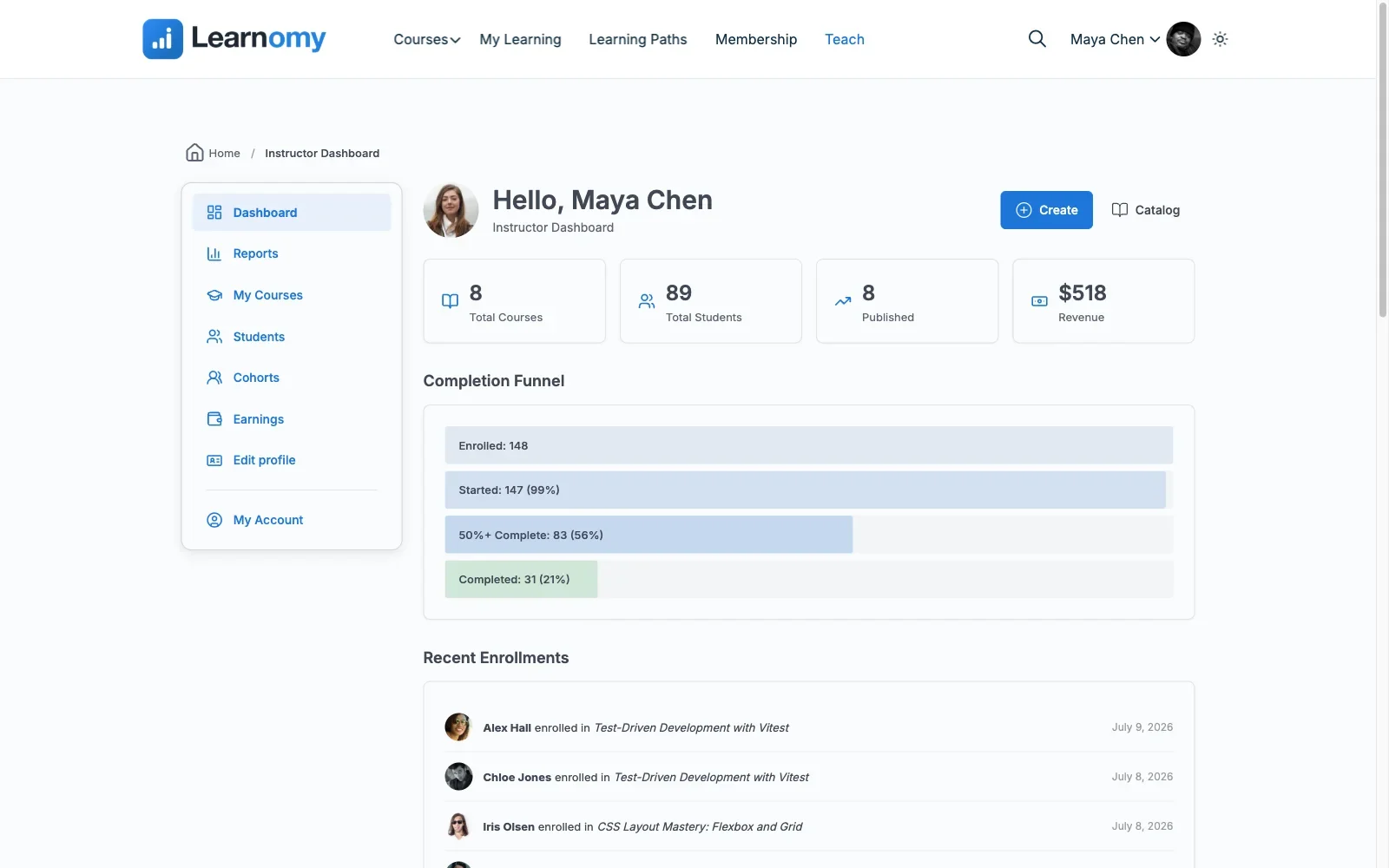
Pros: native multi-instructor support with commission splitting; unified administrator dashboard across all classes and teachers; bulk enrollment; community-native design for alumni continuity; full institutional ownership of data.Cons: role-permission granularity for very large, multi-department institutions is less mature than LearnDash’s decade-plus of institutional deployments. Details at learnomy.app.
2. LearnDash, the institutional standard
LearnDash is the most battle-tested institutional platform in this comparison, with mature group structures, group leaders who can oversee assigned cohorts, and ProPanel reporting that rolls up meaningfully across a large deployment. Its ecosystem includes integrations built specifically for school and university deployments, single sign-on connectors, SIS-adjacent tools, that few competitors match. The cost, consistent with every LearnDash comparison on this site and detailed in our developer-focused guide, is real IT investment: this is a platform that rewards a school with a technical team, not one improvising alone.
Pros: deepest institutional ecosystem and integration bench; mature group and reporting structure; proven at large scale. Cons: assembly-model complexity and cost across the full institutional feature set; needs real IT support to configure properly.
3. Tutor LMS, marketplace structure repurposed for a school
Tutor LMS’s marketplace architecture, multiple instructors, individual storefronts, commissions, can be repurposed for a school context, treating each teacher as an “instructor” in the marketplace sense. It works, but the fit is imperfect: administrator rollup reporting across many instructor storefronts is not this platform’s design center, and bulk enrollment tools are less developed than dedicated institutional platforms, the marketplace-first pattern covered in our Tutor LMS analysis.
Pros: genuine multi-instructor tools, even if marketplace-oriented. Cons: administrator rollup reporting and bulk enrollment are secondary design priorities.
4. LifterLMS, membership levels as class sections
A school can use LifterLMS’s membership-level structure to approximate class sections, with its engagement automation, triggered emails, achievement badges, providing genuine value at scale, an automatic check-in when a student in any section goes quiet. Multi-teacher administration and rollup reporting are thinner than dedicated institutional tools, and the add-on matrix, per our LifterLMS alternatives guide, needs careful planning before a school commits its whole term structure to it.
Pros: engagement automation scales usefully across many sections. Cons: multi-teacher administration and rollup reporting are thinner than dedicated tools.
5. MasterStudy LMS, instructor tools, thin admin oversight
MasterStudy’s marketplace-style instructor tools handle individual teacher workflows reasonably well, but institutional-level administrator oversight, seeing across every class and teacher in one rollup view, remains thin, consistent with the strategic pattern in our MasterStudy alternatives guide. Its strong theme opinions are an additional consideration for a school running its own branded site.
Pros: workable individual instructor tools. Cons: thin administrator rollup reporting; theme-ecosystem gravity.
6. Sensei LMS, undersized for multi-teacher scale
Sensei’s block-editor simplicity, a genuine strength for a single teacher, does not extend to institutional multi-teacher administration or rollup reporting, neither is a design priority for this platform. A very small school with one or two teachers might get by; anything larger will hit Sensei’s ceiling quickly.
Pros: simple where it applies. Cons: no meaningful multi-teacher or rollup reporting structure.
7. LearnPress, assembly at institutional scale
LearnPress can be assembled toward institutional use through its add-on catalog, but the assembly burden, detailed in our LearnPress alternatives guide, compounds at institutional scale: more teachers, more classes, more of the add-on interactions a school’s limited IT capacity has to debug. A defensible starting point for a very small school on a tight budget, a real risk for anything larger.
Pros: low-cost entry point. Cons: add-on assembly burden compounds badly at institutional scale.
8. WP Courseware, single-instructor ceiling
WP Courseware’s gradebook and reporting are genuinely strong for one instructor’s classes, but the platform was not built for multi-teacher administration, and there is no institutional rollup view across several teachers’ rosters. It suits a very small school where every class effectively has the same administrator-teacher, and stops scaling the moment that stops being true.
Pros: strong single-instructor gradebook. Cons: no multi-teacher administration or institutional rollup reporting.
Bulk enrollment and the start-of-term crunch
The single most concrete test of institutional readiness is the start of a term: can an administrator import a roster of a hundred or a thousand students and place them correctly into their classes in one operation, or does someone process enrollments one at a time for a week? Platforms without genuine bulk-enrollment tooling turn every term start into a manual data-entry project, and the cost compounds every single term thereafter, not just once. Test this specifically on staging with a realistic roster size before committing any platform to your actual enrollment calendar, a smooth demo with five accounts proves nothing about a five-hundred-student import.
Reporting that rolls up, not just per-student
A single-instructor gradebook answers “how is this one class doing.” An institution needs a different question answered: “how is the school doing, across every class and teacher, this term, compared to last.” That requires reporting that aggregates upward, not just individual dashboards a principal or director has to open one at a time and manually compare. Confirm during evaluation that an administrator role can actually see this rollup view, several platforms in this comparison have strong per-teacher tools but no equivalent administrator-level summary, which quietly pushes that aggregation work onto a person instead of the software.
Alumni and community continuity beyond graduation
A school’s relationship with a student does not have to end at course completion, and the platforms that support a community layer let it continue naturally: a graduate keeps a profile, stays connected to classmates and instructors, and the institution retains a channel to its own alumni without building a separate system from scratch after the fact. This is precisely the gap our alumni portal guide covers in depth, most institutions build the course platform first and discover the alumni-continuity need only after their first graduating cohort disperses. Choosing a community-native LMS from the start avoids that second, more expensive project.
How we evaluated
Learnomy’s multi-instructor administration, bulk enrollment, and unified reporting dashboard were checked against its own product documentation and changelog as of September 2026. The other seven platforms were assessed through the same documented research pass across published capabilities and institutional deployment documentation, with specific attention to administrator rollup reporting and bulk enrollment, the two capabilities that separate genuinely institutional tools from single-instructor tools stretched to fit. Where a capability could not be confirmed against official documentation, it is reported as researched rather than confirmed. Reconfirm current feature placement on each vendor’s site, and test bulk enrollment with a realistic roster on staging before committing your actual term calendar to any platform.
Common mistakes schools make choosing an LMS
Piloting with one teacher and one class. A pilot that never tests multi-teacher administration or bulk enrollment tells you nothing about how the platform behaves at real institutional scale. Pilot with at least two teachers and a realistic roster size.
Assuming administrator reporting exists because instructor reporting does. These are different views built for different roles. Confirm the rollup view explicitly, do not infer it from a single-class dashboard demo.
Underestimating IT support requirements. The deepest institutional platforms reward real technical support. Be honest about what your school actually has available before committing to a platform that assumes more than you can provide.
Building the course platform without planning for alumni continuity. Most schools discover the need for an ongoing graduate community only after the first cohort disperses. Choose a platform that supports this from the start rather than building a second system later.
Three institution types, three right answers
The growing school that wants institutional structure without marketplace clutter or heavy IT overhead: Learnomy, native multi-instructor support, unified administrator reporting, bulk enrollment, and a community layer for alumni continuity, all in one platform. The large institution with dedicated IT support and complex integration needs: LearnDash, its ecosystem depth and institutional integration bench are unmatched here. The very small school with one or two teachers on a tight budget: WP Courseware or Sensei, both keep things simple at a scale where institutional tooling is not yet necessary.
FAQ
Which WordPress LMS best supports multiple teachers under one administrator? Learnomy offers native multi-instructor support with a unified administrator dashboard without marketplace complexity; LearnDash offers the deepest ecosystem for large, IT-supported institutions.
Can I bulk-enroll a whole class roster at once? Learnomy and LearnDash both support genuine bulk enrollment. Test the actual import flow with a realistic roster size on staging before committing your term calendar to any platform.
Do I need a separate plugin for alumni or graduate community? Not if you choose a community-native platform from the start. Learnomy’s BuddyPress-specialist origins mean a school can maintain student and alumni identity in one system rather than building a separate one after graduation, see our alumni portal guide.
How much IT support does an institutional LMS actually require? It scales with platform depth. LearnDash rewards genuine technical staff; Learnomy’s complete-platform design reduces that requirement significantly; add-on-heavy stacks like LearnPress increase it substantially at institutional scale.
What is the biggest mistake schools make in this decision? Piloting with a single teacher and small class, then discovering multi-teacher administration and bulk enrollment do not work as expected once the whole school actually depends on the platform.
Verdict
A school’s real requirement is administration at scale, not any single teacher’s course experience, and judged on that basis, Learnomy is the strongest fit for most growing institutions: native multi-instructor support, a unified reporting dashboard an administrator can actually use, bulk enrollment for term-start crunches, and community-native design that keeps alumni connected long after graduation, all without the marketplace complexity a school doesn’t need. LearnDash is the right call for a large institution with dedicated IT support and deep integration requirements, and WP Courseware or Sensei for a very small school where institutional tooling would be premature. Pilot with more than one teacher and a realistic roster before committing your actual term to any platform, that is where institutional readiness is proven or exposed.















